TL;DR
FLUX 1.1 Pro is Black Forest Labs' current flagship text-to-image model, focused on photoreal output, clean text rendering, and flexible aspect ratios. Here is the short version of what you actually need to know if you want to use it through hiapi:
- On hiapi: $0.05 per image, flat. No resolution multiplier, no quality tiers — same price for 1:1, 9:16, 16:9, and other aspect ratios.
- Endpoint:
/v1/tasks(async task pattern), model nameflux-1.1-pro. It is not served on/v1/chat/completionsor the OpenAI-compatible images endpoint. - What it is good at: photorealistic portraits, product photography, cinematic scenes, and short sign/headline text. Text rendering is noticeably more reliable than the older Dev tier most teams started with.
- What is missing on hiapi: the older FLUX.1 Dev and the first-generation FLUX Pro are not listed in the hiapi catalogue. hiapi currently carries only the 1.1 Pro flagship from the FLUX family.
The rest of this post walks through the capabilities, where 1.1 Pro sits versus older FLUX tiers at the model level, four real outputs we ran through the hiapi endpoint, and a copy-pasteable code example.

Where FLUX 1.1 Pro sits in the family
Black Forest Labs ships several FLUX variants and they are easy to confuse, so a quick map:
- FLUX.1 Dev — the open-weight model the community started building on. Strong general image quality, but with a non-commercial license and the older text-rendering and detail behaviour. Most third-party LoRA work was built on top of this.
- FLUX.1 Pro (the original "Pro") — the first closed API model from BFL. Higher fidelity than Dev, but slower and tuned conservatively.
- FLUX 1.1 Pro — the current flagship. The headline improvement is generation speed and a noticeably higher ceiling on prompt fidelity and short-text rendering, while keeping the same broad-strokes "photo-grade" look the Pro line is known for.
If you have only ever used FLUX.1 Dev, the most obvious differences when you switch to 1.1 Pro are: faces stop looking generically "AI", short headline text (signs, posters, labels) is much more likely to actually be the string you asked for, and the model handles dramatic lighting and shallow depth of field with less prompt hand-holding.
A note on the comparison: hiapi currently only lists
flux-1.1-proin its catalogue — we did not benchmark Dev and the original Pro against 1.1 Pro inside hiapi, because they are not available there to be called the same way. The differences above are about the models themselves at the design level, not a head-to-head price/latency benchmark inside one platform.
Pricing on hiapi
Straight from the hiapi pricing API:
| Model | Endpoint | Price per image | Resolution / aspect-ratio surcharge |
|---|---|---|---|
flux-1.1-pro | POST /v1/tasks | $0.05 | none — flat across aspect ratios |
A few things worth flagging:
- No 2K/4K markup. Some image models on hiapi have a quality multiplier (e.g. 2K = 1.5× the base price). FLUX 1.1 Pro does not — you pay $0.05 whether you ask for a square avatar or a 16:9 hero image.
- Per-image, not per-token. You pay once per finished image. Prompt length does not affect price.
- Confirm before you commit. Pricing on hiapi is versioned (
pricing_versionin the API response), and we have seen quality tiers added or removed over time. Always re-fetch /api/pricing before you wire up billing on your own service.
For context, $0.05/image puts FLUX 1.1 Pro in the same ballpark as Google's Nano Banana on hiapi (also $0.05 at 1K) and below GPT Image 2 Pro ($0.35/image, 1K). It is positioned as the "photoreal default" rather than the "premium specialist".
How to call it
FLUX 1.1 Pro is served on the async task endpoint, not on /v1/chat/completions. This is the part that catches most people the first time. You:
POST /v1/taskswith{"model": "flux-1.1-pro", "input": {"prompt": "...", "aspect_ratio": "16:9"}}→ you get back ataskId.- Poll
GET /v1/tasks/<taskId>untildata.status == "success". - Read the rendered image URL from
data.output[0].url. The URL is on hiapi's CDN and has anexpireAttimestamp — download it if you want to keep it around.
A minimal Python example that has actually been used to render the four images in this post:
import json, os, time, urllib.request

TOKEN = os.environ["HIAPI_API_KEY"]
BASE  = "https://api.hiapi.ai"

def submit(prompt: str, aspect_ratio: str = "16:9") -> str:
    body = json.dumps({
        "model": "flux-1.1-pro",
        "input": {"prompt": prompt, "aspect_ratio": aspect_ratio},
    }).encode()
    req = urllib.request.Request(
        f"{BASE}/v1/tasks",
        data=body,
        headers={
            "Authorization": f"Bearer {TOKEN}",
            "Content-Type":  "application/json",
        },
    )
    with urllib.request.urlopen(req, timeout=60) as r:
        data = json.loads(r.read())
    if data.get("code") != 200:
        raise RuntimeError(f"submit failed: {data}")
    return data["data"]["taskId"]

def wait_for(task_id: str, timeout_s: int = 240) -> str:
    deadline = time.time() + timeout_s
    while time.time() < deadline:
        time.sleep(5)
        req = urllib.request.Request(
            f"{BASE}/v1/tasks/{task_id}",
            headers={"Authorization": f"Bearer {TOKEN}"},
        )
        with urllib.request.urlopen(req, timeout=30) as r:
            data = json.loads(r.read())
        status = data.get("data", {}).get("status")
        if status == "success":
            return data["data"]["output"][0]["url"]
        if status in ("failed", "canceled"):
            raise RuntimeError(f"task {task_id} {status}: {data}")
    raise RuntimeError(f"task {task_id} timed out after {timeout_s}s")

prompt = (
    "Wide-angle photograph of an old roadside diner at dusk, neon sign "
    "on the roof clearly reading 'MIDNIGHT DINER', warm interior lights "
    "spilling onto an empty parking lot, distant mountains silhouetted "
    "against a deep blue twilight sky, cinematic film still feel"
)
task_id = submit(prompt, aspect_ratio="16:9")
url     = wait_for(task_id)
print(url)
In our four-image run, each task came back in roughly 14–19 seconds end-to-end (submit → poll → CDN URL). That is wall-clock time including the poll interval; the actual model inference was faster. If you are building UI on top, plan around ~10–20 s of perceived latency per image and keep the polling interval at 5 s or longer to stay polite.
A few practical notes:
- Use
aspect_ratio, notsize. The task input does not accept asizefield for this model. Pass standard ratios like"1:1","4:3","3:4","16:9","9:16". Passingsizewill get you a400 invalid inputwithadditional properties 'size' not allowed. - The CDN URL is temporary. Each response includes an
expireAt(unix seconds). The image lives oncdn.hiapi.aifor a few days — copy it into your own storage if you need it long-term. - No streaming, no progress. Tasks are fire-and-poll. There is no SSE/WebSocket progress signal.
Four real outputs
Below are the four images rendered through the code path above. All prompts are original to this post — none of them are recycled from FLUX gallery posts. Time-to-image numbers are wall-clock from submit to the CDN URL becoming valid.
Portrait, 9:16 — photoreal character
Prompt: "Photorealistic portrait of a 28-year-old marine biologist standing on a windy seaside cliff at sunrise, navy waterproof jacket, salt spray in her hair, distant lighthouse out of focus behind her, natural cool morning light with warm sun on her face, eye-level frame, magazine cover composition, natural skin texture, shallow depth of field."
Wall-clock: ~14 s.
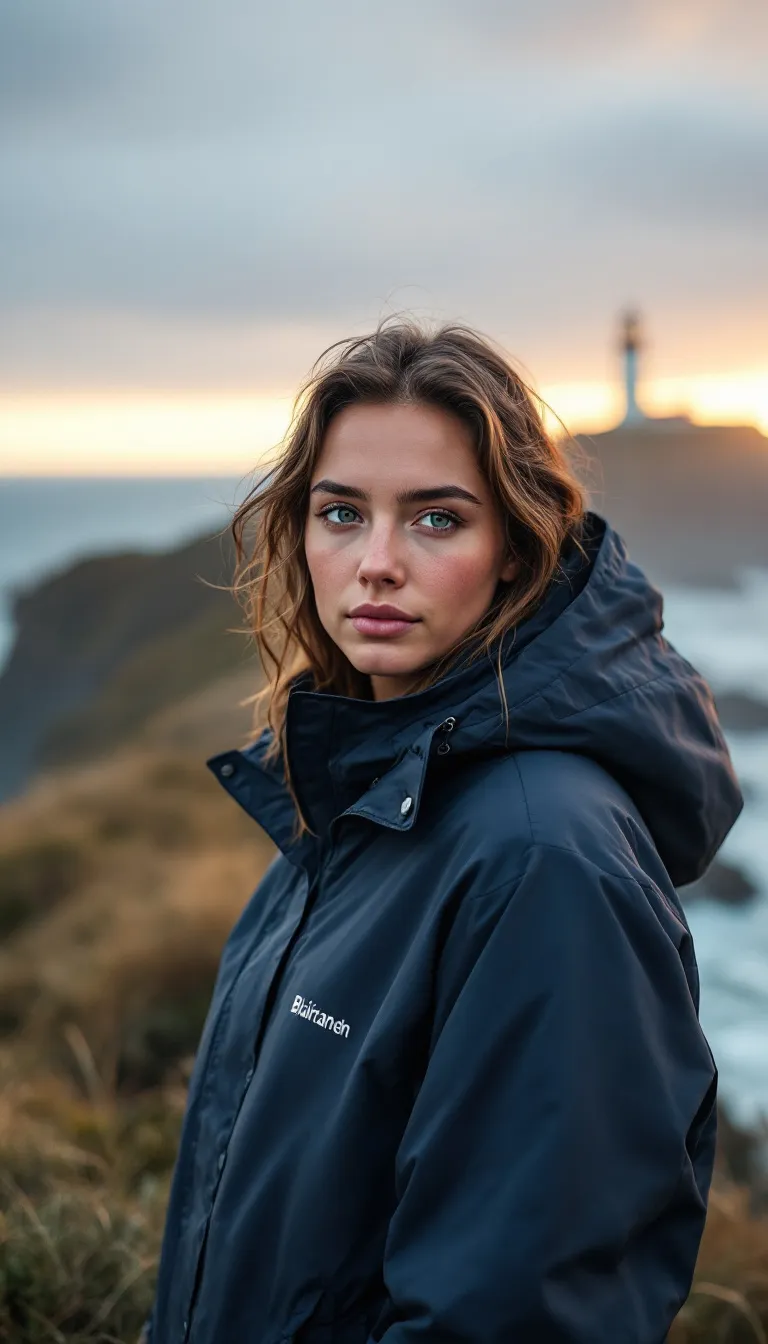
What worked: skin texture and eye detail are convincing without the waxy "AI face" look. Hair edges hold up against a busy background. The lighthouse stays correctly out of focus.
What did not: the jacket got a small auto-generated brand mark on the chest that we did not ask for and is a slightly distorted string. FLUX 1.1 Pro is much better at requested text than older versions but it can still hallucinate decorative text on garments and product surfaces. If you are generating images for a real brand, plan to either inpaint over these or include explicit "no text on clothing" guidance and accept that prompt adherence on negatives is imperfect.
Product, 1:1 — flat-lay e-commerce
Prompt: "Top-down product photograph of three handmade ceramic mugs in matte sage green arranged on a sun-dappled oak table, scattered coffee beans and a brass spoon between them, soft morning light from a window casting realistic shadows, editorial e-commerce style, crisp focus on mug rims, neutral color grading, premium catalogue aesthetic."
Wall-clock: ~19 s.

What worked: the dappled light and beans look photographic — shadows fall in a consistent direction, the wood grain is plausible, and the matte glaze on the ceramic is clean. This is the kind of output that can land in a real catalogue moodboard with minimal retouching.
What did not: we asked for a brass spoon and got two. FLUX 1.1 Pro is generally good at counts up to about three but gets looser when items are scattered around the frame. If quantity matters, either include the number in multiple places in the prompt ("three mugs", "exactly one brass spoon") or generate then crop.
Landscape with text, 16:9 — neon sign rendering
Prompt: "Wide-angle photograph of an old roadside diner at dusk, neon sign on the roof clearly reading 'MIDNIGHT DINER', warm interior lights spilling onto an empty parking lot with one parked classic pickup truck, distant mountains silhouetted against a deep blue twilight sky, cinematic film still feel, subtle lens flare, photoreal detail."
Wall-clock: ~14 s.
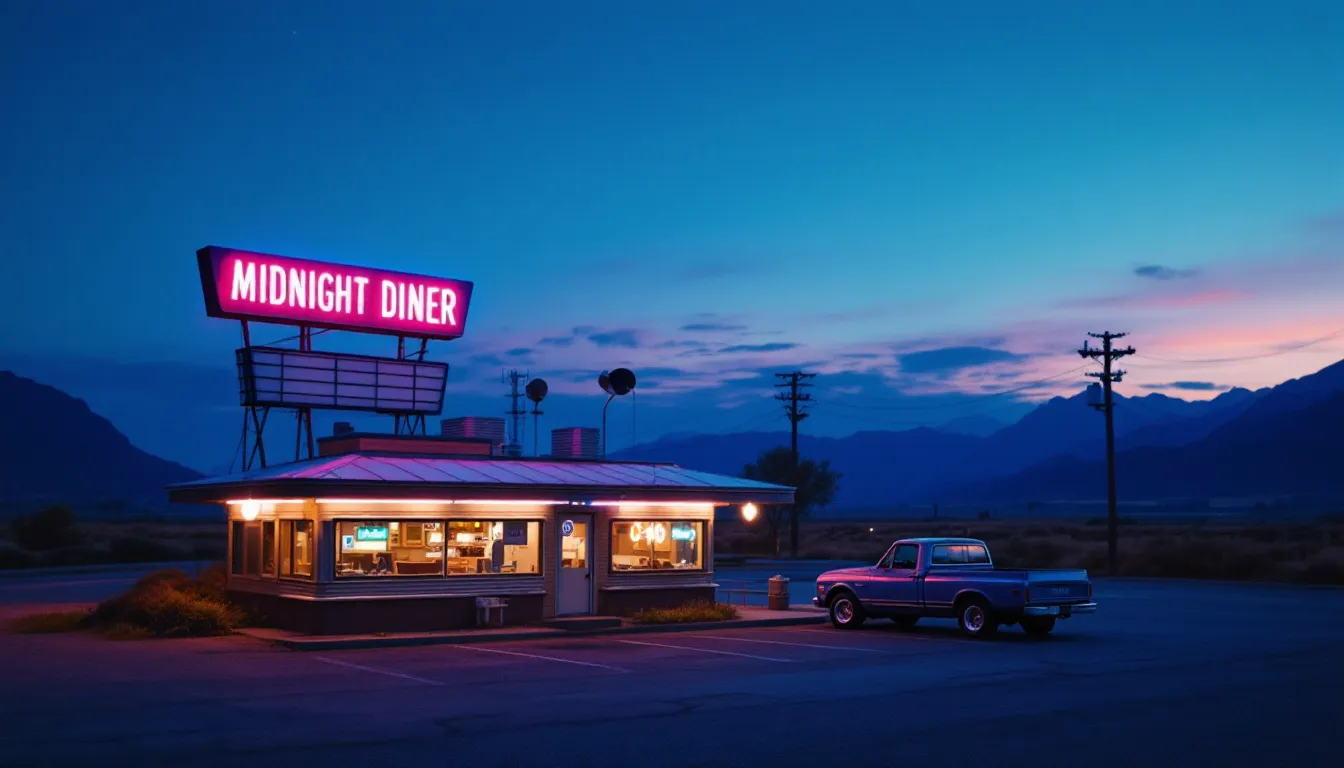
What worked: the neon text "MIDNIGHT DINER" comes out exactly as written, with correct letter spacing and a believable pink/magenta glow. This is the headline capability — short, all-caps sign text inside a photographic scene. The truck, mountain silhouette, and twilight gradient are all coherent.
What did not: a smaller secondary text panel under the main sign is illegible. As a rule of thumb, FLUX 1.1 Pro is reliable for one short string per image; ask for more and at least one of them tends to degrade.
Cover, 16:9 — still-life detail
The hero image at the top of this post (the brass film camera on weathered wood) was generated with the same code path. Wall-clock: ~15 s. Window light direction, the leather notebook fold, and the bokeh in the background all hold up at full resolution.
Honest note on this one too: the brand text on the camera body is auto-invented gibberish. This is the consistent pattern — requested text renders well, unrequested decorative text on objects is unreliable.
When to pick FLUX 1.1 Pro
Quick guide based on what we actually saw across these four runs:
- Yes: photoreal portraits, product flat-lays, cinematic landscapes, short headline / sign text. Anything where you want a "photo-grade" base layer that does not need a lot of negative prompting.
- Maybe: stylised illustration (it can do it, but other models are tuned more specifically for that), images with multi-line typography (one short string is fine — multi-line poster text drifts).
- No: brand-faithful logos and trademarks (it will improvise), strict-count compositions where the count must be exact, anything that needs an image-to-image workflow on this exact model (the
/v1/tasksroute here is text-to-image only).
For a comparison angle inside hiapi, the closest neighbour by price is Nano Banana at $0.05/image — that one leans into faster turnaround and the Gemini family's character-consistency story, while FLUX 1.1 Pro leans into photoreal still images and reliable short text. If you want to look at both, the hiapi pricing API lists them side by side under the image / text-to-image category.
Wrap-up
If you have been holding off on FLUX 1.1 Pro because you were not sure whether hiapi exposed it cleanly: it does, and the integration surface is small.
- One async endpoint (
/v1/tasks), one input shape,aspect_rationotsize. - A flat $0.05 per image at any aspect ratio.
- Reliable photoreal output and reliable short-string text rendering, with the same caveats every generative image model still has around unprompted text and exact counts.
The code block above is the minimum viable client. From there it is mostly a question of which prompts work for your domain — and that part, as always, is empirical.









