HiAPI
  • Models
  • Pricing
Search

Search HiAPI models, tools, and resources.

  • Models
  • Pricing
HiAPI

One API, All AI Models

Generate images, video, and audio with leading models through one production-ready API.

Get a free API key

AI Image API

  • All image models
  • GPT Image 2
  • Nano Banana 2
  • Seedream 5.0 Pro
  • Qwen Image 2.0 Pro
  • FLUX 1.1 Pro

AI Video API

  • All video models
  • Seedance 2.5
  • FLUX.3 Video
  • Seedance 2.0
  • Veo 3.1
  • Kling 3.0

AI Audio API

  • All audio models
  • MiniMax Music 2.6
  • MiniMax Music 1.5
  • ElevenLabs v3
  • Text to music
  • Text to speech

Product

  • Model marketplace
  • Playground
  • Pricing
  • Image API Cost Calculator
  • Free GPT Image 2 Generator
  • Free Nano Banana Image Generator
  • Outfit Preview
  • Product Photo Lab

Developers

  • Documentation
  • API Reference
  • Agent Skills
  • LLM integration index
  • Blog

Company

  • About
  • Contact support
  • Terms of Service
  • Privacy Policy

© 2026 hiapi. All rights reserved.

Open source on GitHubPython SDK on PyPI
  • The call: prompt + input_urls
  • The source
  • Transform 1: background and lighting swap
  • Transform 2: drop it into a scene
  • When to step up to the Pro tier
TutorialJun 22, 20265 min read

GPT Image 2 Image-to-Image API Guide

Transform an existing product image — new background, lighting, or scene — with the GPT Image 2 image-to-image API on hiapi. Two real before-and-after transforms, the call, and the parameters.

HiAPI TeamUpdated Jun 26, 2026GPT Image 2Image-to-ImageTutorial

Latest models

Explore models

Contents
  • The call: prompt + input_urls
  • The source
  • Transform 1: background and lighting swap
  • Transform 2: drop it into a scene
  • When to step up to the Pro tier

Generate it with HiAPI

Choose a model, enter your prompt, and see the result.

HiAPI Blog

Related articles

HiAPI

Generate it with HiAPI

Text-to-image starts from nothing. Image-to-image starts from an asset you already have — a product packshot, a brand visual, a reference photo — and transforms it: new background, new lighting, a different scene, a restyle. It is the workflow for teams that already own their imagery and need variations, not net-new inventions. This guide shows the GPT Image 2 image-to-image API on hiapi with two real before-and-after transforms, the exact call, and the parameters.

The standout fact: on hiapi, gpt-image-2/image-to-image is $0 per call. You can iterate on background swaps and restyles for free, which makes it the natural first stop before you reach for any paid tier.

The call: prompt + input_urls

Image-to-image is the same task lifecycle as everything else on hiapi — POST /v1/tasks, poll or callback, download. The only new piece is input_urls: the image(s) you want the model to work from.

curl -X POST https://api.hiapi.ai/v1/tasks \
  -H "Authorization: Bearer $HIAPI_TOKEN" \
  -H "Content-Type: application/json" \
  -d '{
    "model": "gpt-image-2/image-to-image",
    "input": {
      "prompt": "Place this product on a dark slate surface with dramatic side lighting",
      "input_urls": ["https://static.hiapi.ai/blog/gpt-image-2-product-image-api/white-bg-packshot.jpg"],
      "aspect_ratio": "1:1"
    }
  }'
FieldTypeRequiredNotes
promptstringyeswhat to change
input_urlsstring[]yesthe source image(s) to transform
aspect_ratioenumnooutput ratio
resolutionenumno1K / 2K / 4K

The source

Both transforms below start from one plain catalog packshot — a white ceramic pour-over dripper on a seamless white background:
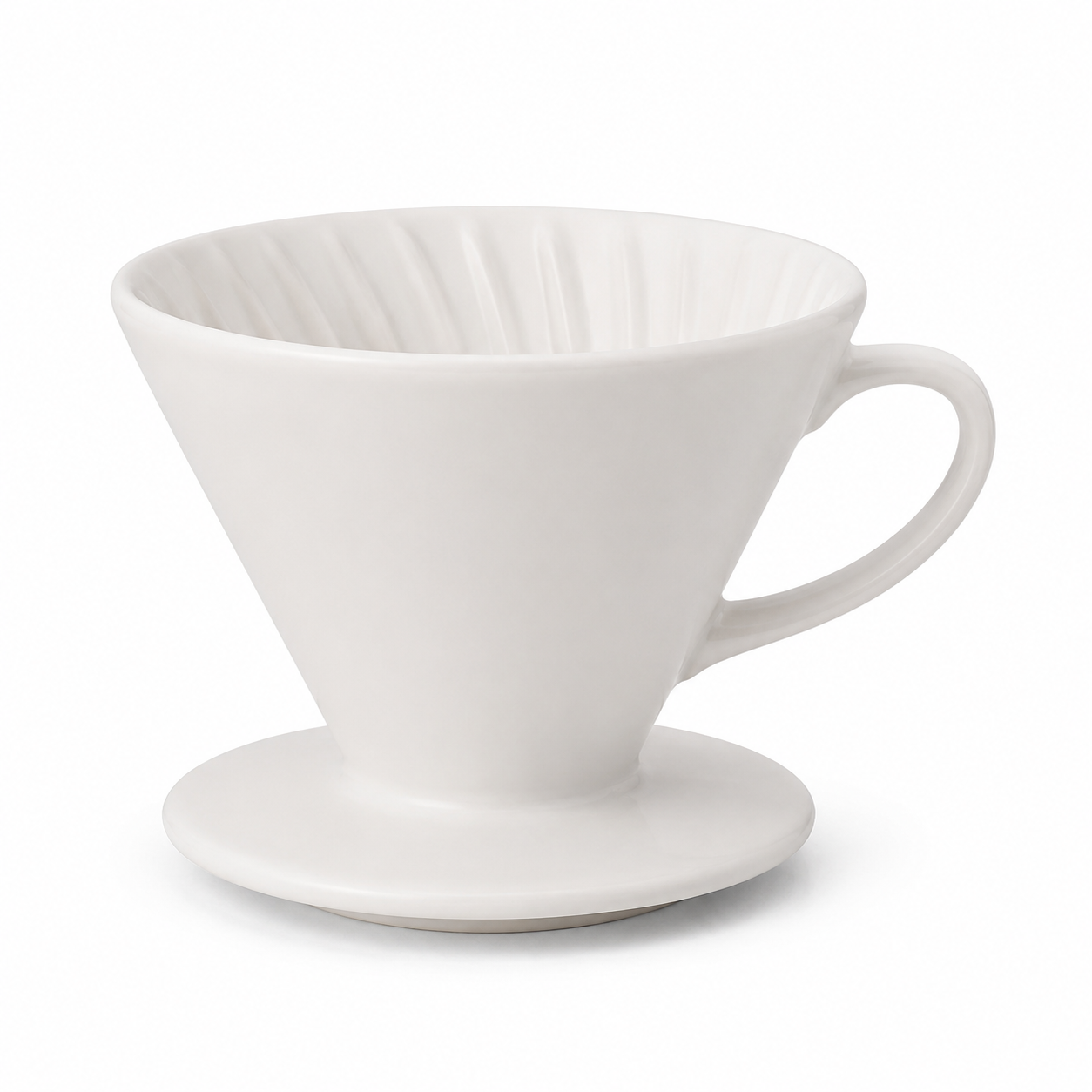
Source image for image-to-image: a white ceramic pour-over dripper on a white background

Transform 1: background and lighting swap

Same product, moody studio treatment — dark slate, dramatic side light, a wisp of steam. The packshot becomes an editorial hero without a reshoot.
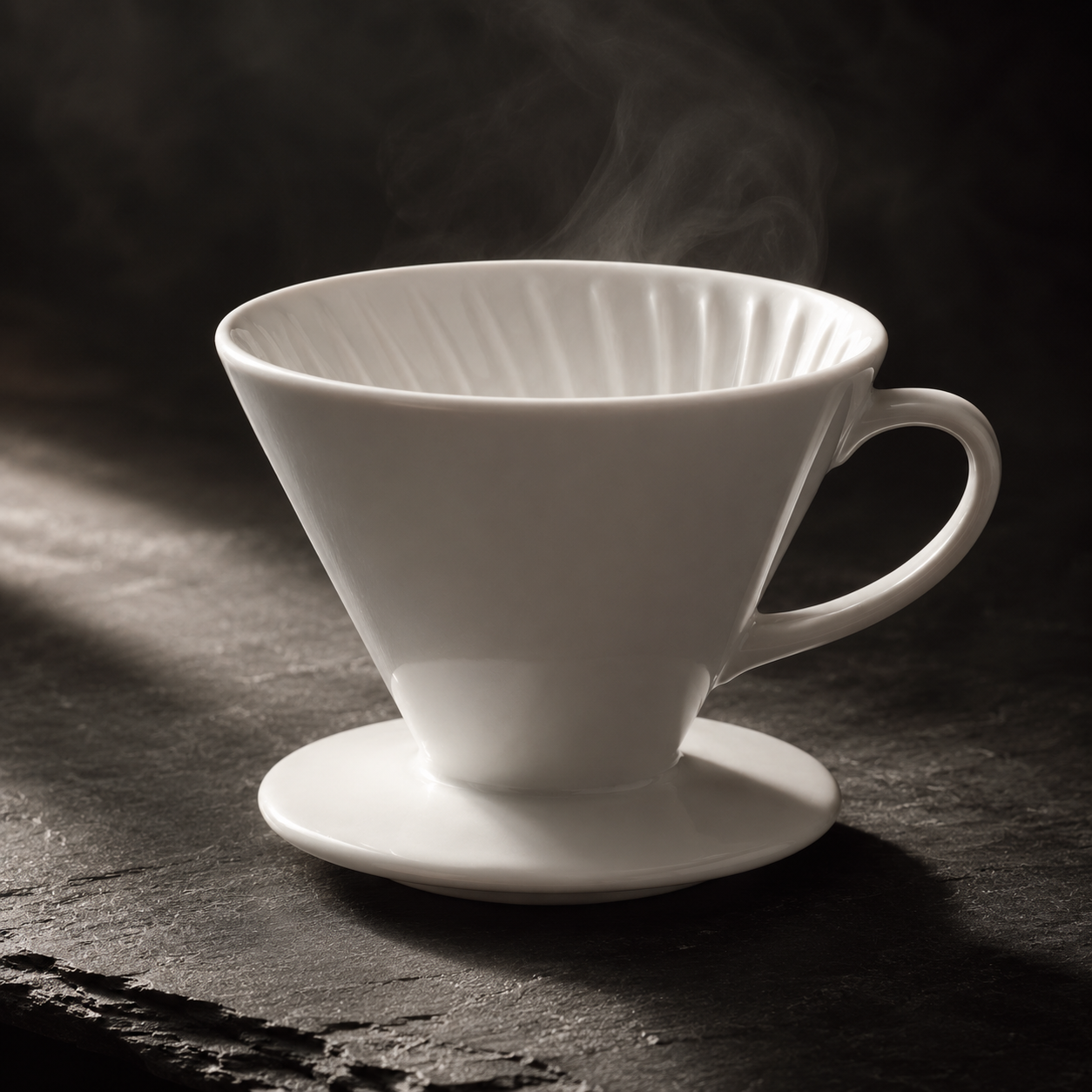
Image-to-image result: the same dripper on dark slate with dramatic side lighting and steam

Place this exact white ceramic pour-over dripper on a dark slate stone surface
with dramatic side lighting and a soft steam wisp, moody editorial product
photography, keep the product shape and color unchanged.
  • Model: gpt-image-2/image-to-image · aspect_ratio: 1:1 · Task ID: tk-hiapi-01KVQK47VS7W1BCS9FCDTEX9XP · Cost: $0
  • What to copy: the phrase "keep the product shape and color unchanged" is doing the heavy lifting — it anchors the subject so the model restyles the scene, not the product.

Transform 2: drop it into a scene

Same source, different intent — place the product in a lifestyle context for an above-the-fold shot.
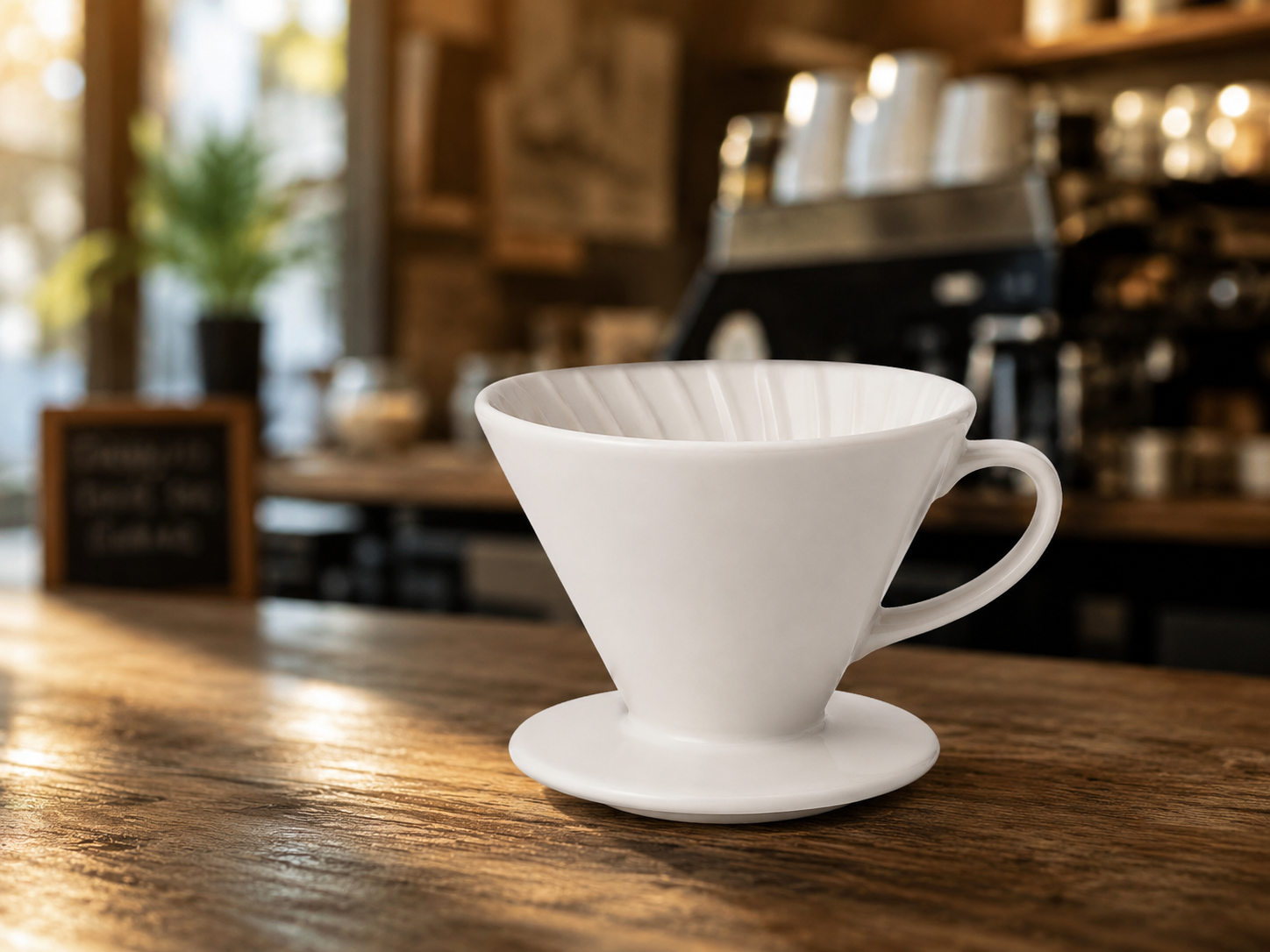
Image-to-image result: the same dripper on a cafe counter with a warm blurred interior

Place this exact white ceramic pour-over dripper on a wooden cafe counter with
a blurred warm cafe interior behind it, morning light, lifestyle product
photography, keep the product shape and color unchanged.
  • Model: gpt-image-2/image-to-image · aspect_ratio: 4:3 · Task ID: tk-hiapi-01KVQK75691SE3XJ1RP31JPQAE · Cost: $0

When to step up to the Pro tier

The free gpt-image-2/image-to-image tier is right for exploration and most edits. When a render has to be production-stable and you need to feed 1–5 reference images at once — compositing, multi-angle consistency, brand-critical assets — there is a gpt-image-2-image-to-image-pro tier at $0.40 built for that reliability. Start free, escalate only when the brief demands it.

For a multi-turn editing workflow (iterating edits across several calls), see GPT Image 2 multi-turn editing. Ready to transform your own assets? Open the GPT Image 2 image-to-image model page.


Latest models

View all models
  • GPT Image 2From $0.007/image
  • Nano Banana 2From $0.051/image
  • Seedream 5.0 ProFrom $0.050/image
  • Seedance 2.5From $0.121/s

Explore models

TextImageVideoAudio
Back to blog
GPT Image 2From $0.007/image
Nano Banana 2From $0.051/image
Seedream 5.0 ProFrom $0.050/image
Seedance 2.5From $0.121/s
View all models
TextChat and reasoning
ImageGenerate and edit
VideoText and image to video
AudioSpeech and music
Start generating
View model pricing
View all articles
How to Use the flux-3 API for Text-to-Video, Audio, and Continuation

How to Use the flux-3 API for Text-to-Video, Audio, and Continuation

minimax-music-3 API: curl & Python Guide

minimax-music-3 API: curl & Python Guide

How to use grok-imagine-image-2.0/image-to-image via the hiapi API: curl, Python, and a working request

How to use grok-imagine-image-2.0/image-to-image via the hiapi API: curl, Python, and a working request

How to Use grok-imagine-image-2.0/text-to-image via the hiapi API: curl, Python, and a Working Request

How to Use grok-imagine-image-2.0/text-to-image via the hiapi API: curl, Python, and a Working Request

How to Use the qwen-image-3.0 API: curl, Python, and a Working Request

How to Use the qwen-image-3.0 API: curl, Python, and a Working Request

How to Use qwen-image-3.0-pro via the hiapi API: curl, Python, and a Working Request

How to Use qwen-image-3.0-pro via the hiapi API: curl, Python, and a Working Request

Start generating







