Why edit product photos instead of generating new ones
Most e-commerce catalogs don't have a "generate from scratch" problem — they have a "one photo, five use cases" problem. A seller shoots a single hero image, usually on a cluttered counter or with mediocre lighting, and then needs a clean white-background version for the marketplace grid, a color variant for each SKU, and a lifestyle shot for ads and social. Reshooting for every variant is slow; generating each one from scratch with text-to-image can't guarantee the result matches the exact product you're actually selling.
flux-2-klein-9b/image-to-image is built for that second problem: it takes one existing product photo plus an edit instruction and returns a new image where everything you didn't ask to change — shape, proportions, cap, logo — stays put. It's the larger, higher-fidelity tier of the FLUX.2 [klein] family on hiapi, sitting above flux-2-klein-4b/image-to-image in both quality and price.
Below is a full three-step workflow run against a single starting photo: clean up a messy "before" shot into a catalog-ready master, then fan that master out into a color variant and a lifestyle variant — three real edits, three real prompts, one batch script for running the same pattern across a catalog.
The starting photo
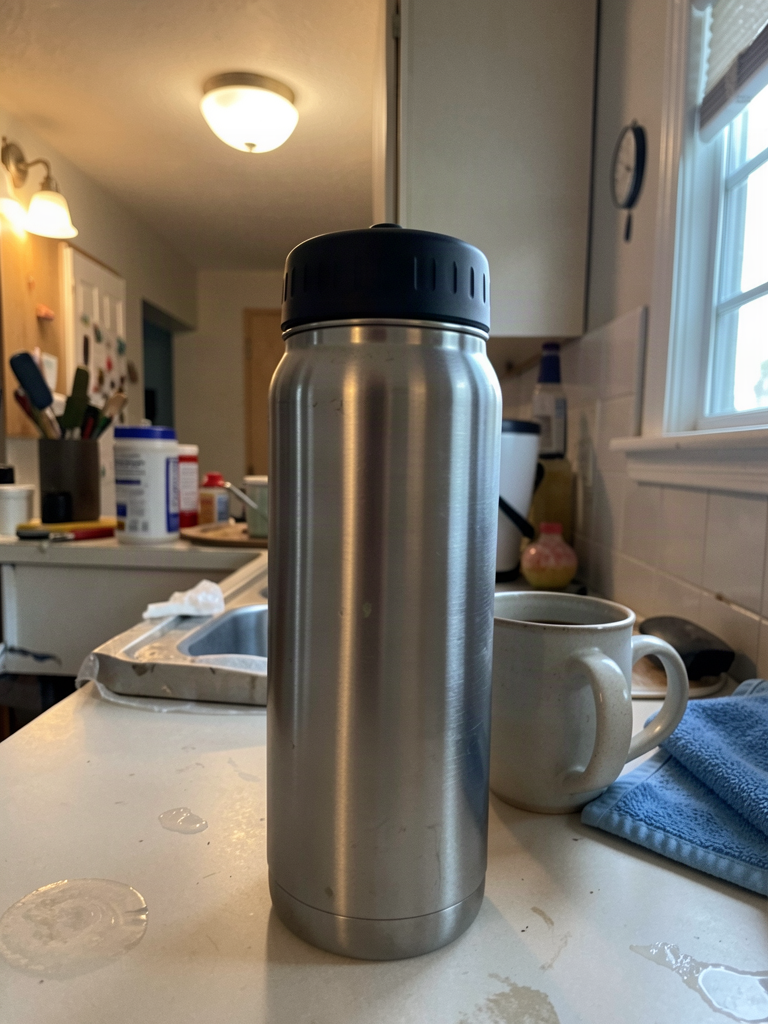
This is the kind of "before" photo a seller actually uploads: a brushed stainless steel insulated water bottle with a matte black screw cap, shot on a cluttered kitchen counter next to a coffee mug and a dish towel, uneven mixed lighting, off-center framing. It's usable as a reference, but not as a listing image.
Prompt used to generate this starting photo (via flux-2-klein-9b/text-to-image):
A slightly imperfect phone photo of a brushed stainless steel insulated water bottle with a matte black plastic screw cap, standing on a cluttered kitchen counter next to a ceramic coffee mug and a folded blue dish towel, mixed warm ceiling light and cool window daylight creating an uneven color cast, faint reflections and fingerprint smudges on the counter, off-center composition, casual amateur snapshot quality, not professional photography
Step 1: studio cleanup — from cluttered counter to catalog-ready
Prompt used:
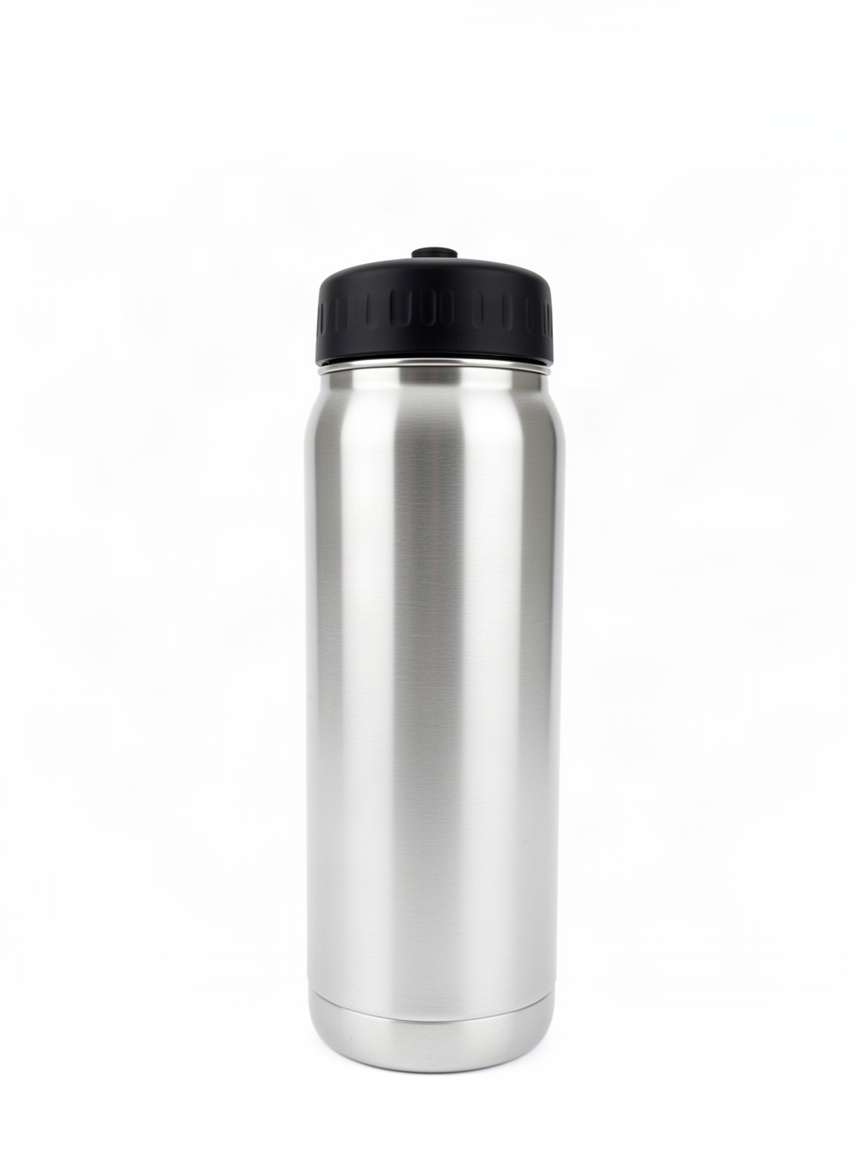
Keep the water bottle exactly as it is: same brushed stainless steel body, same matte black screw cap, same proportions and shape. Remove the cluttered counter, coffee mug, and towel completely. Replace the background with a seamless pure white studio background. Correct the lighting to even, shadowless studio lighting from the front, center the bottle in the frame, sharp focus, no reflections, no smudges, clean e-commerce catalog product photography.
This is the edit that matters most for a real workflow: one call turns a phone snapshot into a marketplace-ready white-background image, with the bottle's shape and cap completely unchanged. This clean result becomes the master — every downstream variant in this guide is generated from this image, not from the original messy photo, so drift doesn't compound across edits.
Step 2: a color variant from the clean master
Prompt used:
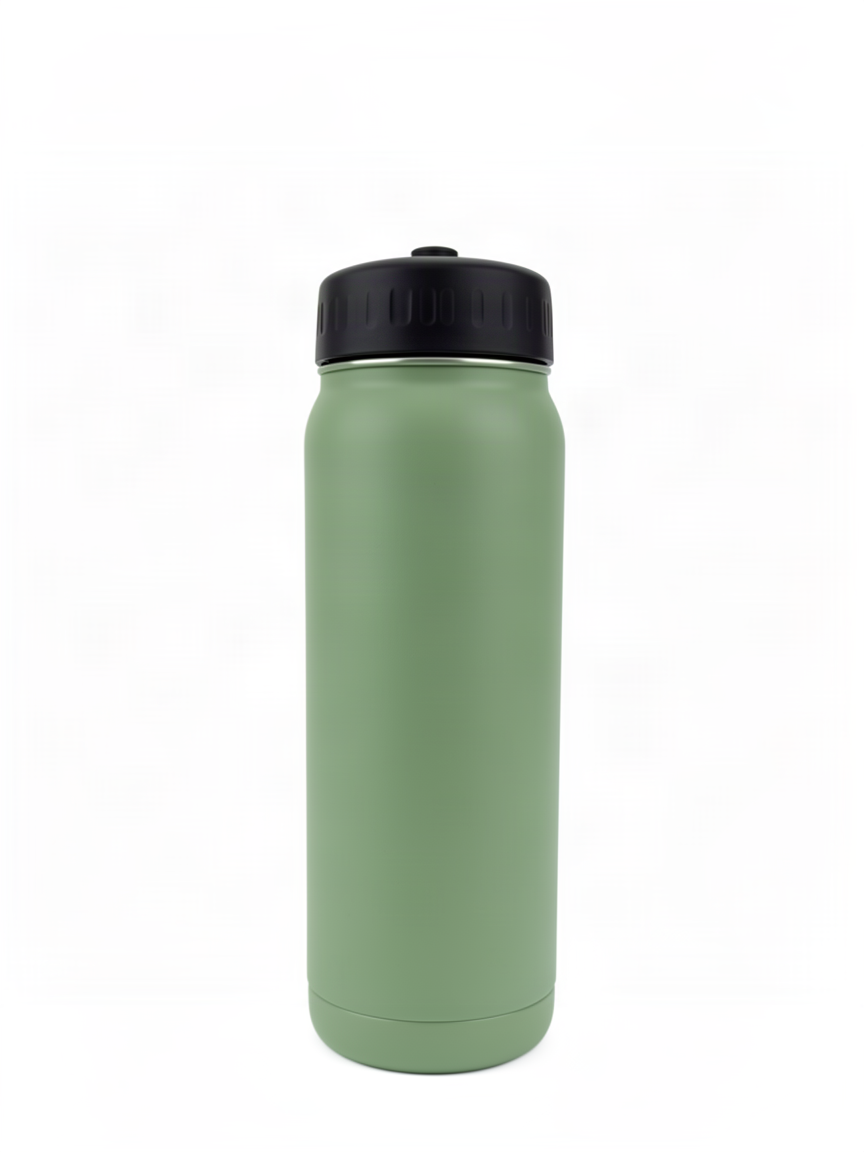
Keep the bottle's shape, screw cap, proportions, and pure white studio background exactly as they are. Change only the body color and finish from brushed stainless steel to a matte sage green, keep the black cap unchanged, keep the same lighting and shadow, e-commerce catalog product photography.
This is the multi-SKU case: a product line that ships in five colors doesn't need five separate photoshoots. Starting from the clean master and scoping the prompt to color-only keeps the cap, proportions, lighting, and background completely fixed — only the body finish changes.
Step 3: a lifestyle variant from the same master
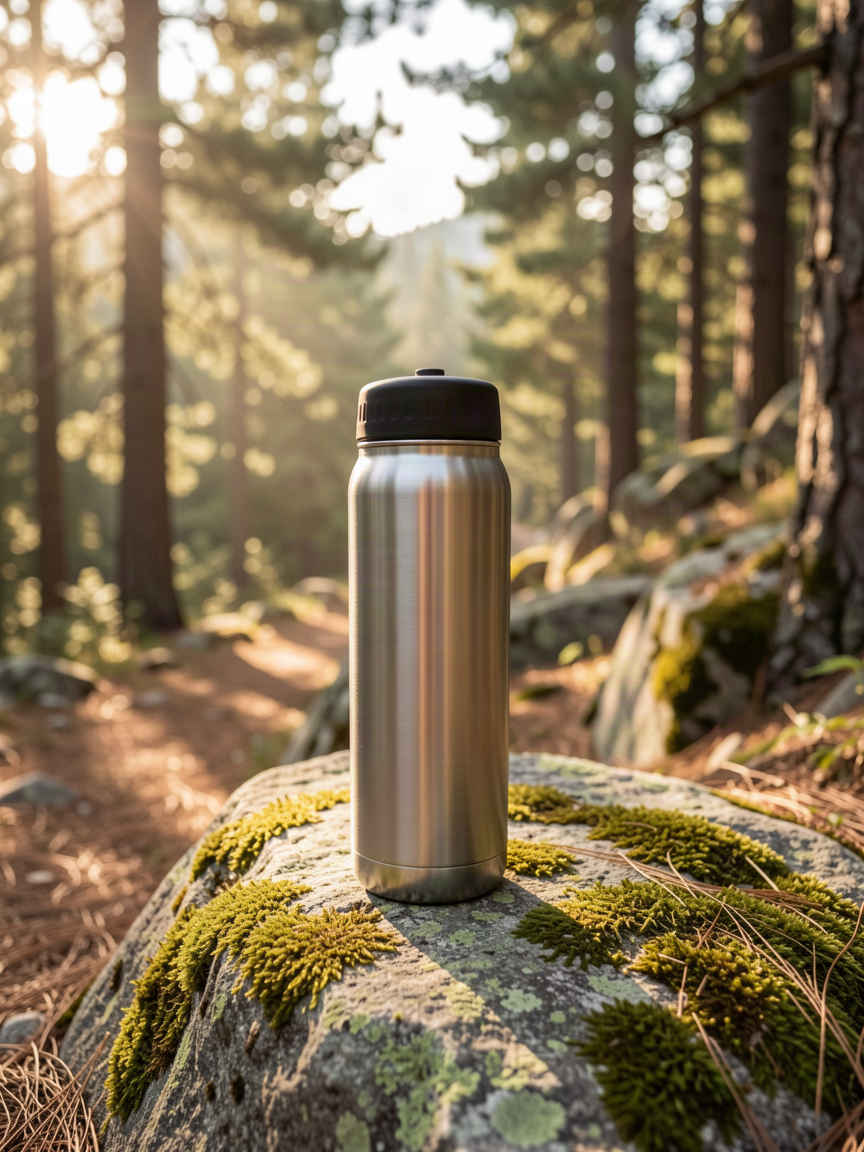
Prompt used:
Keep the water bottle exactly as it is: brushed stainless steel body, matte black cap, proportions unchanged. Replace the plain white studio background with an outdoor lifestyle scene: the bottle resting on a moss-covered granite rock beside a hiking trail, soft early-morning sunlight filtering through pine trees, shallow depth of field, warm natural color grade, outdoor lifestyle product photography.
Same master, different destination: this is the shot for an ad, a social post, or a landing-page hero — an outdoor lifestyle setting instead of a catalog background, with the product identity locked in place by the same "keep this exactly as it is" anchor used in every prompt above.
What makes these edits reliable
- Anchor what stays the same before describing the change. Every prompt above opens by naming the parts that must not move — shape, cap, proportions — before it says anything about the new background or color. That ordering is what keeps product identity locked across three successive edits instead of drifting a little further with each one.
- Chain edits from a clean master, not the raw photo. Steps 2 and 3 both start from the Step 1 output, not the original messy photo. Editing from a clean, correct base is more reliable than trying to fix clutter and swap a background in the same prompt.
- Scope each prompt to one change. The color variant only touches color; the lifestyle variant only touches background. Neither prompt asks for two unrelated changes at once.
- flux-2-klein-9b/image-to-image takes exactly one reference image per
call. Unlike some editing models that accept multiple reference images,
this model's schema is deliberately minimal: a
promptstring and animage_urlsarray capped at one image. There's noresolutionoraspect_ratioparameter on the image-to-image endpoint — the output follows the input photo's dimensions, so there's nothing to configure beyond the prompt and the source image.
Batch-editing a product catalog
All three edits above share the same request shape: one reference image URL
plus an edit prompt, submitted to hiapi's async task endpoint. The snippet
below loops that pattern over a list of (base_image_url, prompt, output_name) tuples — the same structure you'd use to push a whole catalog
through cleanup, color variants, and lifestyle variants in one run.
import os
import time
import requests

API_BASE = "https://api.hiapi.ai/v1/tasks"
TOKEN = os.environ["HIAPI_API_KEY"]
MODEL = "flux-2-klein-9b/image-to-image"


def submit_edit(base_image_url: str, prompt: str) -> str:
    resp = requests.post(
        API_BASE,
        headers={"Authorization": f"Bearer {TOKEN}"},
        json={
            "model": MODEL,
            "input": {
                "prompt": prompt,
                "image_urls": [base_image_url],
            },
        },
        timeout=60,
    )
    resp.raise_for_status()
    return resp.json()["data"]["taskId"]


def wait_and_download(task_id: str, out_path: str, poll_s: int = 5, timeout_s: int = 300) -> None:
    deadline = time.time() + timeout_s
    while time.time() < deadline:
        r = requests.get(
            f"{API_BASE}/{task_id}",
            headers={"Authorization": f"Bearer {TOKEN}"},
            timeout=30,
        )
        task = r.json().get("data", {})
        if task.get("status") == "success":
            url = task["output"][0]["url"]
            img = requests.get(url, timeout=120)
            with open(out_path, "wb") as f:
                f.write(img.content)
            return
        if task.get("status") == "fail":
            raise RuntimeError(task.get("error"))
        time.sleep(poll_s)
    raise TimeoutError(f"task {task_id} did not finish in {timeout_s}s")


# One entry per product / variant. Chain color and lifestyle edits from a
# clean master, not the raw source photo, for best consistency.
batch = [
    ("https://cdn.example.com/products/bottle-raw.jpg",
     "Keep the bottle exactly as it is: same body, same cap, same "
     "proportions. Remove the cluttered background completely. Replace it "
     "with a seamless pure white studio background and even, shadowless "
     "lighting, clean e-commerce catalog product photography.",
     "bottle-clean-master.jpg"),
    ("https://cdn.example.com/products/bottle-clean-master.jpg",
     "Keep the bottle's shape, cap, proportions, and white studio "
     "background exactly as they are. Change only the body color to matte "
     "sage green, keep the cap unchanged.",
     "bottle-sage-green.jpg"),
    ("https://cdn.example.com/products/bottle-clean-master.jpg",
     "Keep the bottle exactly as it is: body, cap, proportions unchanged. "
     "Replace the white studio background with an outdoor lifestyle scene "
     "on a mossy rock beside a hiking trail, soft morning sunlight.",
     "bottle-lifestyle-hiking.jpg"),
]

for base_url, prompt, out_name in batch:
    task_id = submit_edit(base_url, prompt)
    wait_and_download(task_id, out_name)
    print(f"saved {out_name}")
Each task call is independent, so for a full catalog you'd typically run a
small pool of these concurrently rather than looping strictly one at a time
— the task API's processing time is the bottleneck, not your client. Note
that step 2 and step 3 both point at bottle-clean-master.jpg, the output
of step 1: chaining from the cleaned result, not the raw upload, is what
keeps color and lifestyle variants consistent with each other.
Pricing
flux-2-klein-9b/image-to-image is billed per image, flat regardless of output size. As of 2026-08, each image-to-image edit costs $0.03143 per image; the companion text-to-image endpoint (used for the starting photo in this guide) costs $0.00858 per image. Both are noticeably higher than the smaller flux-2-klein-4b/image-to-image tier at $0.00715 per edit — 9B trades that cost premium for higher output fidelity on detail-heavy edits like material and color changes. See the pricing page for current rates across all models, since pricing can change.
FAQ
Does flux-2-klein-9b/image-to-image support multiple reference images per
call?
No. The schema accepts exactly one image in image_urls (maxItems: 1).
For edits that need to combine two separate source images, this isn't the
right model — it's built for single-reference edits like background swaps,
color changes, and cleanup.
Can I control the output resolution?
No — the image-to-image endpoint has no resolution or aspect_ratio
parameter. The output follows the input photo's dimensions. If you need a
specific output size, resize the source image before submitting it, or
resize the result afterward.
How is this different from flux-2-klein-4b/image-to-image? Same request shape and same one-reference-image schema, but 9B costs more per edit ($0.03143 vs $0.00715) in exchange for higher fidelity — it's the better choice when a catalog edit involves fine detail (material texture, color accuracy) rather than a simple background swap.
Why chain edits from a "clean master" instead of editing the raw photo each time? Editing from a raw, cluttered photo asks the model to fix clutter and apply a new change in the same pass, which increases the chance of unwanted drift. Cleaning up once, then branching every variant from that single clean result, keeps every downstream image consistent with every other one.
Can I run this against a whole catalog at once?
Yes — the batch script above is the pattern: loop over (image, prompt, output name) tuples, submitting each as its own task, and run a handful of
requests concurrently rather than one long sequential loop.
Try it yourself
Every edit in this guide — cleanup, color variant, lifestyle variant — took one API call each, chained from a single starting photo. If you have existing product photos and want catalog-ready variants without a reshoot, the hiapi docs quickstart covers authentication and your first request in a few minutes.