If you already have decent product photos — even messy ones, shot against the wrong background or cropped the wrong way — flux-2/image-to-image can turn them into publish-ready e-commerce images without a reshoot. It's an editing model, not a text-to-image model: feed it 1-8 reference images plus an instruction, and it returns a new image that keeps the product's exact shape, color, material and proportions while changing everything around it — background, lighting, composition, even which scene the product sits in.
We ran it end-to-end on hiapi's /v1/tasks API for two common e-commerce jobs —
studio background swap and lifestyle-scene compositing — and verified the input schema,
the aspect-ratio behavior, and the real per-image price against
hiapi's pricing page before writing any of this down.
- flux-2/image-to-image takes up to 8 reference images in one call, so a background swap (1 image) and a scene composite (2+ images) use the exact same endpoint.
aspect_ratio: "auto"genuinely tracks your input image's own aspect ratio — a portrait 9:16 sneaker photo stays 9:16 unless you override it. An explicit value like"1:1"forces that shape regardless of what you fed in.- Pricing is resolution-tiered: $0.035/image at 1K, $0.05/image at 2K — flat, not per-megapixel.
- It's a genuine edit, not a redraw: logos, stitching, and material texture on the product itself survive the background/scene change.
- A single batch script (below) is enough to run an entire catalog through the same background-cleanup prompt.
What flux-2/image-to-image actually does
Under the hood it's a single model on hiapi's unified task interface — you're not choosing between a "background removal" tool and a "compositing" tool, you're writing one instruction and giving it the right reference images for the job:
curl -s https://api.hiapi.ai/v1/tasks \
  -H "Authorization: Bearer $HIAPI_API_KEY" \
  -H "Content-Type: application/json" \
  -d '{
    "model": "flux-2/image-to-image",
    "input": {
      "prompt": "Remove the background and place the product on a seamless white studio background with a soft contact shadow. Keep the product'"'"'s shape, color and proportions unchanged.",
      "image_urls": ["https://your-cdn.example.com/raw-product-photo.jpg"],
      "aspect_ratio": "auto",
      "resolution": "1K"
    }
  }'
The required fields are prompt (string), image_urls (array, max 8),
aspect_ratio (auto, 1:1, 4:3, 3:4, 16:9, 9:16, 3:2, or 2:3), and
resolution (1K or 2K). The response gives you a taskId — poll
GET /v1/tasks/{taskId} until status is success, then download the image from
output[0].url immediately (that link expires, so don't treat it as permanent storage).
For a background swap you only need one reference image. For compositing a product into a lifestyle scene, pass two: the product shot first, the target scene second, and describe in the prompt which object goes where.
What "auto" aspect ratio actually does
This is the part worth testing before you build a pipeline around it, because it's easy to assume the model always outputs a fixed square or a fixed default shape. It doesn't.
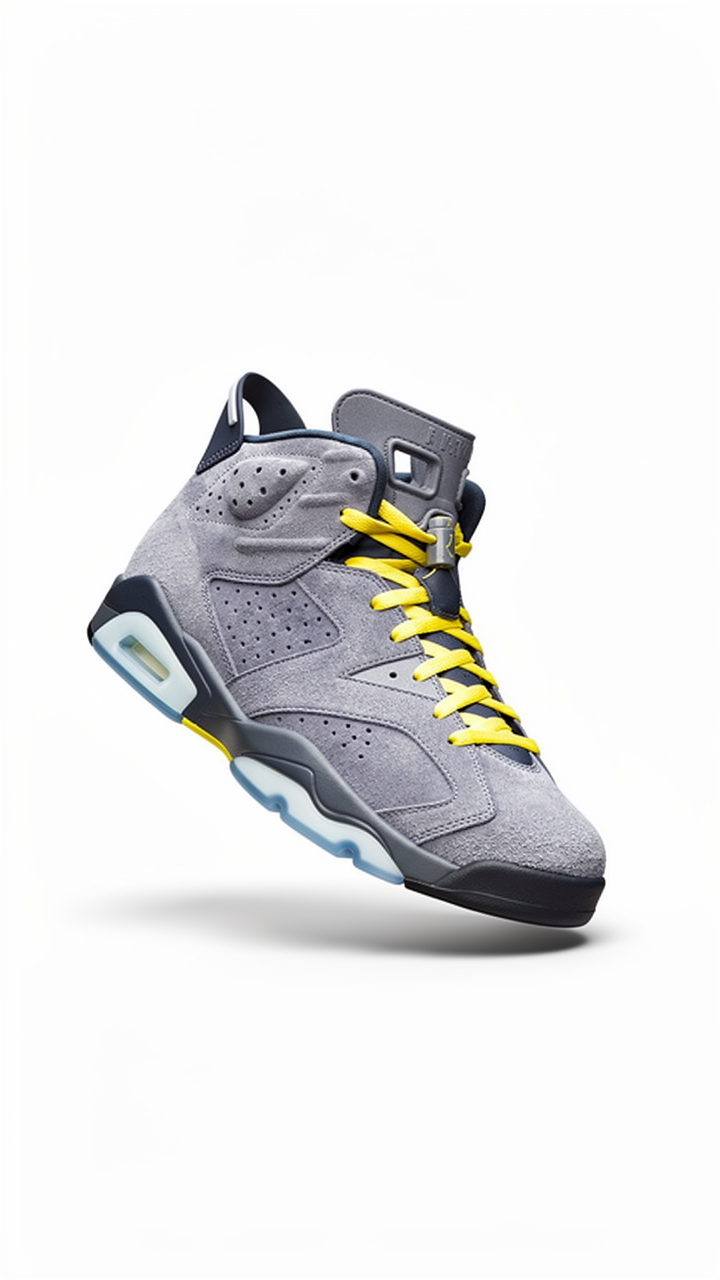
This is a portrait sneaker photo run with aspect_ratio: "auto" — the output came back
at 720×1280, an exact 9:16 match to the input reference, not cropped or padded to a
different shape. auto means "follow the input," not "pick a default."
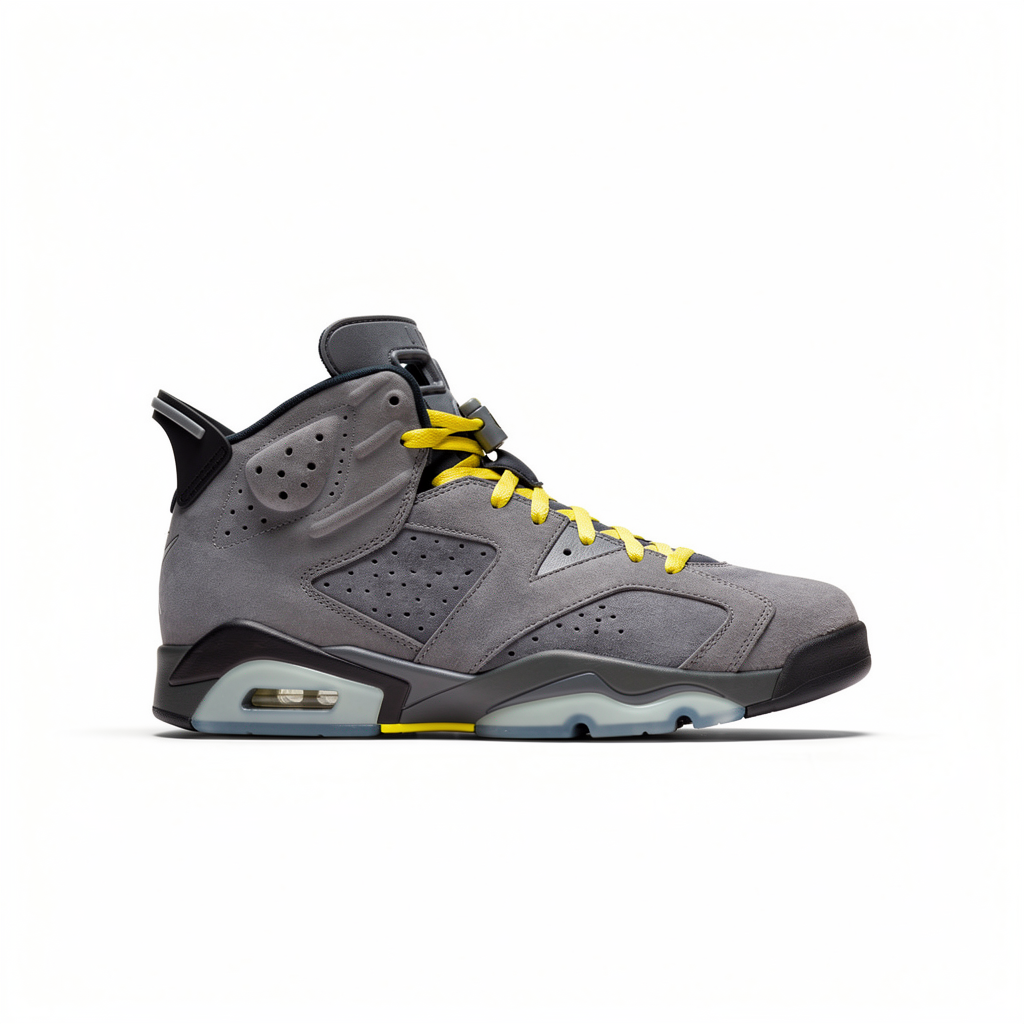
Same source image, same prompt — the only change was setting aspect_ratio: "1:1"
explicitly. The output came back as an exact 1024×1024 square, with the model
re-composing the shot to fit rather than just cropping it. If your catalog needs a
consistent square grid for a listing page, force the ratio; if you want each image to
keep its native framing, leave it on auto.
Two scene-composite examples
Background swaps are the simple case. The more useful trick for e-commerce content is compositing a clean product shot into a lifestyle scene — useful for hero images, social posts, or "shown here with" secondary photos, without a real photoshoot.
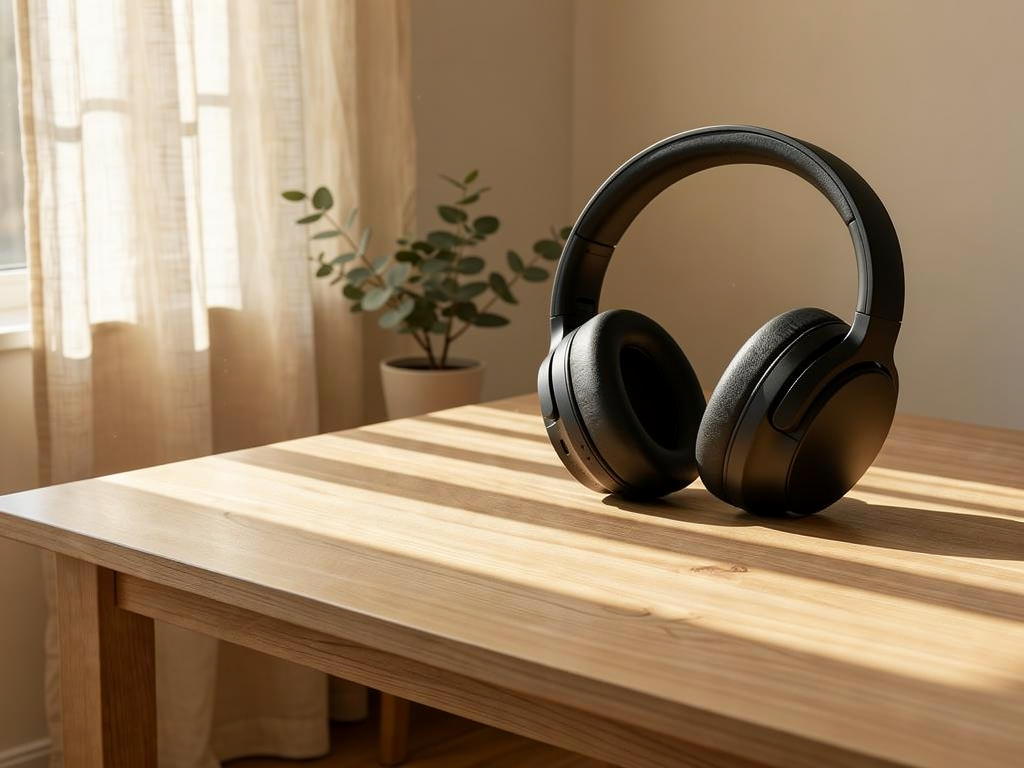
Two reference images went in here: a plain product photo of the headphones, and a separate sunlit oak-table scene. The prompt named which object to place and where ("resting naturally near the plant"), and asked the model to match the scene's existing light direction and cast a believable shadow — which is the detail that sells the composite as real rather than pasted.
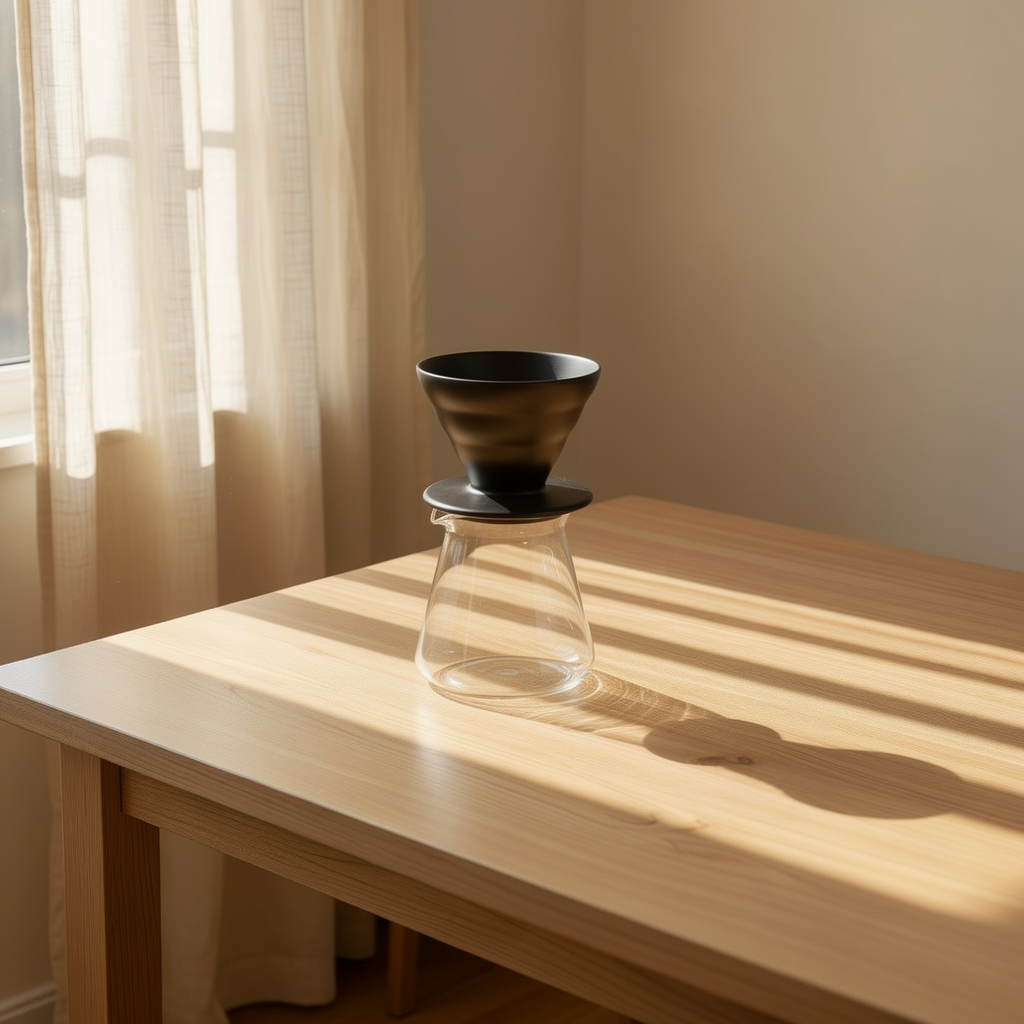
Same target scene, different product, aspect_ratio: "auto" again (it inherited the
scene reference's square framing). The dripper's shape and ceramic material carried over
unchanged from its own reference photo — only its surroundings changed.
Batch-processing a catalog
At $0.035/image (1K resolution) — cheaper than restaging a single product for a reshoot —
running flux-2/image-to-image across a whole catalog is easy to justify. If you just want
to test a prompt cheaply first, the lighter flux-2-klein-4b/image-to-image tier is worth
a look before committing to the full model at scale; current numbers for both are on
hiapi's pricing page.
Once a prompt is dialed in for one product, running it across a catalog is just a loop over the same request. This example walks a list of raw product photos, runs the same background-cleanup instruction on each, and prints the resulting hosted URL:
import os
import time

import requests

API_BASE = "https://api.hiapi.ai/v1/tasks"
TOKEN = os.environ["HIAPI_API_KEY"]

HEADERS = {
    "Authorization": f"Bearer {TOKEN}",
    "Content-Type": "application/json",
}

BACKGROUND_PROMPT = (
    "Remove the existing background and place the product on a seamless pure white "
    "studio background with a soft, realistic contact shadow and even diffused catalog "
    "lighting. Keep the product's exact shape, color, material and proportions unchanged."
)


def edit_product_image(prompt, image_urls, aspect_ratio="auto", resolution="1K"):
    payload = {
        "model": "flux-2/image-to-image",
        "input": {
            "prompt": prompt,
            "image_urls": image_urls,
            "aspect_ratio": aspect_ratio,
            "resolution": resolution,
        },
    }
    resp = requests.post(API_BASE, headers=HEADERS, json=payload, timeout=60)
    resp.raise_for_status()
    task_id = resp.json()["data"]["taskId"]

    while True:
        time.sleep(3)
        status = requests.get(f"{API_BASE}/{task_id}", headers=HEADERS, timeout=30).json()
        state = status["data"]["status"]
        if state == "success":
            return status["data"]["output"][0]["url"]
        if state == "fail":
            raise RuntimeError(f"task {task_id} failed: {status}")


CATALOG = [
    {"sku": "SNK-001", "image_url": "https://cdn.example.com/raw/snk-001.jpg"},
    {"sku": "HDP-014", "image_url": "https://cdn.example.com/raw/hdp-014.jpg"},
    {"sku": "DRP-022", "image_url": "https://cdn.example.com/raw/drp-022.jpg"},
]

for item in CATALOG:
    out_url = edit_product_image(BACKGROUND_PROMPT, [item["image_url"]])
    print(item["sku"], "->", out_url)
Each output[0].url is a time-limited link — download and re-host it (your own bucket,
CDN, whatever backs your storefront) as part of the loop rather than storing the raw
link. A full walkthrough of the task/poll/download cycle, including error handling, is in
How to Use flux-2/image-to-image via the hiapi API.
FAQ
Does flux-2/image-to-image change the product itself, or just the background? Prompted correctly, it should only change what you tell it to — background, scene, lighting — while keeping the product's shape, color and material as they were in the reference. It's not perfect on every attempt; check output against the source before publishing, especially for small text or logos on packaging.
How many reference images can I use in one call? Up to 8. A background swap only needs 1. A scene composite typically needs 2 (product + target scene) — more references than that are useful when you want the model to match a specific existing character, prop, or brand element across a set of shots.
Should I use 1K or 2K resolution? 1K ($0.035/image) is enough for most catalog and web listing use — the headphones and dripper composites above were both generated at 1K. Reach for 2K ($0.05/image) for hero banners or anything that will be cropped or zoomed after the fact.
What's the difference between flux-2/image-to-image and the Klein tiers? Klein (9b and 4b) trades some edit fidelity for a lower price — useful for testing a prompt cheaply before running the full model across a catalog. See the pricing table above for current numbers.
Can I force a specific output size instead of letting the model decide?
Yes — set aspect_ratio to an explicit value (1:1, 4:3, 16:9, etc.) instead of
auto. The model will recompose the shot to fit that shape rather than simply cropping
the auto-matched output.
Key takeaways
- flux-2/image-to-image edits existing product photos rather than generating from scratch — reference images in, edited image out, product identity preserved.
aspect_ratio: "auto"follows the input image's own shape; set it explicitly when you need a consistent output ratio across a catalog grid.- 1K resolution ($0.035/image) covers most e-commerce use cases; 2K ($0.05/image) is for hero-sized or heavily-cropped output.
- The same endpoint handles both single-image background swaps and multi-image scene
composites — the difference is just how many
image_urlsyou pass. - Batch processing is a plain loop over the task/poll/download cycle, no separate batch endpoint required.
If you're ready to try it against your own catalog, the flux-2/image-to-image model page has the live schema and a quick-start request, and flux-2/image-to-image prompt recipes has more tested prompt patterns beyond background swaps and scene composites.









