FLUX.2 [klein] 9B is hiapi's higher-fidelity image-editing tier — the one to reach for when a product label, a storefront sign, or fine surface detail has to survive an edit without going soft or garbled. We ran five real image-to-image prompts against it end to end through the live /v1/tasks API, with the actual outputs embedded below and real cost tracked throughout. Every prompt here is copy-paste ready.
Why Image-to-Image Prompting Is Different
Text-to-image prompts describe an entire scene from scratch. Image-to-image prompts do the opposite: you're handing the model an existing photo and a narrow instruction. The most reliable way to get a predictable result is to anchor the prompt with what to keep unchanged before describing what to change — "keep the bottle shape, cap, and label unchanged. Change only..." rather than just "change the glass color." Every recipe below follows that pattern, and several of them chain one edit on top of the previous edit's output to test how well fine detail survives multiple passes.
Recipe 1: Add a Badge to a Product Label
Keep the bottle shape, cap, marble surface, and the CLARIA label exactly unchanged. Add a small circular badge to the lower right area of the label reading DERM TESTED in a simple sans-serif font, matching the existing minimalist label style
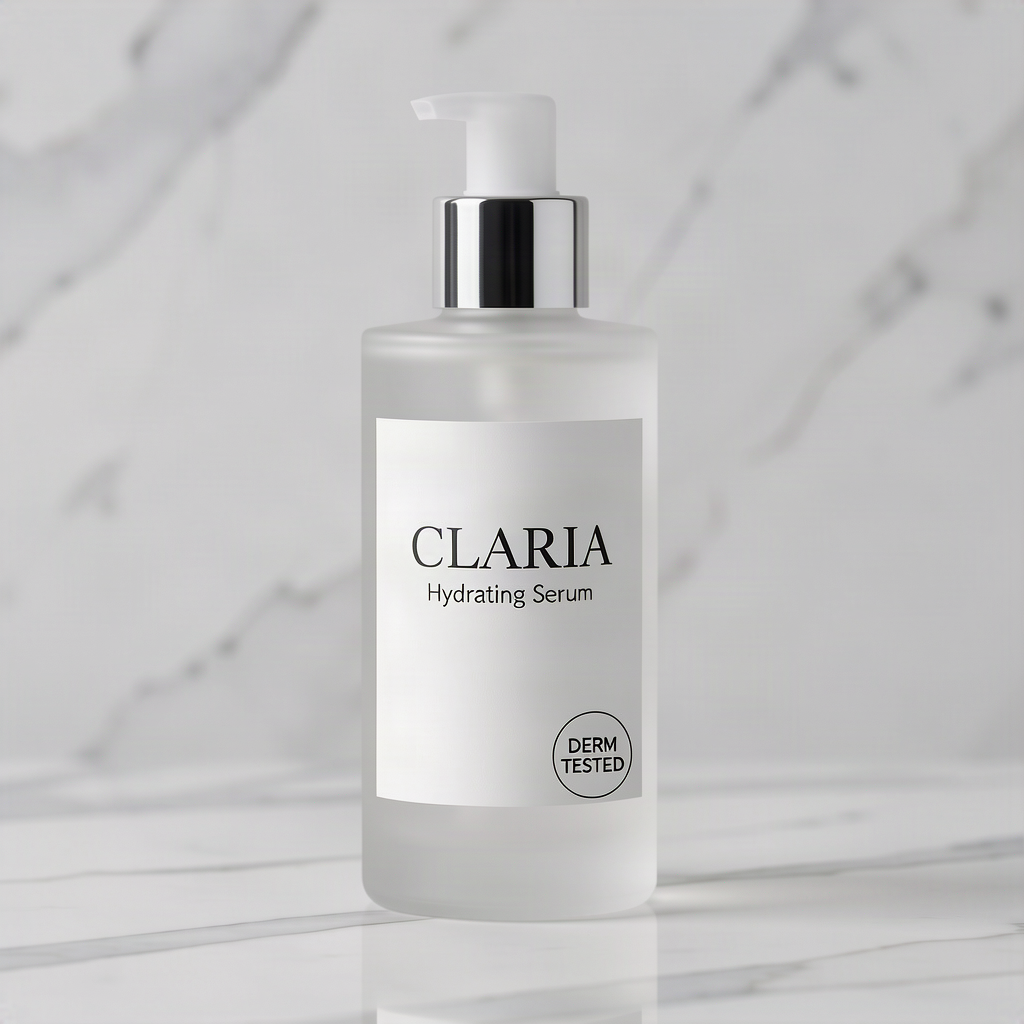
Clean on the first try. The badge text is crisp and correctly spelled, it sits in the requested lower-right position without overlapping the existing CLARIA wordmark, and the bottle, cap, and marble surface behind it are untouched.
Recipe 2: Change Glass Material and Color
Keep the bottle shape, cap, marble surface, and the CLARIA label with the DERM TESTED badge exactly unchanged. Change the glass material from frosted white glass to a deep amber tinted glass
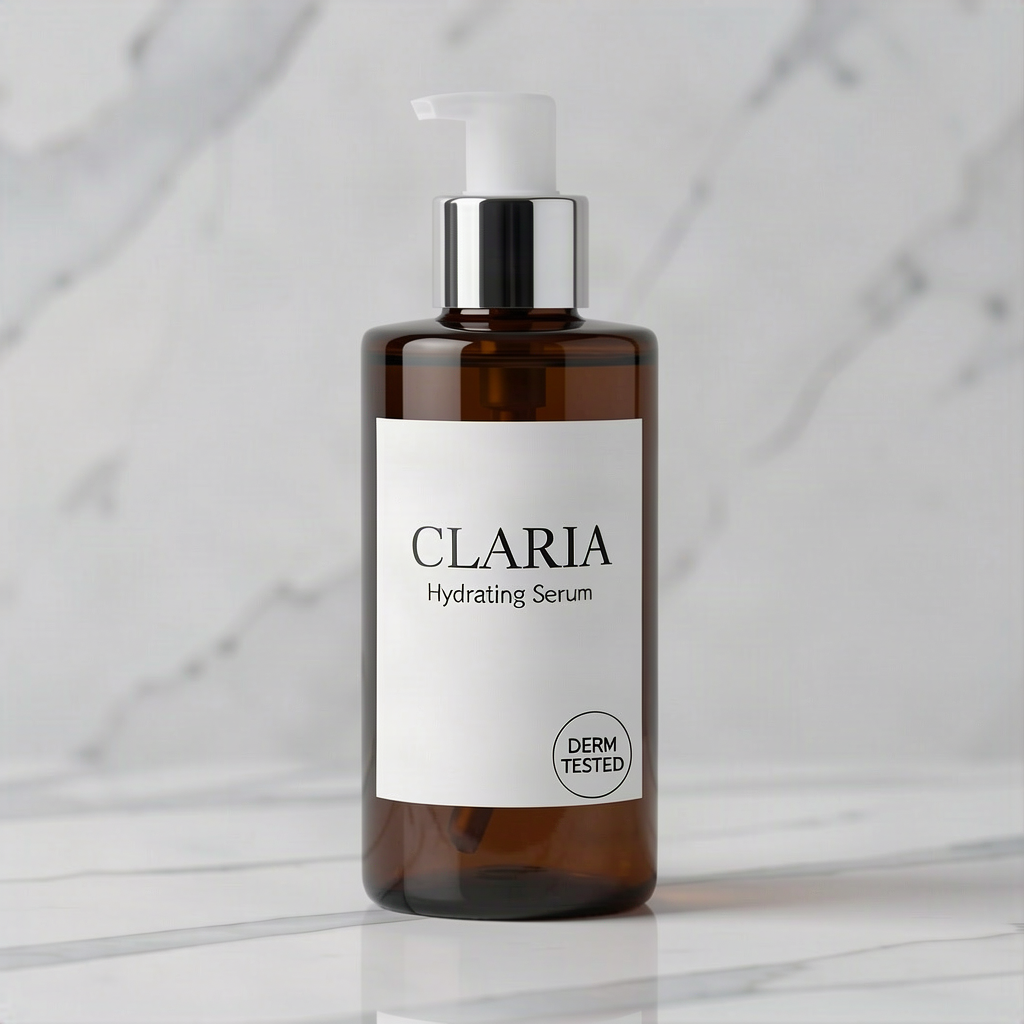
This is a chained edit, built on Recipe 1's output rather than the original photo. The material and color swap to amber glass came through correctly, and — the harder part — both lines of label text, including the small badge added in the previous step, carried over sharp and legible onto the new glass tone instead of smearing or fading.
Recipe 3: Replace Two Lines of Masthead Text
Keep the cream background border, sage-green accent color, layout, and mountain trail sunrise photo exactly unchanged. Replace only the masthead text FIELD NOTES with ROAM QUARTERLY in the same bold sans-serif style, and replace the subhead line Slow Travel Fast Ideas with Stories From The Road, keeping the same font weight and position
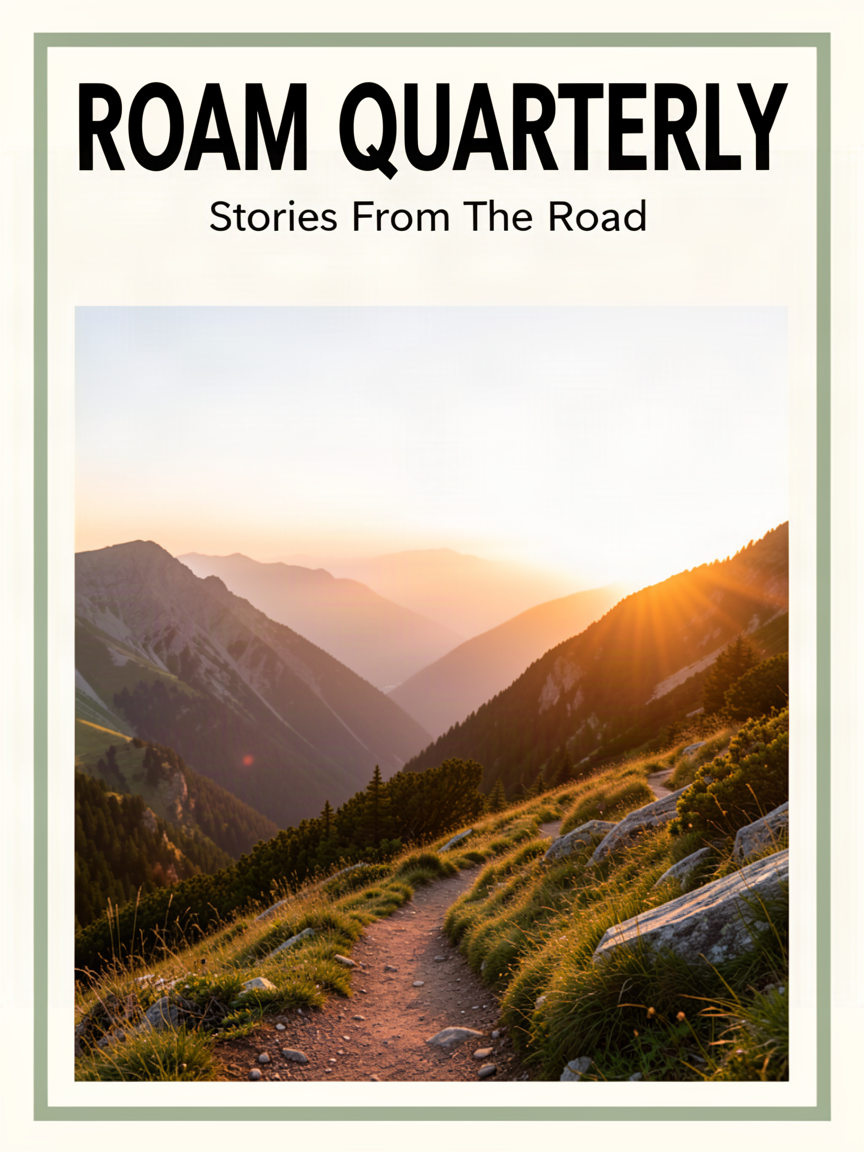
Both text replacements landed correctly — new masthead, new subhead, same bold weight and position, no spelling errors, and the cream border and sage-green accent color held steady. The honest miss: the mountain trail photo itself shrank slightly and shifted position compared to the source, instead of staying pixel-locked. It's a small drift, easy to miss on a quick glance, and a reminder to compare the edit against the source side by side rather than trusting a "keep X unchanged" instruction to hold every element pixel-perfect — even on a model whose text handling this reliable.
Recipe 4: Swap Signage Text in a Complex Night Scene
Keep the storefront, rain-slicked sidewalk reflections, night lighting, and cinematic composition exactly unchanged. Change only the neon sign text from LUNA RECORDS to VELVET DINER, keeping the same pink and blue neon glow style and mounting position
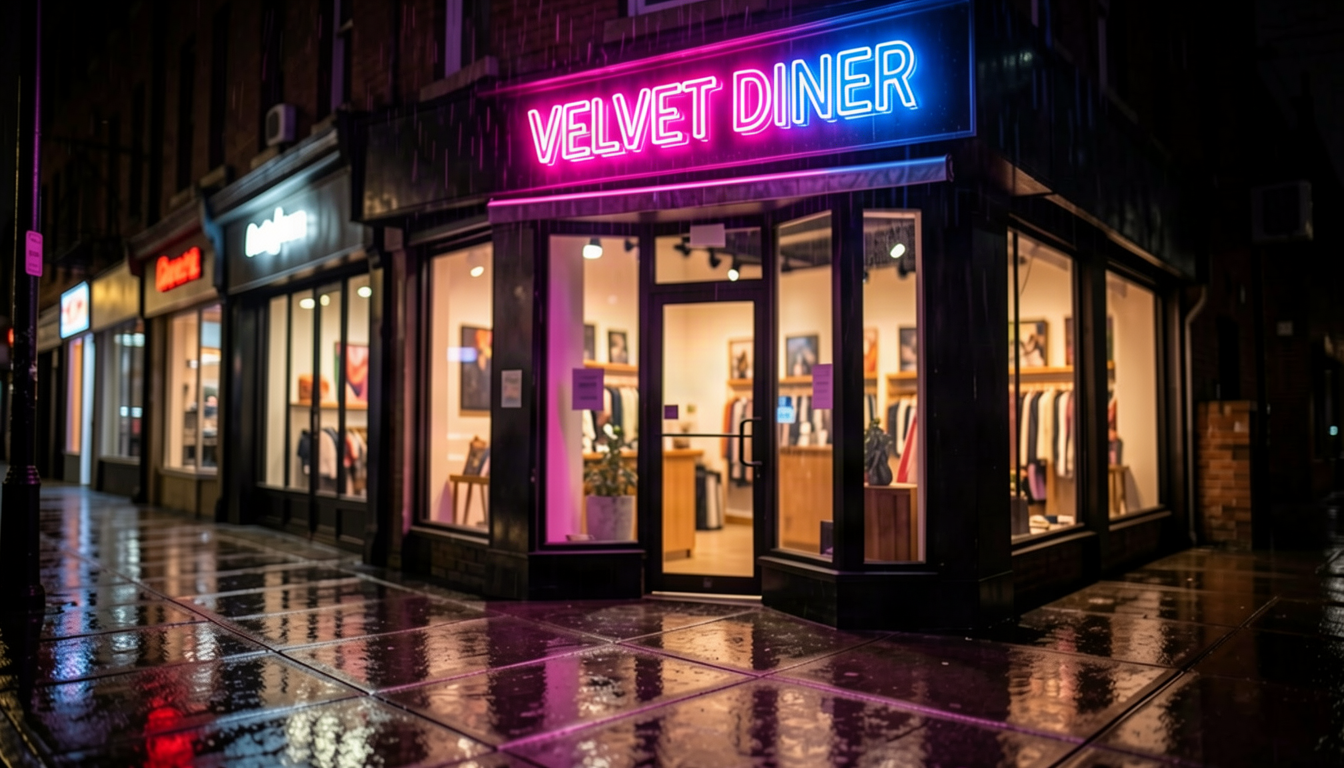
A genuine straight replacement, not an addition — the old sign text is fully gone, the new text is correctly spelled, and it kept the same pink-and-blue neon glow and mounting position. The wet-sidewalk reflections and the rest of the storefront came through unchanged. This is the scenario where hiapi's 4B tier of the same model family only partially followed instructions (adding new text as a subtitle instead of replacing it); the 9B tier's stronger text handling committed to the full replacement here.
Recipe 5: Reformat to Vertical for Social Stories
Keep the amber glass bottle, CLARIA label, DERM TESTED badge, and marble surface exactly unchanged. Reframe the composition into a taller vertical shot suitable for a social media story, with more empty marble space above the bottle for text overlay
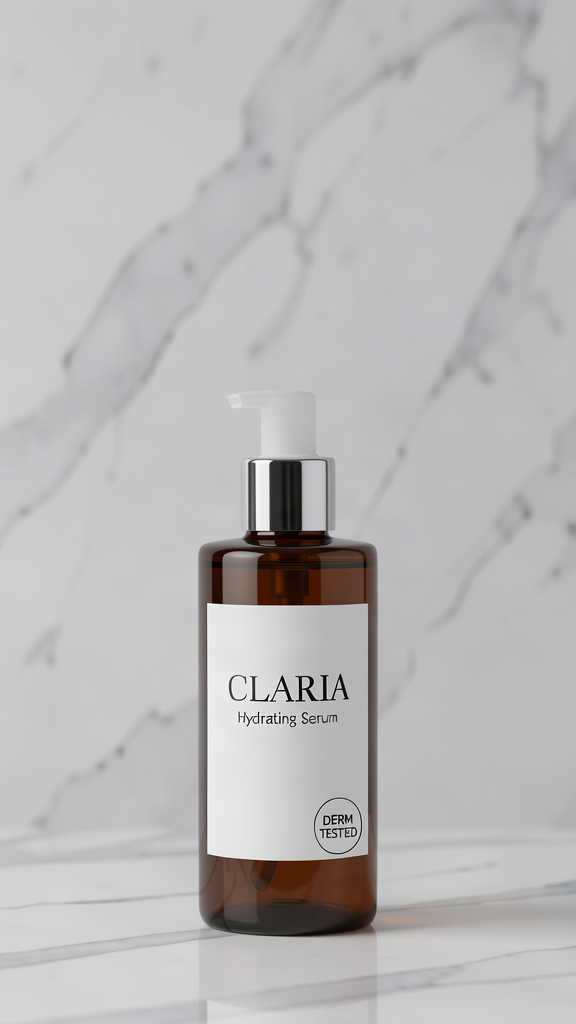
Another chained edit — this one reformats Recipe 2's amber-glass output using the model's aspect_ratio input field set to 9:16. The bottle, label, and badge stayed centered and fully legible, the marble surface extended naturally to fill the new headroom with no visible seams, and the extra empty space above the bottle is exactly where a story-format text overlay would go.
How to Reproduce These With the API
All five edits above use the same flux-2-klein-9b image-to-image model through hiapi's async task endpoint: submit a POST to /v1/tasks with your prompt and a source image, poll the task until it reports success, then pull the result from output[0].url.
The input schema is intentionally narrow — three fields, no more:
prompt(required) — your instruction, ideally in the "keep X unchanged, change only Y" pattern used aboveimage_urls(required, array) — your source image as a public URL; this model takes exactly one reference imageaspect_ratio(optional, string like"9:16") — used in Recipe 5 to force the vertical reframe
Unlike some other tiers in the FLUX.2 Klein family, this model does not accept a resolution or strength parameter — sending either returns a schema error. There's also no multi-MP pricing tier to think about: every edit is a flat $0.03143 per image regardless of output size, which is simpler to budget for than resolution-tiered models. Check hiapi's live pricing page before a production run in case that changes.
FAQ
Does flux-2-klein-9b support image-to-image editing? Yes — it accepts one source image via image_urls plus a text prompt describing the edit, and is positioned as the higher-fidelity tier in the FLUX.2 Klein family for text rendering and detail preservation.
How much does each edit cost? A flat $0.03143 per image, with no resolution tiers to choose between.
Can I pass a resolution or strength parameter? No — this model's schema only accepts prompt, image_urls, and optional aspect_ratio. Sending resolution or strength returns a schema error.
Why does every prompt say "keep X unchanged" before describing the edit? It's the most reliable way to stop an image-to-image model from quietly redrawing parts of the photo you didn't ask it to touch — anchor what stays, then describe what changes.
Does it handle straight text replacement in busy scenes? Better than the smaller 4B tier in this family — Recipe 4 above replaced a neon sign's text outright in a complex night scene rather than just appending new text alongside the old. Still, always proofread AI-rendered text before shipping, and check the rest of the frame too — Recipe 3 shows that a background element can drift slightly even when the text edit itself is clean.
Try It Yourself
All five prompts above are ready to copy into your own request — swap in your own source image and adjust the details for your product or scene. For the faster, budget tier of the same model family, see FLUX.2 Klein 4B image-to-image prompt recipes, or for the wider FLUX.2 prompt patterns, FLUX.2 image-to-image prompt recipes. Ready to try it on your own images? Head to the flux-2-klein-9b model page to get started.









