E-commerce catalogs live and die by consistency. A seller with 40 SKUs doesn't need 40 different photo shoots — they need one good background and a fast way to drop every product into it. That's the actual use case for reference-driven image editing, and it's exactly what grok-imagine/image-to-image on the hiapi API is built for: feed it a scene and a product shot, and it composites the two into one clean, on-brand image — no manual masking, no separate background-removal step.
This guide covers the model's real, tested request schema (not the marketing copy), the pricing you'll actually be billed, a batch script for running a full catalog through one background, and a practical trick for controlling output aspect ratio across marketplaces that all want different crops.
What the model actually does
grok-imagine/image-to-image takes a text prompt plus a small set of reference images and blends them into a single new image. For product photography that means:
- Background unification — put every SKU shot in front of the same styled scene (a desk, a shelf, a studio backdrop) without re-shooting anything.
- Scene composition — combine a product cutout with an environment reference so lighting and framing match.
- Style transfer between references — carry color grading or props from one image into another while keeping the product itself unedited.
All of this happens in one task call, billed as a flat per-image fee regardless of how many reference images you send.
The real schema (verified against the live API, not the pricing page)
We probed POST /v1/tasks directly with grok-imagine/image-to-image and the model's input schema accepts exactly two fields:
{
  "model": "grok-imagine/image-to-image",
  "input": {
    "prompt": "string, required",
    "image_urls": ["array of public image URLs, required, max 3"]
  }
}
That's it — no resolution, no aspect_ratio, no strength parameter. Anything else in the payload gets rejected by the strict schema.
One correction worth flagging: the hiapi pricing page currently describes this model as supporting "up to 6" reference images. We tested that directly by sending 6 and 7 image URLs in the same request, and both were rejected:
{"error_code":"INVALID_REQUEST","message":"invalid input: image_urls: maxItems: got 6, want 3"}
{"error_code":"INVALID_REQUEST","message":"invalid input: image_urls: maxItems: got 7, want 3"}
The enforced limit as of this writing is 3 images per call, not 6. If you're building a pipeline around this model, plan for 3 and treat any marketing copy that says otherwise as stale — always confirm against a live POST /v1/tasks call before shipping automation that depends on it, since these limits do change as the platform evolves.
Auto Aspect: the output ratio follows your first reference image
The model has no aspect_ratio input field, so where does the output's shape come from? We ran a controlled test to find out: same prompt, same two reference images, only the order of image_urls swapped.
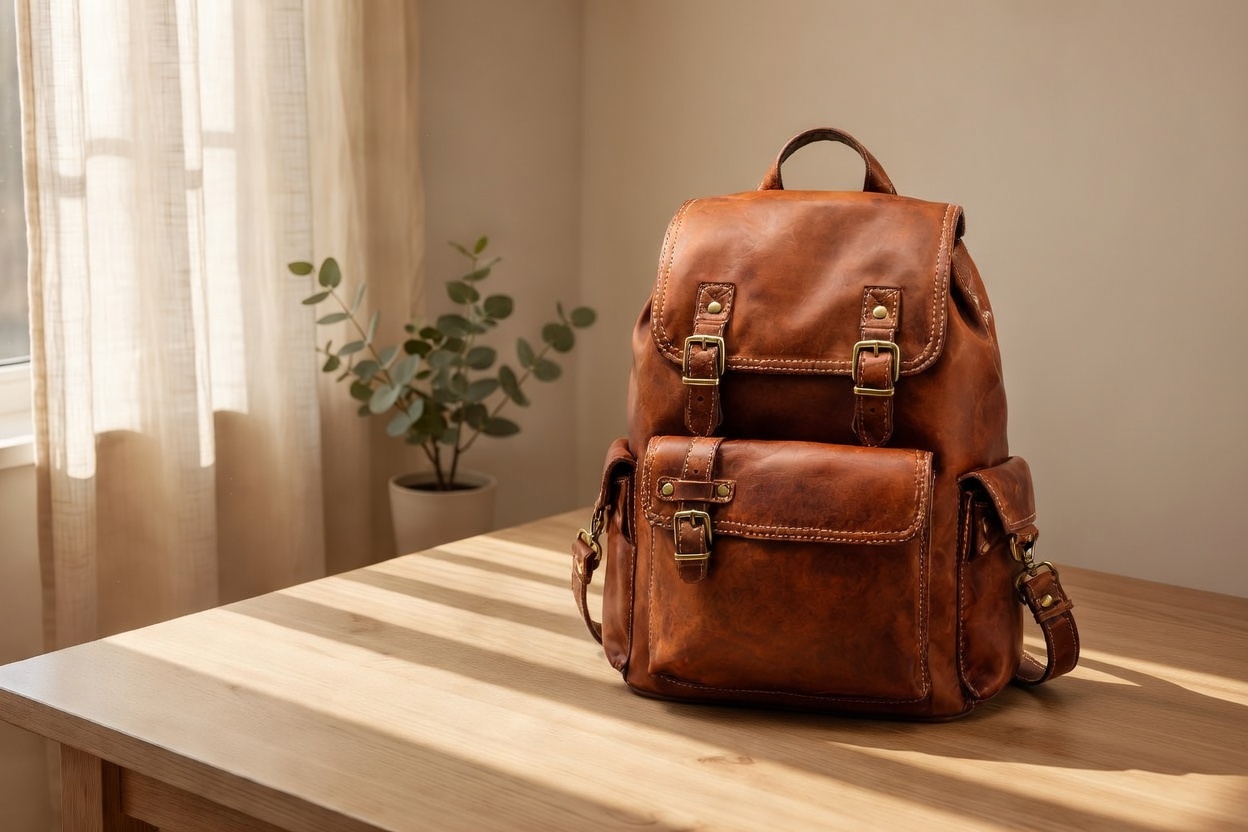
For this render, the product photo (the backpack) was listed first in image_urls, followed by the background scene. The output came back at 1248×832 — a 3:2 landscape that matches the product photo's own proportions.
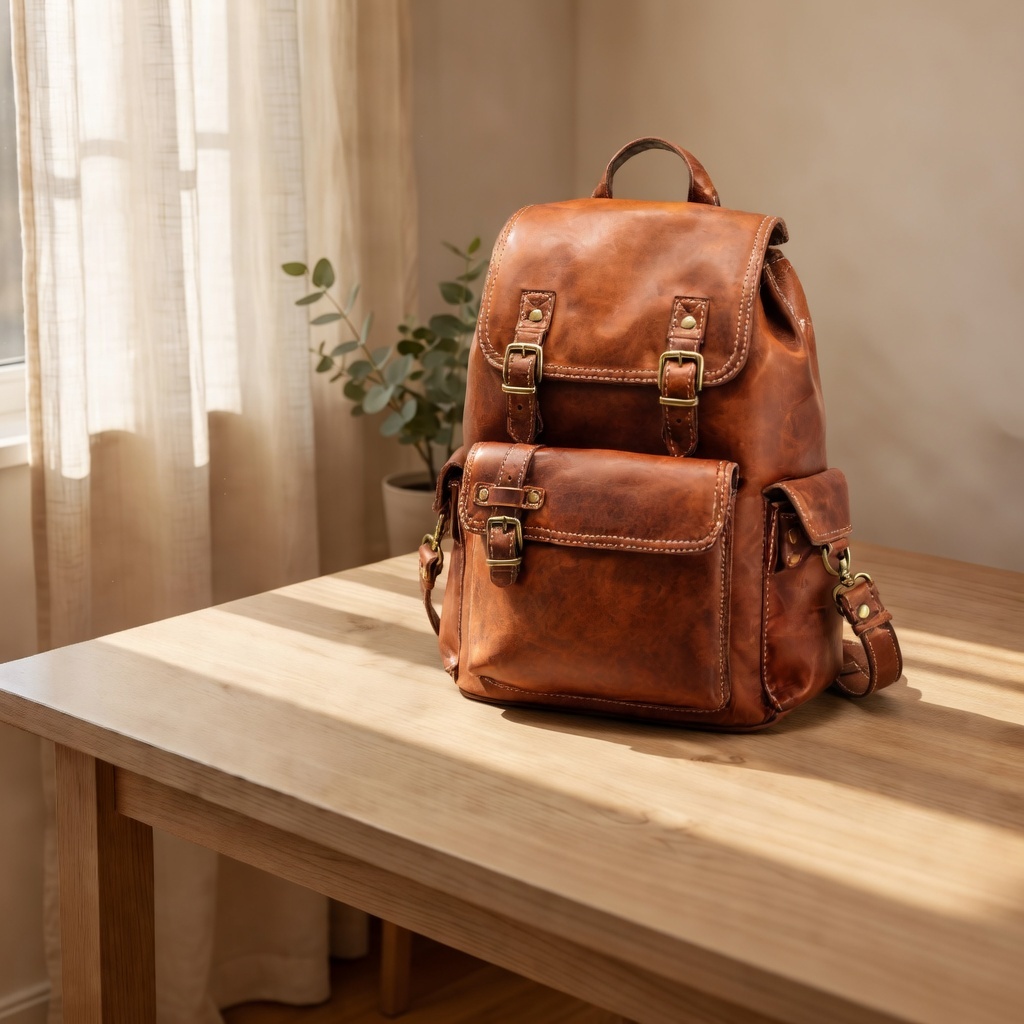
Same prompt, same two images — but with the background scene listed first this time. The output came back at 1024×1024, a square crop that matches the scene reference's own aspect ratio instead of the product's.
The rule: grok-imagine/image-to-image inherits its output aspect ratio from whichever URL appears first in image_urls. It isn't reading your prompt for framing hints ("product shot" vs. "wide scene") — it's purely positional. That's a genuinely useful lever once you know it's there: to target a specific marketplace's preferred crop, just reorder your reference array. Put a square reference first for Instagram-style square listings; put a landscape reference first for a wide banner slot.
Pricing (checked against the live rate card)
| Model | Call type | Price |
|---|---|---|
grok-imagine/text-to-image | text → image | $0.03 / image |
grok-imagine/image-to-image | reference-driven edit (this guide) | $0.035 / image |
grok-imagine-quality/text-to-image | text → image, premium tier | $0.07 / image (1K) |
grok-imagine-quality/image-to-image | reference-driven edit, premium tier | $0.09 / image (1K), $0.11 / image (2K) |
The base grok-imagine/image-to-image tier used in this guide is flat-rate regardless of resolution — you're not paying a 2K/4K surcharge the way you would on the -quality tier. For a catalog refresh where you're compositing dozens of SKUs against one scene, that flat $0.035/image is the number to budget against. Always re-check /en/pricing before committing to a large batch run, since rates are subject to change.
If you need sharper detail per shot and can accept a 2-3x price jump, the grok-imagine-quality tier is the same workflow at higher fidelity. For pure text-to-image product mockups with no reference photo at all, see the base-tier text-to-image walkthrough instead.
Batch script: one scene, a full catalog
Here's a minimal Python loop that takes one reusable background scene and composites it against every product photo in a folder, submitting each as its own task and polling to completion. It uses the confirmed schema above and puts the product image first so every output inherits the product photo's own aspect ratio — swap the order if you want the scene's ratio instead.
import os
import time
import requests

API_BASE = "https://api.hiapi.ai/v1"
TOKEN = os.environ["HIAPI_API_KEY"]
HEADERS = {"Authorization": f"Bearer {TOKEN}", "Content-Type": "application/json"}

SCENE_URL = "https://static.hiapi.ai/blog/grok-imagine-image-to-image-ecommerce/scene-base.jpg"
PROMPT = (
    "Composite the product from the first reference photo naturally into the "
    "second reference's studio scene, matching its lighting and shadow direction. "
    "Keep the product's shape, color, and texture unchanged."
)


def submit(product_url: str) -> str:
    payload = {
        "model": "grok-imagine/image-to-image",
        "input": {
            "prompt": PROMPT,
            "image_urls": [product_url, SCENE_URL],  # product first -> output follows its ratio
        },
    }
    resp = requests.post(f"{API_BASE}/tasks", headers=HEADERS, json=payload, timeout=30)
    resp.raise_for_status()
    return resp.json()["data"]["taskId"]


def wait_for_result(task_id: str, timeout_s: int = 300) -> str:
    deadline = time.time() + timeout_s
    while time.time() < deadline:
        resp = requests.get(f"{API_BASE}/tasks/{task_id}", headers=HEADERS, timeout=30)
        resp.raise_for_status()
        task = resp.json()["data"]
        if task["status"] == "success":
            return task["output"][0]["url"]
        if task["status"] == "fail":
            raise RuntimeError(f"task {task_id} failed: {task.get('error')}")
        time.sleep(5)
    raise TimeoutError(f"task {task_id} did not finish in {timeout_s}s")


if __name__ == "__main__":
    product_urls = [
        "https://your-storage.example.com/catalog/dripper-raw.jpg",
        "https://your-storage.example.com/catalog/sneaker-raw.jpg",
        "https://your-storage.example.com/catalog/backpack-raw.jpg",
    ]
    for url in product_urls:
        task_id = submit(url)
        output_url = wait_for_result(task_id)
        print(f"{url} -> {output_url}")
For a production pipeline, register a callback.url on the task instead of polling in a loop — see the hiapi models directory for the full callback payload shape. Store the taskId alongside your product SKU so a failed task can be retried without resubmitting the whole batch.
Real product-photo examples
<!-- image: dripper.jpg -->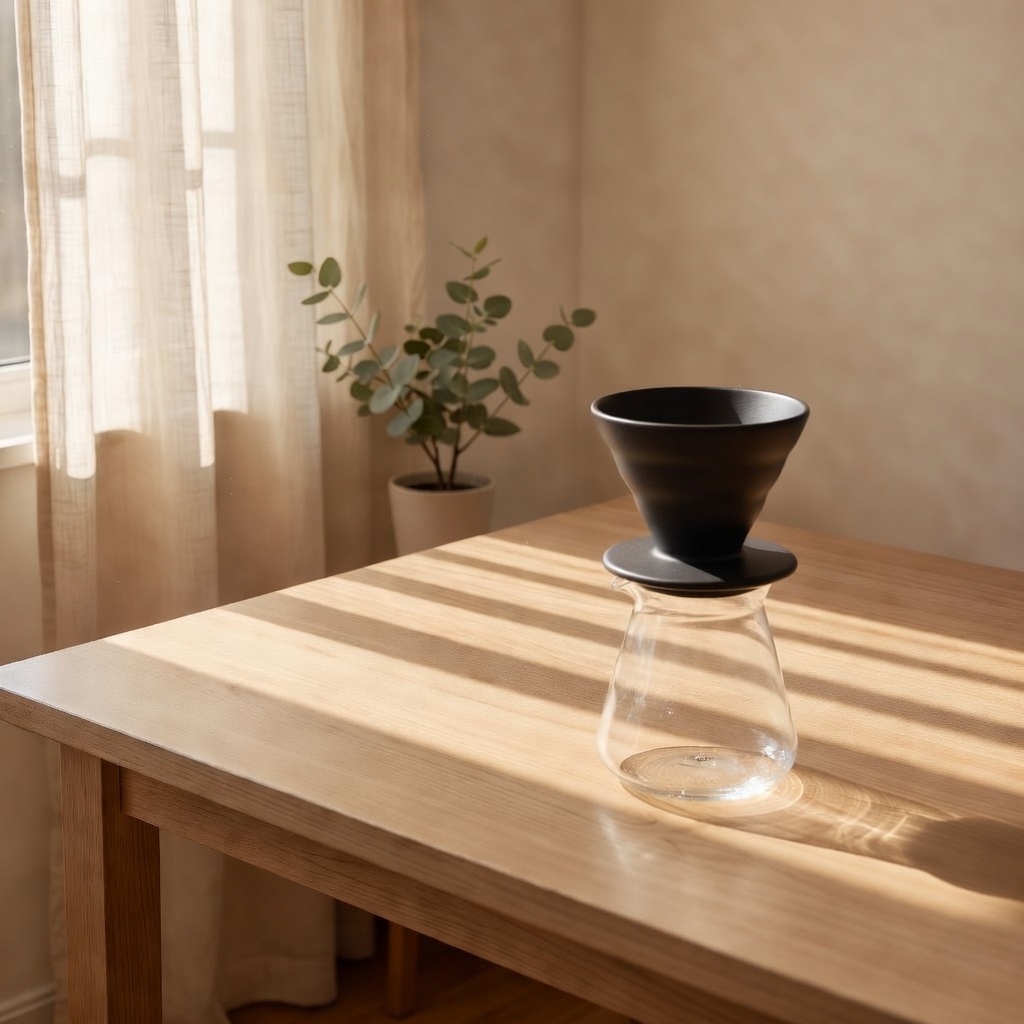
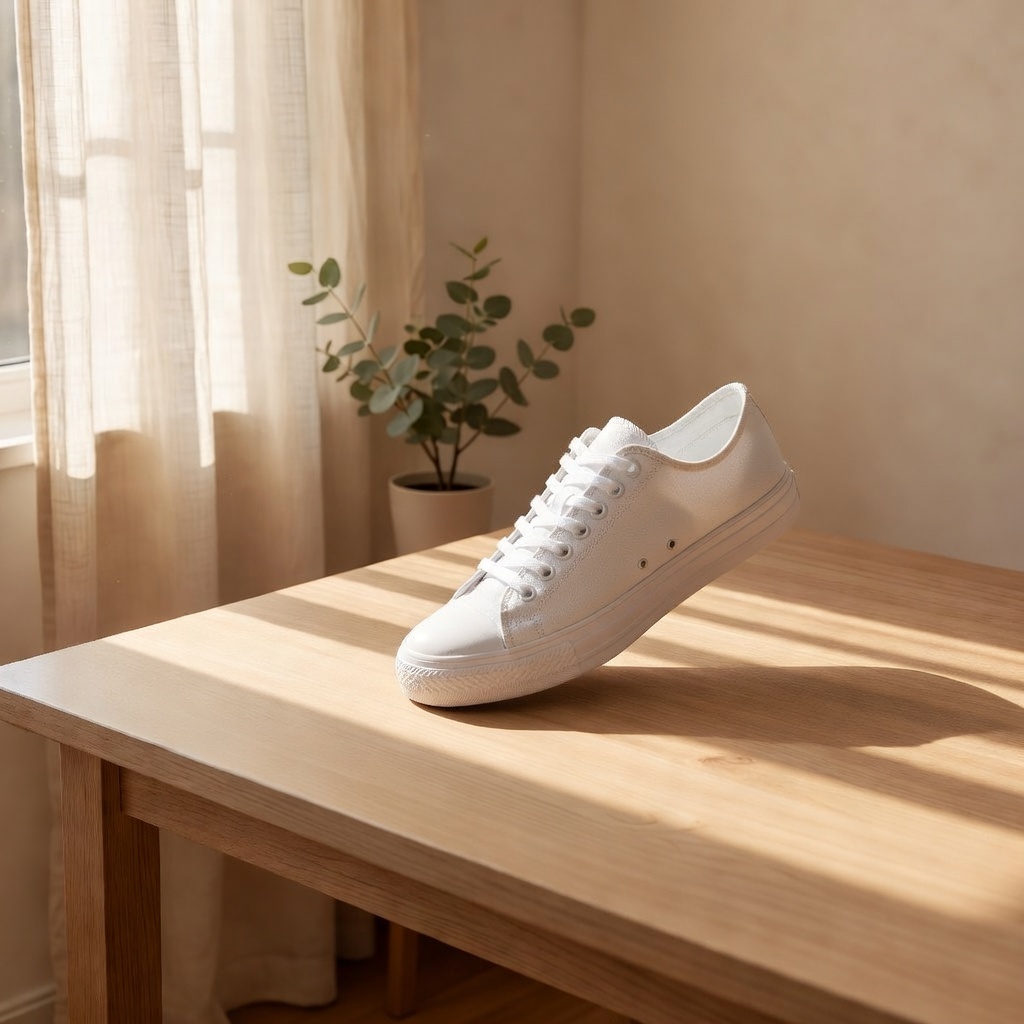
Both of these were generated from the same background scene reference, with only the product photo swapped between calls — the lighting, table surface, and background plant stay consistent across the whole "catalog," which is the entire point of a reusable-scene workflow.
FAQ
Can I use more than 3 reference images in one call?
No. The live schema enforces maxItems: 3 on image_urls — confirmed by direct API testing, regardless of what marketing copy elsewhere says. Design your prompts around a maximum of 3 references (typically: product + scene, or product + scene + style reference).
How do I control the output's aspect ratio?
There's no aspect_ratio parameter on this model. The output inherits the aspect ratio of whichever image is listed first in image_urls — reorder your references to target the ratio you need.
Does it support text-only generation with no reference image?
No — image_urls is a required field. For text-only product mockups, use grok-imagine/text-to-image instead, at $0.03/image.
Is there a higher-fidelity version of this model?
Yes, grok-imagine-quality/image-to-image runs the same reference-driven workflow at $0.09/image (1K) or $0.11/image (2K) for sharper detail.
Try it
Grab an API key from your hiapi dashboard, pull one background scene together, and run your first batch against a handful of SKUs before committing to a full catalog swap — at $0.035/image the cost of testing the workflow on 10 products is under a dollar.









