TL;DR
hiapi is an image- and video-generation API gateway that fronts more than a dozen production models under one HTTP contract. If you have ever wired up three different generative SDKs to ship one feature, this page is what you came looking for. Quick summary:
- One endpoint, many models. Everything — text-to-image, image-to-image, text-to-video, image-to-video — runs through the async
POST /v1/tasksendpoint. You change themodelfield, not the SDK. - Image models on the catalogue today:
Nano-Banana,Nano-Banana-2,Nano-Banana-Pro,flux-1.1-pro,gpt-image-2(plus-betaand-provariants),gpt-image-2/image-to-image(plus-pro),qwen-image-2.0. - Video models on the catalogue today:
wan2.7-t2v,wan2.7-i2v,seedance-2-0,happyhorse-1-0. Resolutions from 480p up to 1080p. - Pricing is per finished task, not per token. $0.02 buys you a
gpt-image-2-betarender; $0.05 buys you a flat-priced Nano-Banana or FLUX 1.1 Pro image; $0.823 buys you a 1080p Seedance clip. - No quality-tier roulette. Pricing is published live at
/api/pricingand versioned with a hash, so your billing code can pin to a known version and break loudly if upstream changes.
This is the brand-SERP page — a walkthrough of what the platform actually is, who it's for, and what it costs. The four images in this post were rendered by four different hiapi-hosted models so you can see what comes out the other end of the wire.

What hiapi is
hiapi is a hosted gateway. You point a single Bearer-token-authenticated HTTP client at api.hiapi.ai, send an async task, and receive a CDN URL with the rendered image or video. Behind that single contract sit multiple model providers — the FLUX family from Black Forest Labs, the Nano-Banana line built on Google's Gemini image models, OpenAI's gpt-image-2 family, Alibaba's Qwen-Image and Wan2.7 video models, ByteDance's Seedance video model, and HappyHorse.
The thing hiapi sells, then, isn't "a model" — it's "one shape of integration." If you have an internal app that generates marketing visuals, product mockups, or short marketing videos, you can A/B two completely different models by changing one string, and the rest of your worker code stays untouched.
The other obvious thing hiapi sells is billing in one place. One invoice, one balance, one rate limit — instead of three.
The image models
Here is the full image catalogue as of this writing, pulled live from /api/pricing:
| Model | Category | Cheapest tier | Notes |
|---|---|---|---|
Nano-Banana | Text-to-image | $0.05 flat | Fast iteration; aspect ratio only, no resolution multiplier |
Nano-Banana-2 | Text-to-image | $0.076 (2K) — $0.085 (1K) — $0.114 (4K) | 4K output; precise text rendering |
Nano-Banana-Pro | Text-to-image | $0.17 (1K/2K) — $0.30 (4K) | Highest quality from the Banana family |
flux-1.1-pro | Text-to-image | $0.05 flat | Photoreal portraits, short-string text rendering |
gpt-image-2 | Text-to-image | $0.03 (1K) — $0.04 (2K) — $0.06 (4K) | The everyday workhorse |
gpt-image-2-beta | Text-to-image | $0.02 | The cheapest generation on the platform |
gpt-image-2-pro | Text-to-image | $0.35 (1K) — $0.70 (2K) | High-fidelity hero shots |
gpt-image-2/image-to-image | Image-to-image | $0.03 → $0.06 | Same prices as the t2i variant |
gpt-image-2-image-to-image-pro | Image-to-image | $0.42 (1K) — $0.84 (2K) | Reference-image remix at premium fidelity |
qwen-image-2.0 | Text-to-image | $0.025 flat | Strong CJK text rendering, DashScope-style request shape |
A few notes that the table doesn't capture:
Pricing categories are flat per call, not per token. You pay once for a finished image. Prompt length doesn't matter. That makes batch jobs predictable: 10,000 calls at gpt-image-2 is $300, no asterisks.
Nano-Banana and flux-1.1-pro are flat across aspect ratios. No 16:9 surcharge, no portrait-mode discount — you pay the same $0.05 for a square avatar or a 21:9 cinematic still.
Models that take a resolution parameter use the image_quality_price_ratio you see in the live pricing. Don't hardcode prices in your billing code — read the policy block.
Schema is per-model, not uniform. Most image models accept input.prompt plus input.aspect_ratio. qwen-image-2.0 is a DashScope-style model — its input goes under input.input.messages[].content[].text, and size is passed as a literal pixel string like 1328*1328. We hit this in our own production code; bake a model→payload adapter on day one.
What "FLUX 1.1 Pro" looks like coming out of hiapi
This portrait was generated by flux-1.1-pro at 3:2 aspect ratio, $0.05 flat. No retouching, no upscaling.

FLUX 1.1 Pro is the photoreal default on the platform. Faces, skin texture, soft directional light, and short on-image text are where it consistently outperforms cheaper tiers.
What qwen-image-2.0 looks like on hiapi
This is qwen-image-2.0 at $0.025 — the cheapest of the dedicated text-rendering models. The four Chinese characters '陆羽茶馆' were specified in the prompt and rendered correctly with the right stroke order. This is exactly the kind of image where Qwen-Image earns its keep.
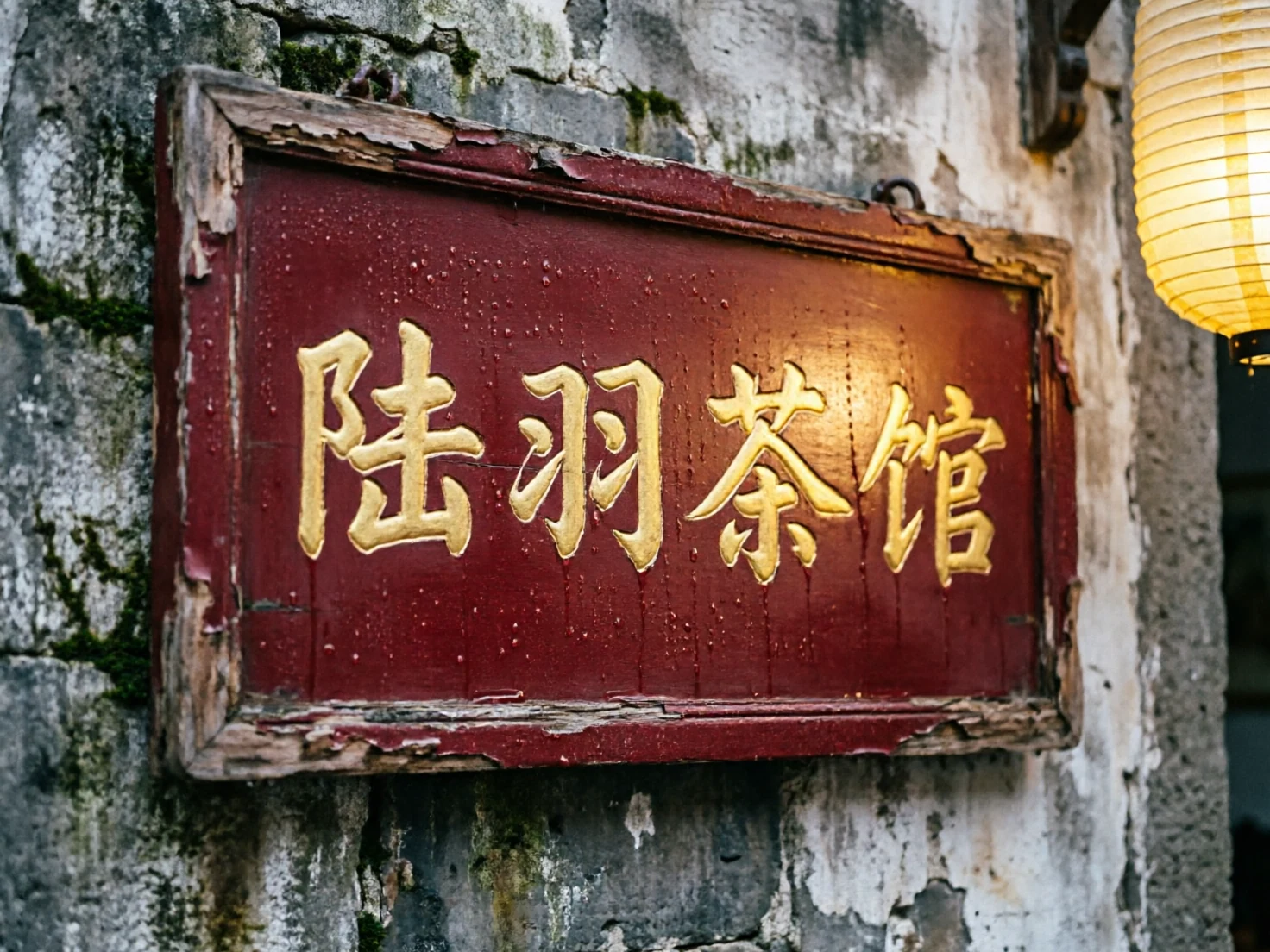
If your use case is product cards or social posts in a CJK market, the $0.025 line is hard to beat for raw glyph accuracy.
What gpt-image-2 looks like for layout-heavy posters
This poster came out of gpt-image-2 at 1K (3:4 aspect ratio, $0.03). One round-trip, no retouching. The headline and the subtitle are both rendered exactly as specified.
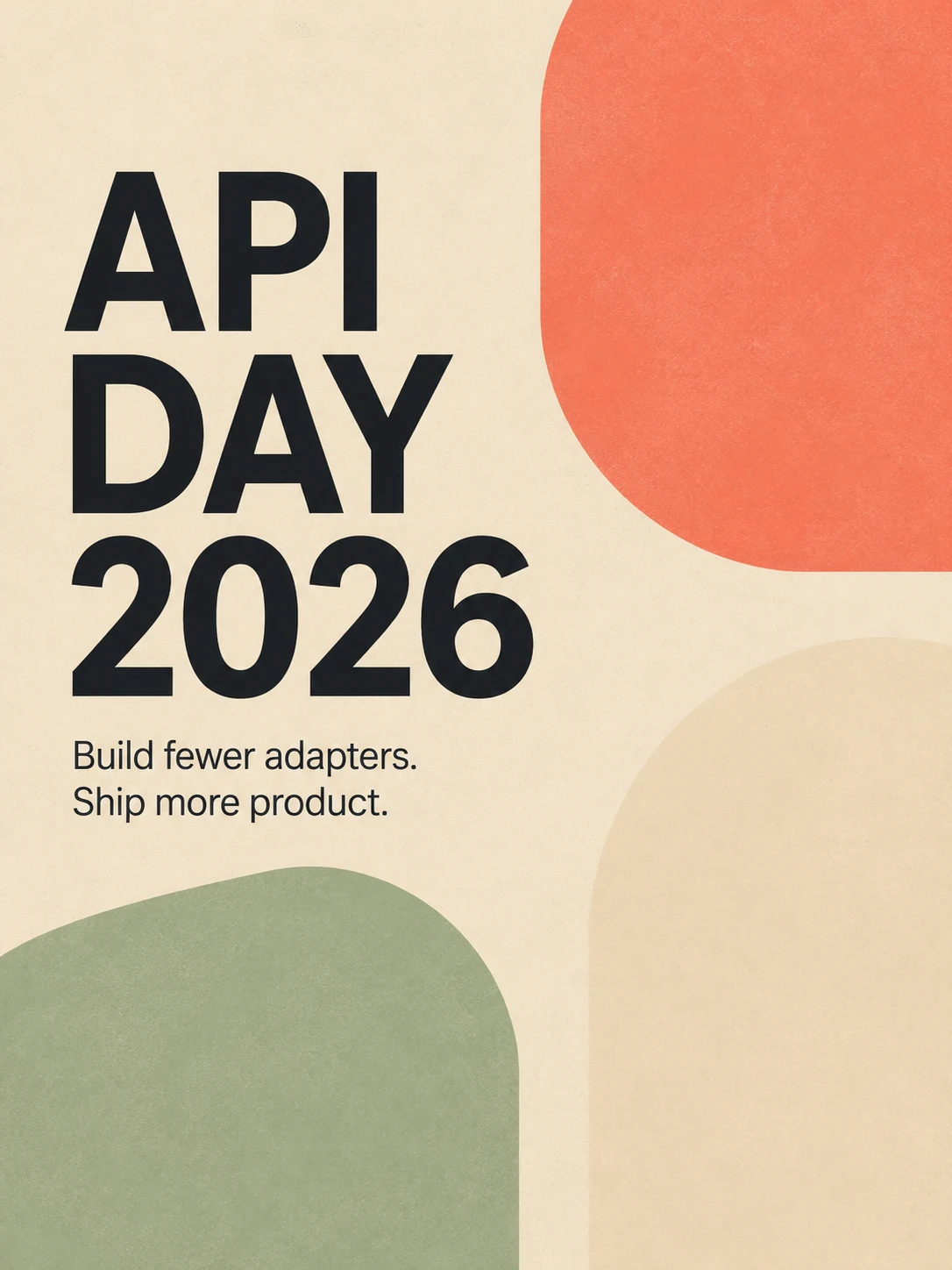
If you are building generative tooling for marketing teams — event posters, social cards, banner ads — gpt-image-2 is the default starting point. It will hold a 4–6 word headline reliably and respects basic layout direction in the prompt.
The video models
Video is the newer half of the catalogue. As of this writing:
| Model | Category | Cheapest tier | Top tier |
|---|---|---|---|
wan2.7-t2v | Text-to-video | $0.10 (720P) | $0.167 (1080P) |
wan2.7-i2v | Image-to-video | $0.10 (720P) | $0.167 (1080P) |
seedance-2-0 | Text-to-video | $0.15 (480p) | $0.823 (1080p) |
happyhorse-1-0 | Text-to-video | $0.168 (720p) | $0.288 (1080p) |
Two practical notes:
Wan2.7 is the cost-effective option for short product loops and image-conditioned animation. The $0.10 720P tier is the cheapest video generation on the platform.
Seedance 1080p is the premium tier — the price jump from $0.15 to $0.823 reflects compute, not markup. If you're building a real product video pipeline rather than a personal-use demo, you'll want to budget toward Seedance for hero shots and Wan2.7 for everything else.
All four video models are served on the same POST /v1/tasks endpoint with output_type: video — same poll-then-download pattern as image tasks.
The pricing model
A few specifics that catch most teams the first time:
Flat-per-call, with optional resolution multipliers. No token billing on image or video tasks. A gpt-image-2 call is $0.03 — whether your prompt is 8 words or 800. When a model offers multiple resolutions, the markup is baked into the policies array in the live pricing response, and it tops out at roughly 2× the base for 4K image output and ~5.5× for 1080p video.
Pricing is versioned. Every model in /api/pricing carries a pricing_version hash. If you ship a generation worker, pin the model's pricing version in config and alert on mismatch — that way you find out a model got repriced before the next billing cycle, not after.
No per-region pricing, no surge. The same model costs the same regardless of which region you call from or when you call it. There's nothing clever to optimise here.
You always re-fetch. Don't hardcode prices in your business logic. The /api/pricing endpoint is the source of truth — same shape as a public catalog, no auth required. We re-fetched it while writing this post and that's where the prices in this table came from.
The endpoint architecture
Everything on the platform — image or video, text-to-X or X-to-X — runs through one async task contract:
POST /v1/tasks
GET  /v1/tasks/{taskId}
The flow:
POST /v1/taskswith{ "model": "...", "input": { ... } }. You get back ataskIdimmediately.- Poll
GET /v1/tasks/{taskId}every few seconds. Watchdata.status— it moves throughpendingtosuccess(orfailwith an error block). - On
success, readdata.output[0].url. That's a hiapi CDN URL with a finiteexpireAttimestamp. Download and re-host it if you need to keep the asset around.
The old /v1/chat/completions and /v1/images/generations shapes are no longer served for image generation. If your code still calls those, it needs to migrate to /v1/tasks.
This is one of those decisions you appreciate later. The task pattern gives you natural retries, no long-running HTTP connections to babysit, and a uniform shape across image and video. You can fan out 200 task submissions inside one second and poll for them in batch.
A working quickstart in Python
Minimal client, no SDK dependency. Standard library only:
import json, os, time, urllib.request

TOKEN = os.environ["HIAPI_API_KEY"]
BASE  = "https://api.hiapi.ai"

def submit(model: str, input_payload: dict) -> str:
    body = json.dumps({"model": model, "input": input_payload}).encode()
    req = urllib.request.Request(
        f"{BASE}/v1/tasks",
        data=body,
        headers={
            "Authorization": f"Bearer {TOKEN}",
            "Content-Type":  "application/json",
        },
    )
    with urllib.request.urlopen(req, timeout=60) as r:
        data = json.loads(r.read())
    if data.get("code") != 200:
        raise RuntimeError(f"submit failed: {data}")
    return data["data"]["taskId"]

def wait_for(task_id: str, timeout_s: int = 240) -> str:
    deadline = time.time() + timeout_s
    while time.time() < deadline:
        time.sleep(5)
        req = urllib.request.Request(
            f"{BASE}/v1/tasks/{task_id}",
            headers={"Authorization": f"Bearer {TOKEN}"},
        )
        with urllib.request.urlopen(req, timeout=30) as r:
            data = json.loads(r.read())
        task = data.get("data") or {}
        if task.get("status") == "success":
            return task["output"][0]["url"]
        if task.get("status") == "fail":
            raise RuntimeError(f"task failed: {task.get('error')}")
    raise TimeoutError(f"{task_id} did not finish in {timeout_s}s")

# Image — Nano-Banana flat $0.05
task_id = submit("Nano-Banana", {"prompt": "a quiet bookshop at dusk", "aspect_ratio": "3:2"})
print(wait_for(task_id))

# Image — flux-1.1-pro flat $0.05
task_id = submit("flux-1.1-pro", {"prompt": "studio portrait, 50mm lens", "aspect_ratio": "1:1"})
print(wait_for(task_id))

# Video — wan2.7-t2v at 720P, $0.10
task_id = submit("wan2.7-t2v", {"prompt": "a koi pond at dawn, gentle ripples", "resolution": "720P"})
print(wait_for(task_id, timeout_s=600))
A few things to bake in before this code is production-ready:
- Wrap
submitandwait_forin retries with exponential backoff. Network blips happen. - Use a
poll_intervalof at least 5 seconds. Polling tighter than that is wasted work — image tasks land in 10–60 s and video tasks in 60–180 s. - Treat the output URL as ephemeral. The CDN URL has an
expireAt; download the bytes and store them in your own bucket if the asset has any lifetime past the request. - Pin a model adapter map.
qwen-image-2.0and a few video models have different input shapes than the image-aspect-ratio default — keep that knowledge in one place.
Who hiapi is for
In broad strokes, hiapi fits three kinds of teams:
Teams who got tired of integrating one SDK per model. If you've ever maintained one adapter for OpenAI image, one for Black Forest Labs FLUX, and one for Alibaba's DashScope, you've felt the productivity tax of N different SDKs. hiapi collapses that to one client.
Teams who need pricing they can forecast. The flat per-call shape lets you build a generation worker, look at last month's task count, and predict next month's bill. That's hard to do against any model that charges by token.
Teams who want one stop for image and video. As soon as your product spans both — say, a marketing tool that generates a cover image and a 10-second loop from one brief — having both behind one endpoint and one balance is worth more than the per-image savings of going direct.
If you're a hobbyist running a personal Discord bot, the direct upstream APIs are fine. The minute you're shipping a real product with real users, the integration math tilts toward a gateway.
FAQ
Is there a free tier? There's a small starter credit for new accounts so you can test the endpoint without committing. Once that's used up, you top up the balance and pay per finished task.
What aspect ratios are supported?
Common ratios — 1:1, 3:2, 2:3, 4:3, 3:4, 5:4, 4:5, 16:9, 9:16, and 21:9 — work across most image models. qwen-image-2.0 uses a fixed list of literal pixel sizes instead; see the model schema notes above.
Are the assets watermarked? No. Outputs come back as clean image/video files without hiapi branding.
What about rate limits? The async task pattern means you can submit a lot of work very quickly. There are per-account limits to keep the platform stable; if you need a higher ceiling, ask before you ship the spike — easier to lift the cap on a Tuesday than during a launch.
Where do I check current prices?
https://www.hiapi.ai/api/pricing. Cache it for an hour at most, and pin the pricing_version per model so you notice when something changes.
Can I use the output commercially?
Most models on the platform carry commercial-use licenses upstream — Nano-Banana family, FLUX 1.1 Pro, and Qwen-Image all explicitly do — but verify the license tag in the live pricing response (tags field) for the model you're using, since a few specialized models have tighter terms.
Where to start
If you're trying this out from scratch:
- Grab an API key from your hiapi dashboard.
- Hit
/api/pricingonce to see the current model catalogue and prices. - Copy the Python snippet above and run it against
Nano-Bananaorgpt-image-2-beta— those are the cheapest models for a sanity check. You'll burn a couple of cents getting a working end-to-end loop. - Wire that loop into whatever you're building. Same shape for video. Same shape for image-to-image. Same shape for the next model added to the catalogue.
That's the whole pitch: one endpoint, one balance, one mental model. The four images in this post — cover illustration, photoreal portrait, CJK calligraphy signboard, layout poster — were all rendered using the snippet above, just with different model strings and the right input shape per model. The total cost for the four images was $0.155.
When the next state-of-the-art image or video model lands on the platform, your worker won't need new code. You'll change a string.









