TL;DR
- What this is: a set of copy-paste prompt recipes for seedance-2.0-mini, each paired with the real video it produced — no cherry-picked demos from elsewhere. Every clip on this page was generated with the prompt printed right above it.
- Modes covered: text-to-video (T2V) and image-to-video (I2V, first-frame control), plus camera moves, visual style, motion/action, and native synced audio.
- Model facts (verified on the API): up to 720p, 4–15s clips,
durationandresolutionare required inputs,aspect_ratiois optional. T2V and I2V share one async task endpoint. - Pricing (per second of output): 480p is $0.068/s, 720p is $0.147/s; supplying a reference video lowers that to $0.043/s (480p) / $0.089/s (720p). See pricing for the live numbers.
- How to run these: POST to the task API, poll until
success, download the mp4 fromoutput[0].url. Full snippet at the end.
How To Read These Recipes
Every recipe below has three parts: a one-line goal, the exact prompt (copy it as-is), and the clip it generated. I wrote each prompt myself and ran it through seedance-2.0-mini on the live API — the videos are the raw first outputs, hosted here so they don't expire. Settings (duration, resolution, aspect ratio) are noted in each caption so you can reproduce them exactly.
A few things that consistently help with this model:
- Lead with the subject, then the camera, then the light. seedance-2.0-mini responds well to prompts ordered "what → how it moves → how it's lit."
- Name the camera move explicitly ("slow dolly-in", "tracking shot moving backward", "locked-off static shot"). Vague prompts drift.
- For audio, describe the sound in the prompt. The model generates native synced audio, so "crackling fire, soft rain on glass" actually lands.
- Keep clips short while iterating. At 4–5s and 480p you're paying cents per try; lock the prompt, then re-run at 720p.
Recipe 1 — Camera Move: Slow Dolly-In (T2V)
Goal: a controlled push toward a single subject with atmosphere, no jump cuts.
A slow dolly-in toward a steaming bowl of ramen on a worn wooden counter in a dim izakaya. Warm amber lantern light, soft volumetric haze, gentle steam curling upward, shallow depth of field, the broth surface rippling slightly. Cinematic, photoreal.
Slow dolly-in on a ramen bowl — seedance-2.0-mini, T2V, 5s @ 480p. Real output, generated for this guide.
Why it works: the move ("slow dolly-in") is stated before the styling, so the model commits to one continuous camera path instead of inventing cuts. The steam and shallow depth of field give it something to animate frame-to-frame.
Recipe 2 — Visual Style: Hand-Drawn Anime (T2V)
Goal: lock a non-photoreal look and hold it for the whole clip.
Hand-drawn 2D anime style. A girl in a red raincoat stands on a quiet train platform at dusk, cherry petals drifting past, her hair and coat fluttering in the wind as a train's headlight grows brighter from the left. Soft cel shading, warm-to-cool color grade, gentle ambient hum.
2D anime girl on a train platform — seedance-2.0-mini, T2V, 4s @ 480p. Real output, generated for this guide.
Why it works: the style tokens ("hand-drawn 2D anime", "soft cel shading") come first and the motion is gentle, so the model isn't fighting between realism and illustration. Style + light motion is the most reliable combo on the mini model.
Recipe 3 — Motion & Action: Fast Subject, Tracking Camera (T2V)
Goal: fast subject motion that stays coherent instead of melting.
A border collie sprints across a sunlit beach toward the camera, kicking up wet sand, ears flapping, tongue out, water spray catching the low golden light. Tracking shot moving backward to keep the dog centered, motion blur on the paws, joyful energy, photoreal.
Border collie sprinting on a beach — seedance-2.0-mini, T2V, 5s @ 480p. Real output, generated for this guide.
Why it works: pairing a fast subject with a matched camera ("tracking shot moving backward to keep the dog centered") gives the model a stable framing target. Adding "motion blur on the paws" tells it where to spend detail.
Recipe 4 — Native Synced Audio: Describe the Sound (T2V)
Goal: get usable ambient audio baked into the clip, not silence.
A cozy fireplace crackling in a log cabin at night, orange embers popping and drifting, a cast-iron kettle gently steaming on the hearth, rain streaking the dark window behind. Static locked-off shot. Native audio: crackling fire, soft rain on glass, a low wind.
Fireplace with native synced audio — seedance-2.0-mini, T2V, 5s @ 480p. Real output, generated for this guide.
Why it works: seedance-2.0-mini generates native synced audio, but it needs to be told what to make. The explicit "Native audio: crackling fire, soft rain on glass, a low wind" line is what turns a silent loop into something you can drop straight into a timeline. Open the clip above (it plays with sound) to hear it.
Recipe 5 — Image-to-Video: First-Frame Control (I2V)
Goal: start from an exact still you already like, then animate it — the most predictable way to control composition.
For I2V you pass a first_frame_url. Here's the reference still I started from (generated separately), followed by the prompt and the animated result:
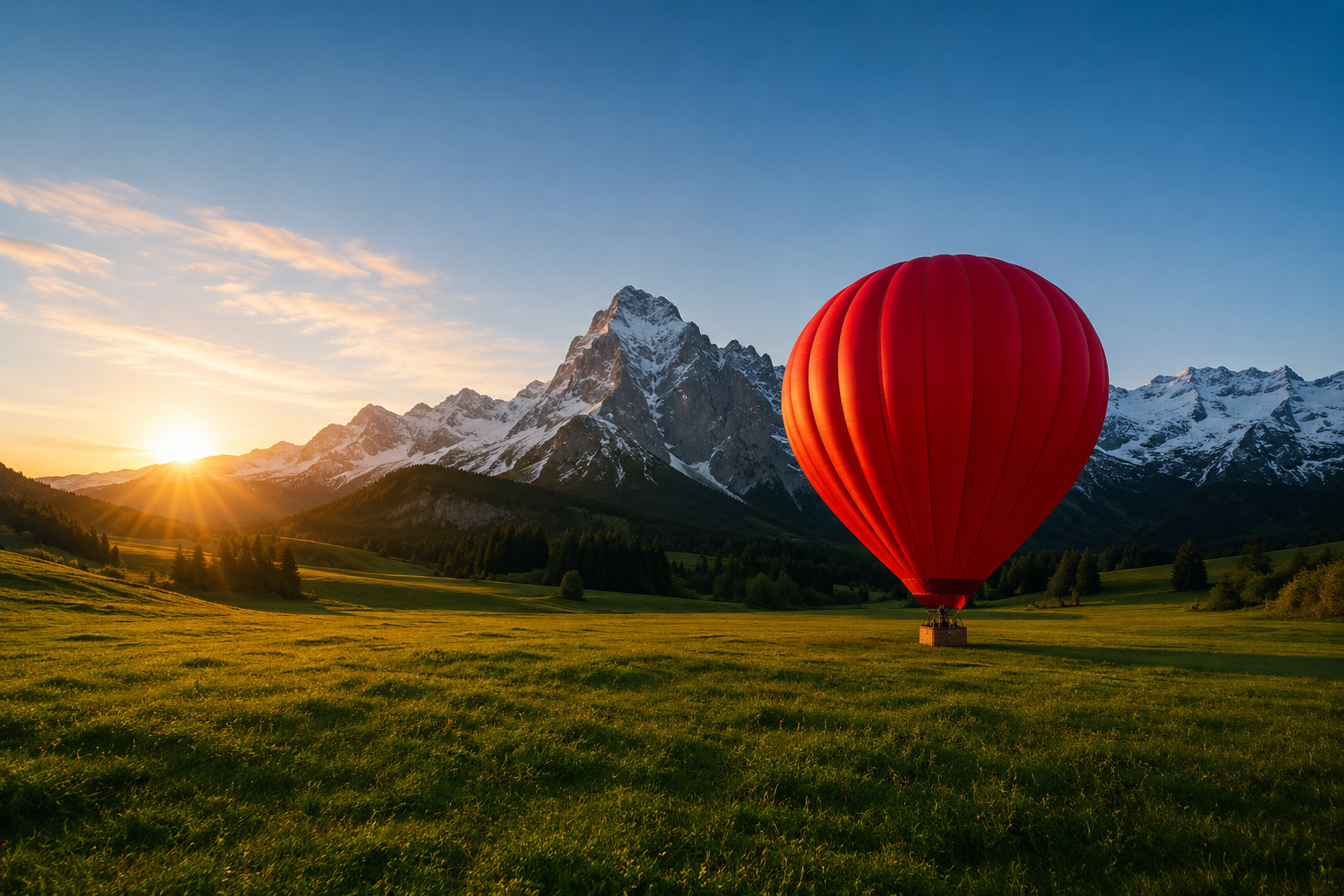
First frame passed to seedance-2.0-mini as first_frame_url.
The red hot-air balloon slowly inflates and lifts off the meadow, rising gently into frame as the burner flares, grass swaying from the downdraft, mist drifting across the valley. Smooth upward camera tilt to follow it.
Balloon lift-off animated from the still — seedance-2.0-mini, I2V, 5s @ 480p. Real output, generated for this guide.
Why it works: I2V keeps the opening frame exactly as your still, so composition, color, and subject identity are locked. Your prompt then only has to describe the motion ("slowly inflates and lifts off… smooth upward camera tilt"), which is a much easier job for the model than inventing a whole scene.
Prompt Patterns That Generalize
Pulling the recipes together, these are the reusable building blocks:
| Block | Put it... | Example phrasing |
|---|---|---|
| Subject | first | "A border collie", "a red hot-air balloon" |
| Camera move | right after the subject | "slow dolly-in", "locked-off static shot", "tracking shot moving backward" |
| Style | early, before lighting | "hand-drawn 2D anime, soft cel shading", "cinematic, photoreal" |
| Lighting | mid-prompt | "warm amber lantern light", "low golden light" |
| Motion detail | near the end | "motion blur on the paws", "steam curling upward" |
| Audio | last, explicit | "Native audio: crackling fire, soft rain on glass" |
Order matters more than length. A tight prompt that follows subject → camera → style → light → motion → audio beats a long unordered paragraph almost every time.
Run These Yourself (API)
All five recipes use the same async task flow. Submit, poll, download — duration and resolution (480p or 720p) are required; aspect_ratio is optional; for I2V add first_frame_url.
import requests, time

API = "https://api.hiapi.ai/v1/tasks"
HEADERS = {"Authorization": "Bearer YOUR_HIAPI_KEY", "Content-Type": "application/json"}

def run(prompt, duration=5, resolution="480p", aspect_ratio="16:9", first_frame_url=None):
    body = {"model": "seedance-2.0-mini",
            "input": {"prompt": prompt, "duration": duration,
                      "resolution": resolution, "aspect_ratio": aspect_ratio}}
    if first_frame_url:
        body["input"]["first_frame_url"] = first_frame_url  # I2V
    task_id = requests.post(API, json=body, headers=HEADERS).json()["data"]["taskId"]
    while True:
        t = requests.get(f"{API}/{task_id}", headers=HEADERS).json()["data"]
        if t["status"] == "success":
            return t["output"][0]["url"]   # mp4 link (expires — download it)
        if t["status"] == "fail":
            raise RuntimeError(t.get("error"))
        time.sleep(5)

print(run("A slow dolly-in toward a steaming bowl of ramen ..."))
The returned output[0].url is a temporary link, so download the mp4 right away rather than hot-linking it. Full parameters are in the docs.
FAQ
What durations and resolutions does seedance-2.0-mini support?
4–15 second clips at 480p or 720p. Both duration and resolution are required fields on the task input.
Does it do image-to-video?
Yes. Pass your starting image as first_frame_url and the model animates from that exact frame (Recipe 5).
Is the audio real?
Yes — native synced audio is generated when you describe the sound in the prompt (Recipe 4). Open the fireplace clip to hear it.
How much does a clip cost?
Billing is per second of output: $0.068/s at 480p and $0.147/s at 720p, so a 5s 480p test is about $0.34. Supplying a reference video drops the rate further. Check pricing for current numbers.
When should I use the full Seedance 2.0 instead of mini?
Reach for Seedance 2.0 when you need higher fidelity or up to 1080p; mini is the cost-efficient choice for fast iteration and high-volume generation. A Seedance 2.5 is also previewed for longer, higher-res clips.









