Seedream 4.5 is the tier people actually run in production. It isn't the flagship — that's 5.0 Pro — but it renders in-image text reliably, holds photographic detail at 2K and 4K, and costs $0.045 per image, flat, at either resolution. That last part changes how you prompt: you can afford to be specific, run the take, and re-roll the rare miss without doing budget math.
This post is six copy-paste prompt recipes for seedream-4.5/text-to-image, spanning the jobs the community keeps picking this model for: posters, promo banners, portraits, packaging, signage and dense product photography. Every output below is real and shown exactly as the model returned it. Across the whole post there were 14 quoted text strings that had to render correctly — headlines, date lines, labels, menu items, a button — and 4.5 went 14 for 14 on first takes. We re-ran exactly one image, and it wasn't for text (more on that in Recipe 2).
The 30-second setup
Seedream 4.5 runs on hiapi's async task endpoint: create a task, poll until it succeeds, download the output.
curl -X POST https://api.hiapi.ai/v1/tasks \
  -H "Authorization: Bearer $HIAPI_API_KEY" \
  -H "Content-Type: application/json" \
  -d '{
    "model": "seedream-4.5/text-to-image",
    "input": {
      "prompt": "YOUR PROMPT HERE",
      "aspect_ratio": "2:3",
      "resolution": "2K"
    }
  }'
# → {"data": {"taskId": "..."}}

curl https://api.hiapi.ai/v1/tasks/TASK_ID \
  -H "Authorization: Bearer $HIAPI_API_KEY"
# poll until "status": "success", then download output[0].url
Four things worth knowing before your first call:
- The schema is exactly three fields, and it's strict.
prompt,aspect_ratio,resolution— all required, and anything extra is rejected with a 400. No seed, no negative prompt, no image count. aspect_ratioaccepts eight values:1:1,4:3,3:4,16:9,9:16,2:3,3:2,21:9. We used seven of the eight in this post.resolutionis"2K"or"4K"— and the price doesn't move. $0.045 per image either way (check the pricing table). Free 4K is this tier's quiet superpower; the Pro tier tops out at 2K. Note the family quirk: 4.5 and Lite accept2K/4K, while Pro accepts1K/2K— code that hops tiers needs to remap.- The output URL expires. Download the file as soon as the task succeeds; don't hot-link it.
In our runs every task came back in 61–112 seconds end to end, 2K and 4K alike — noticeably quicker than the 2–3.5 minutes we clocked on Pro for its recipe collection.
Recipe 1: the screen-print gig poster — three strings, one style
Illustrated poster work, not photographic key art: a flat-ink screen-print look with a title, a date line and a venue line, each anchored to its own zone.
A screen-printed gig poster for a fictional jazz festival, the title
'BLUE HOUR JAZZ FESTIVAL' in bold geometric sans-serif capitals stacked
across the top half, a double bass player silhouetted against a huge
orange evening sun rendered in flat layered inks, date line
'AUGUST 21-23' in a clean slab serif beneath the title, venue line
'RIVERSIDE PARK PAVILION' in small spaced capitals at the bottom edge,
limited-palette screen print texture with visible paper grain, burnt
orange, midnight blue and cream palette, premium gig-poster finish
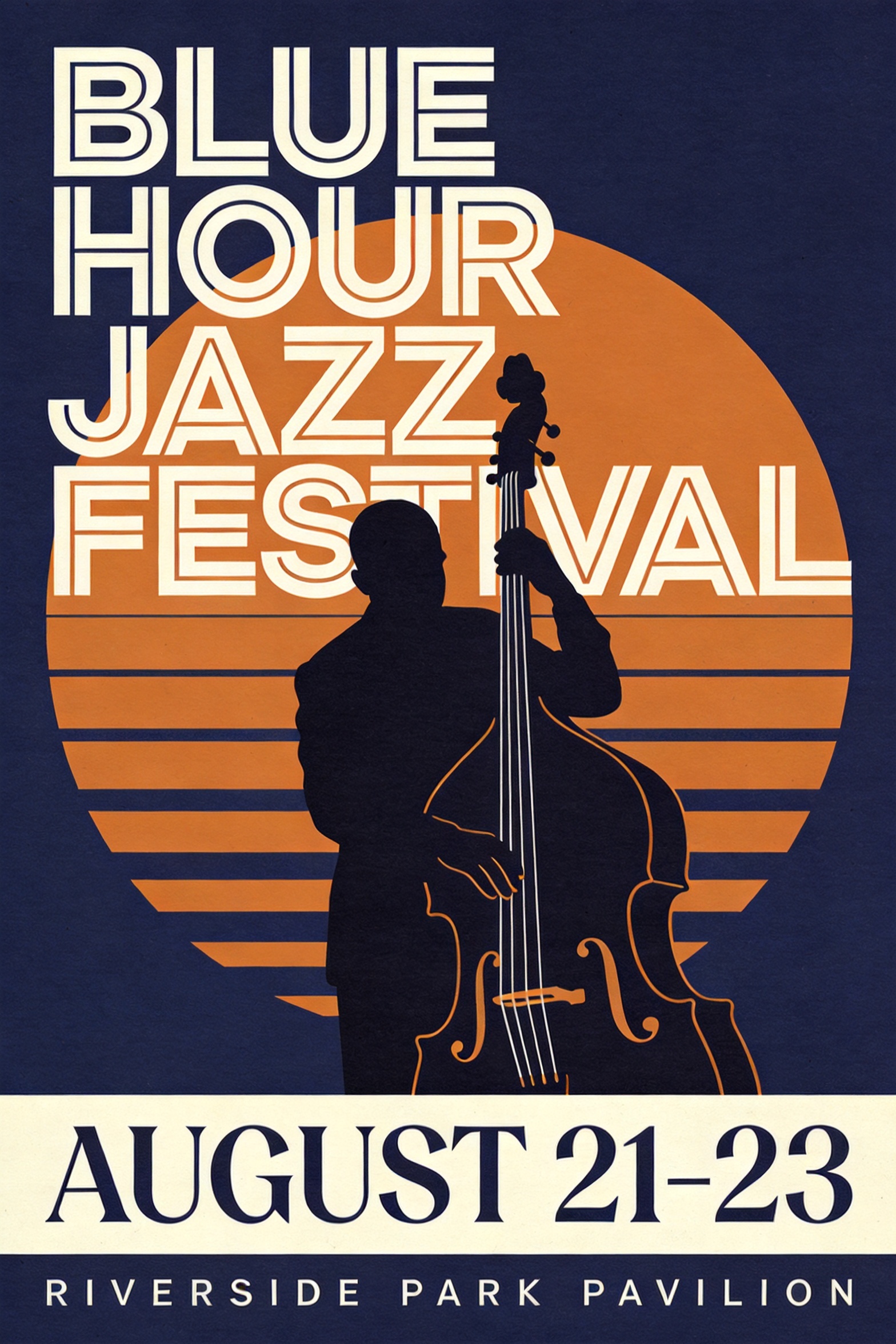
Title, date, venue: 3/3 on the first take, with the stacked-capitals layout and the paper grain both honored. The transferable move: give every string its own type treatment ("bold geometric sans-serif capitals", "clean slab serif", "small spaced capitals") and its own anchor ("across the top half", "beneath the title", "at the bottom edge"). Naming a medium — screen print, flat layered inks — locks the whole image into one coherent style system. Ran at 2:3, 2K.
Recipe 2: the promo hero banner — and the one retake in this post
A 21:9 web hero with a headline, a discount subline and a CTA button. This recipe earns its spot for what went wrong: the text was perfect on the first take, but the model quietly decorated the earcup with an emblem that looked uncomfortably close to a real audio brand's logo. For commercial work that's a shipping blocker, so we added one clause — "completely plain unbranded earcups, no logo or emblem anywhere on the product" — and the retake came back clean.
A wide e-commerce hero banner for a fictional headphone brand's summer
sale, a matte black over-ear headphone with completely plain unbranded
earcups, no logo or emblem anywhere on the product, floating at the
right third with soft studio reflections, headline 'TURN DOWN THE
NOISE' in heavy modern sans-serif on the left, subline 'up to 40% off
wireless flagships' in light type beneath it, a small pill-shaped
button labeled 'SHOP NOW' under the subline, clean gradient background
from ice blue to white, soft studio lighting, crisp product edges,
premium commercial finish
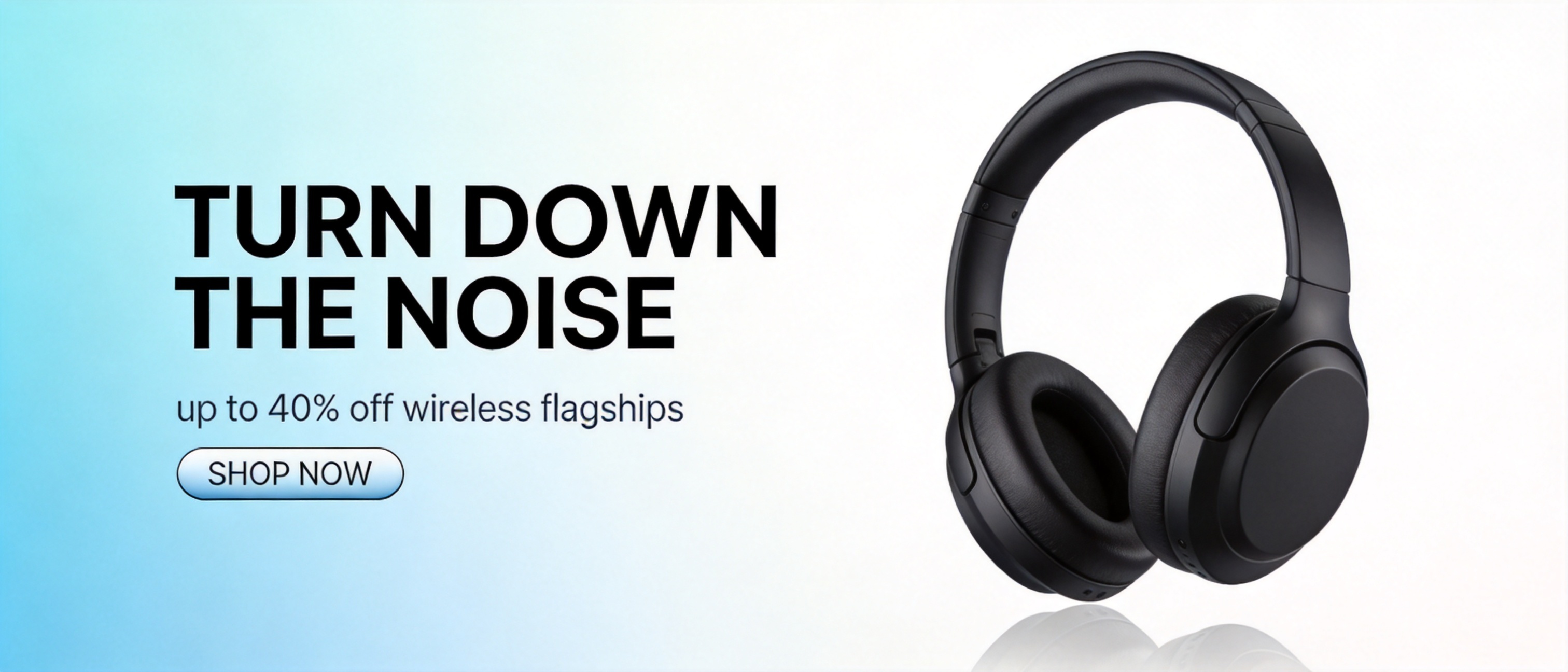
Headline, subline (with the 40% intact) and button label: 3/3 on both takes. The lesson is the negative clause: when a product category has an iconic market leader, 4.5's photorealism will drift toward it, so spell out "unbranded, no logo" for any commercial product shot. At $0.045 a take, the insurance rerun costs less than a nickel. Ran at 21:9, 2K.
Recipe 3: the documentary portrait — name the evidence, not the adjective
The fidelity check, no text involved. The recipe works by listing physical evidence of realism instead of piling on "ultra-realistic" adjectives.
A candid documentary portrait of an elderly luthier in his cramped
violin workshop, he holds an unvarnished violin up to a dusty window
to sight along its neck, wood shavings caught in the lamplight and
clinging to his wool cardigan, walls dense with hanging clamps and
templates softly out of focus, visible skin texture and silver
stubble, natural window-light color grade, shot on a fast 50mm prime
lens, photorealistic, high dynamic range
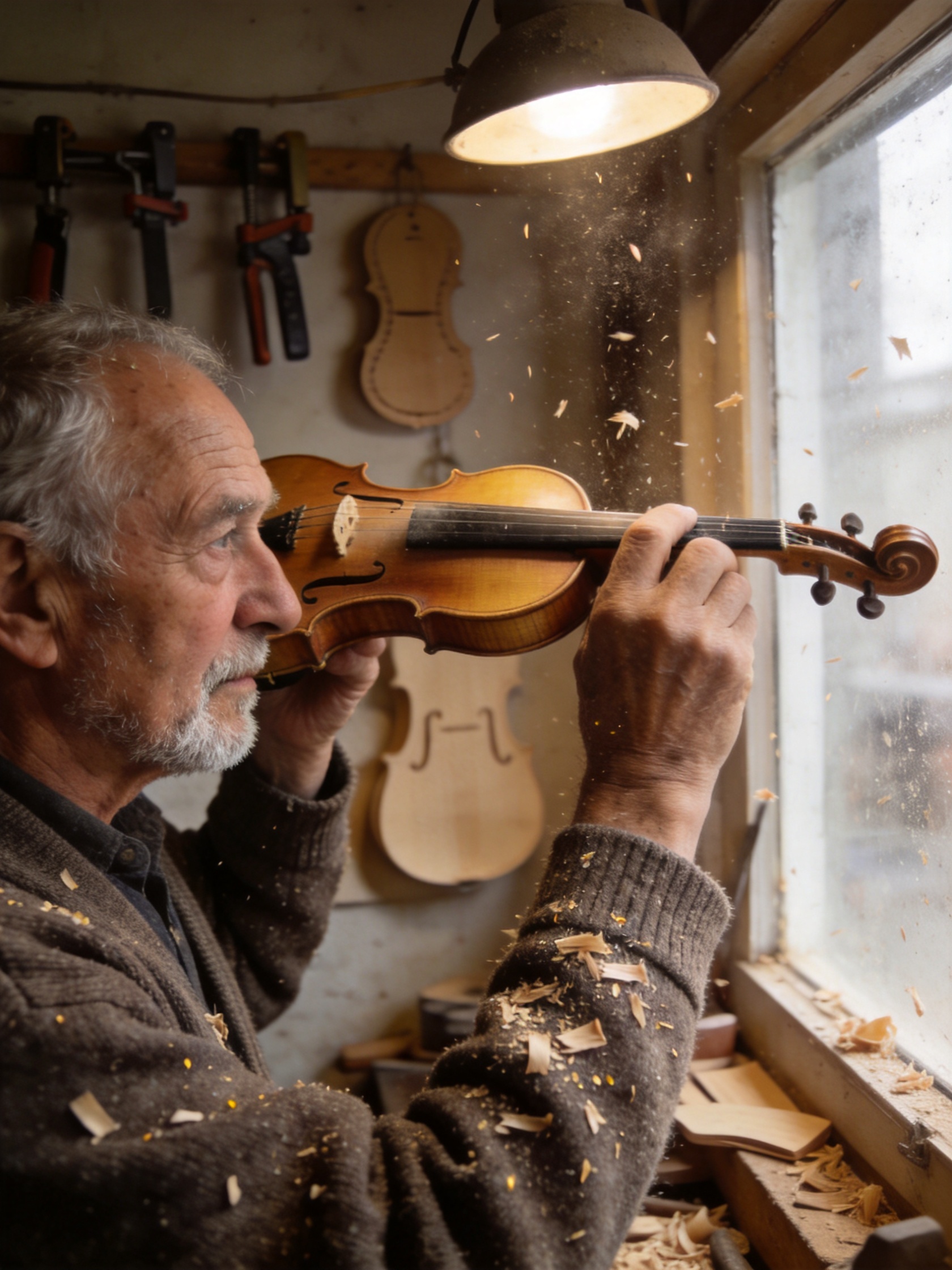
Skin texture, silver stubble, shavings on the cardigan, the wall of clamps — every named piece of evidence is in the frame. One honest footnote: we asked for an unvarnished violin and got a varnished amber one. Fine-grained material states are where this tier drifts; if a detail is contractual, put it in twice or plan a re-roll. Ran at 3:4, 2K.
Recipe 4: the packaging shot — label type with case control
Two strings on a matte kraft surface — a brand wordmark in caps and a sub-label that must stay lowercase. Case is the detail most models shout over.
A studio product shot of a matte kraft-paper coffee bag standing on a
walnut counter, the bag's label reads 'HALFLIGHT ROASTERS' in a
stamped serif wordmark with 'single origin - honey process' in small
letterpress type beneath it, scattered roasted beans and a brass scoop
in the foreground, steam rising from an out-of-frame cup catching the
side light, warm morning side light, shallow depth of field,
hyper-detailed product photography, premium commercial finish
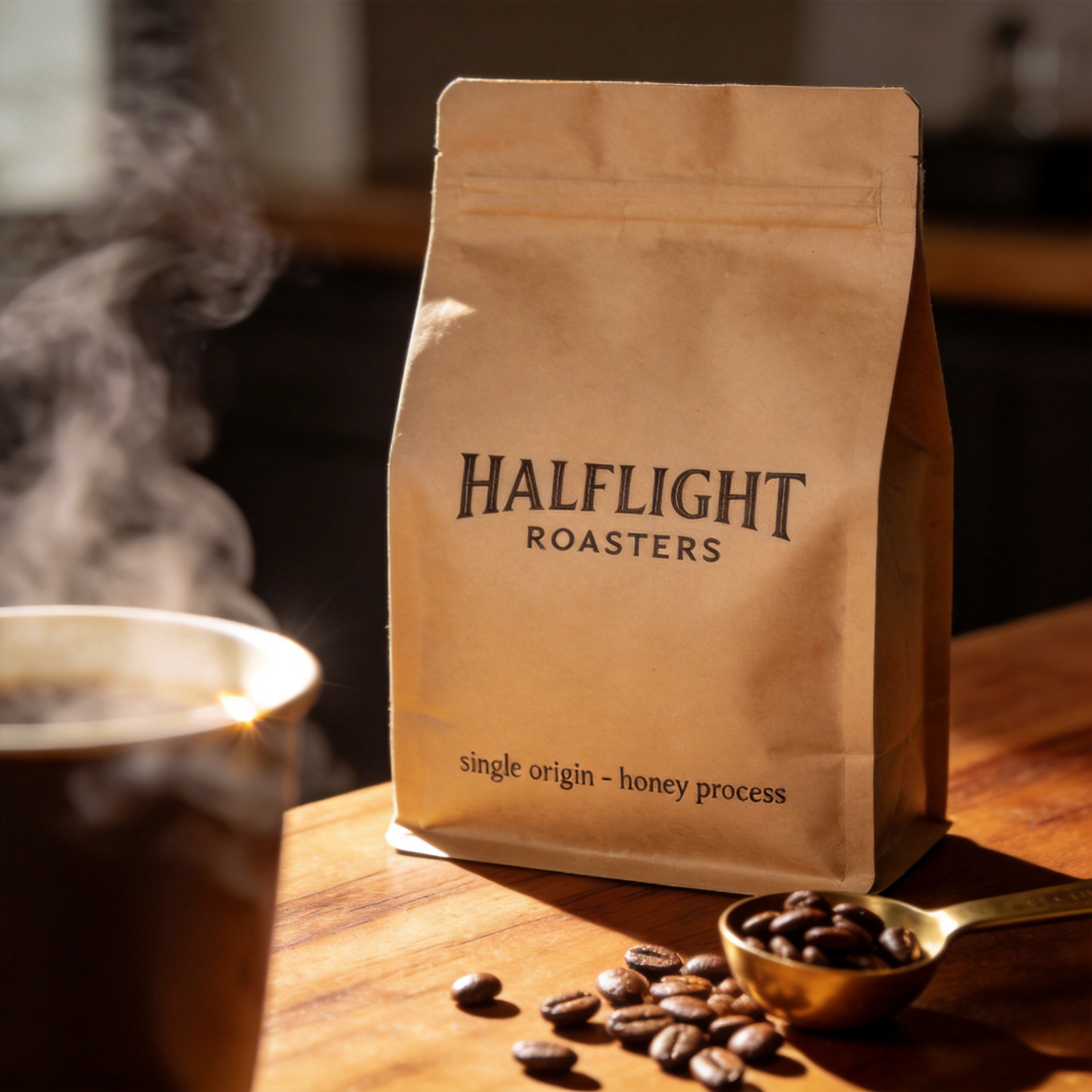
Both strings landed first take — the wordmark stamped in caps, the sub-label genuinely lowercase, both following the bag's soft curve. Saying how the type got onto the surface ("stamped serif wordmark", "small letterpress type") does double duty: it sets the typeface and the print texture. Ran at 1:1, 2K.
Recipe 5: the chalkboard menu — a four-string layout brief
The hardest text test here: a heading plus three menu lines, hand-lettered, on a 9:16 board. Multi-line menus are where text rendering usually falls apart, because every line is another chance to misspell.
A tall rustic cafe chalkboard menu photographed straight-on,
hand-lettered chalk type on a black slate board framed in worn oak,
the heading 'TODAY'S POUR' in tall chalk capitals with a decorative
underline, three menu lines beneath it reading 'FLAT WHITE 4',
'OAT LATTE 5' and 'CASCARA FIZZ 6', small chalk illustrations of a
coffee cup and a leaf in the corners, a string of warm cafe lights
blurred in the background bokeh, cozy natural light, photorealistic,
rich cohesive color grade
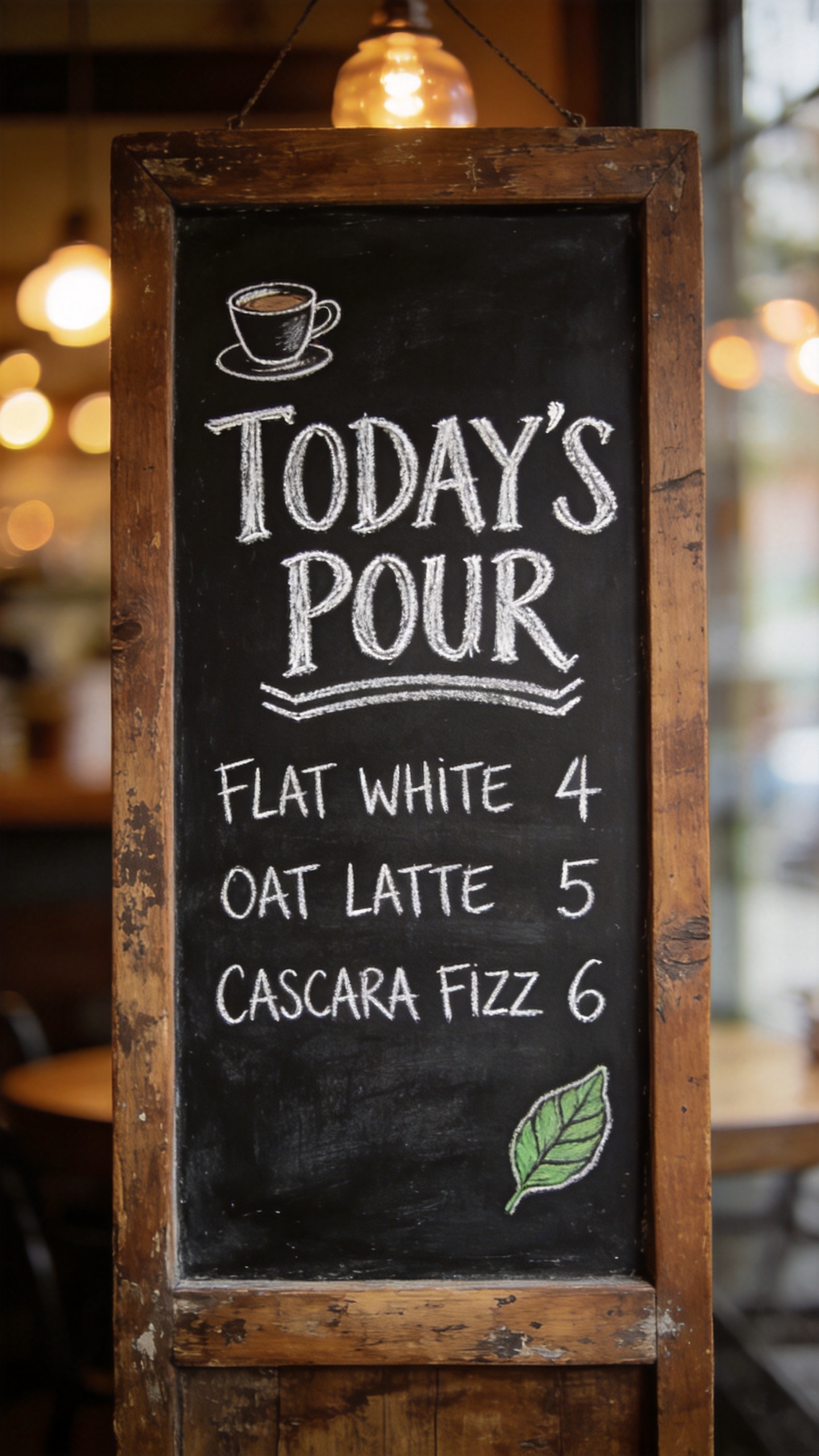
All four strings correct on the first take — apostrophe in 'TODAY'S' included — with the decorative underline and both corner illustrations placed as asked. The counting trick from our Pro testing holds on 4.5: state the number of lines explicitly ("three menu lines beneath it") and the model treats it as a hard constraint rather than a vibe. Ran at 9:16, 2K.
Recipe 6: the 4K knolling shot — free resolution, honestly appraised
Same $0.045, double the pixels. A knolling flat-lay is the use case that actually cashes in 4K: dozens of small objects whose textures have to survive zooming.
An overhead knolling photograph of a vintage film photographer's
complete kit arranged in a precise grid on dark green felt: a chrome
rangefinder camera, three lenses with engraved focal-length rings,
rolls of 35mm film, a handheld light meter, screw-on filters in open
leather pouches, a horsehair brush, lens tissues and a weathered field
notebook, every engraving and knurled texture sharp, even soft studio
light, top-down composition, ultra-detailed, premium editorial finish
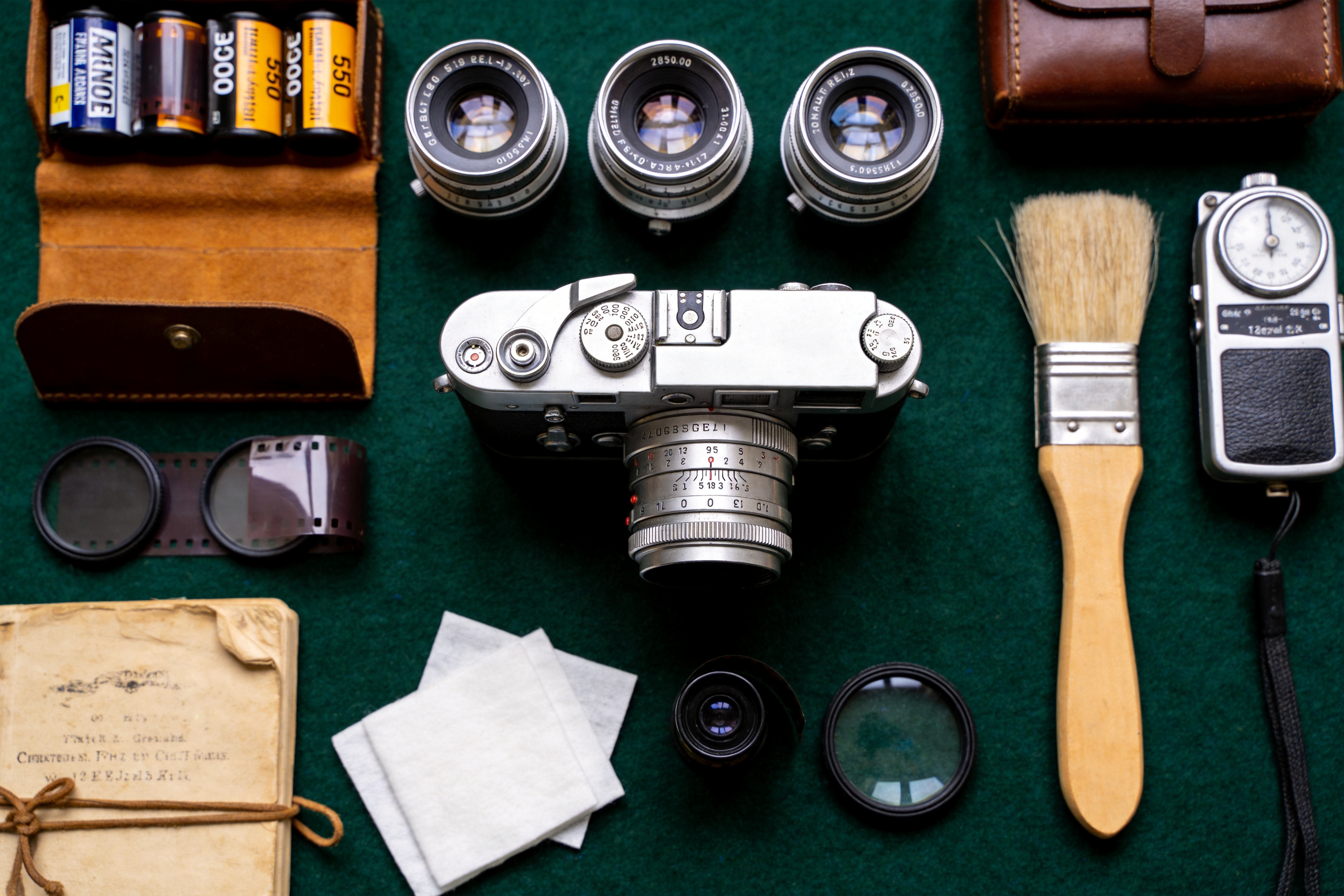
The file came back at 4992×3328, and the knurling, leather grain and felt texture are tack-sharp at full zoom. One honest caveat: the incidental micro-type — the engravings on the lens rings we never quoted — is still plausible-looking pseudo-lettering up close. That's the boundary of this model's text skill in one image: quoted, anchored strings render; background type the prompt doesn't specify gets invented. If a string matters, quote it. Ran at 3:2, 4K.
The pattern behind all six prompts
- Quote it, place it, style it. Every string that must render gets quotes, an anchor ("at the bottom edge") and a type treatment ("slab serif"). All 14 strings prompted this way rendered correctly, first take.
- Name the medium, not just the subject. Screen print, letterpress, hand-lettered chalk — the medium clause styles the type and the whole image at once.
- Use negative clauses for brands. "Unbranded, no logo or emblem" belongs in every commercial product prompt. The one retake in this post existed because we left it out.
- Count things out loud. "Three menu lines", "three lenses" — explicit numbers get treated as constraints.
- Spend the savings on re-rolls. At $0.045 flat, the workflow is: precise prompt, one take, inspect, re-roll the one miss. Eight generations powered this entire post — about $0.36.
4.5 or 5.0 Pro?
If type is the hero at print scale — multi-level movie posters, magazine covers — the flagship earns its price; those live in the Seedream 5.0 Pro recipe collection. But 4.5 delivered every text job in this post at a third of Pro's 2K price ($0.045 vs $0.15), returned results in half the time, and it's the only tier of the two that outputs 4K at all. For banners, packaging, signage and portrait work headed for the web, 4.5 is the default; escalate to Pro when a first-take 4.5 result shows its ceiling. And if you're editing existing images rather than generating, the same model has an image-to-image endpoint with its own recipe collection.
FAQ
How much does seedream-4.5/text-to-image cost? $0.045 per image, flat — same price at 2K and 4K, any aspect ratio. Everything in this post (six recipes, the cover, one retake) took 8 generations: about $0.36.
How fast is it? Every task in this post finished in 61–112 seconds end to end on the task endpoint, including the 4K one.
Which aspect ratios and resolutions are supported?
Eight ratios (1:1, 4:3, 3:4, 16:9, 9:16, 2:3, 3:2, 21:9) and two resolutions (2K, 4K). The input schema is strict — exactly prompt, aspect_ratio, resolution, nothing else.
Does it handle non-English or long text? Short quoted strings — headlines, labels, dates, buttons — are its reliable zone, and that covers all 14 strings here. For dense paragraphs of copy, composite real type over a generated background instead.
To make any of these yours: keep the anchors, the type treatments and the negative clauses, swap the quoted strings and the subject, and fire it at the Seedream 4.5 model page — at $0.045 a take, your first result is about a minute away.









