Most product photo workflows start with a camera. This one starts with a text prompt — and skips the studio, the model, and the reshoot entirely.
TL;DR
- Seedream 5.0 Pro's
text-to-imageendpoint generates e-commerce-ready product scenes — hero packshots, promo banners with rendered text, styled flat-lays — from a written description alone, no source photo required. - Text rendering is a genuine strength: banner copy came out clean and legible on the first take, no re-rolls needed.
- Pricing is resolution-gated: $0.05/image at 1K, $0.10/image at 2K.
- The model only accepts 8 fixed aspect ratios —
1:1,4:3,3:4,16:9,9:16,2:3,3:2,21:9— verified against the live API, not the docs. - If you're starting from an existing product photo instead of a blank page, use Seedream 5.0 Pro's image-to-image mode instead — this article is specifically about generating new scenes from nothing.
Why generate product images instead of shooting them
Every listing needs at least three kinds of images: a clean hero shot, a promotional banner for the current sale, and a lifestyle or flat-lay shot for social and marketplace grids. Shooting all three for every SKU means a studio booking, props, lighting, and a retouch pass — for images that get swapped out again in a season.
Seedream 5.0 Pro's text-to-image mode treats that whole set as a prompting problem instead of a production problem. You describe the product, the surface it sits on, the lighting, and the mood — and it renders a finished frame, including any on-image text the banner needs. There's no source photo to work from and none of the "does this look AI-generated" texture that occasionally shows up in earlier models — the fidelity is the actual reason this is a Pro-tier model rather than the entry Lite tier.
This is a from-scratch workflow. If you already have a real photo of your product and want to place it in a new scene or swap its background, that's an image-to-image job — see the companion article on Seedream 5.0 Pro image-to-image prompts for that half of the workflow.
Setup
Seedream 5.0 Pro runs on hiapi's unified async task API. Every request follows the same three-step shape: submit a task, poll until it finishes, download the output.
import requests
import time

API_KEY = "YOUR_HIAPI_KEY"
BASE = "https://api.hiapi.ai/v1/tasks"

def generate(prompt: str, aspect_ratio: str = "1:1", resolution: str = "1K") -> str:
    resp = requests.post(
        BASE,
        headers={"Authorization": f"Bearer {API_KEY}"},
        json={
            "model": "seedream-5.0-pro/text-to-image",
            "input": {
                "prompt": prompt,
                "aspect_ratio": aspect_ratio,
                "resolution": resolution,
            },
        },
    ).json()
    task_id = resp["data"]["taskId"]

    while True:
        task = requests.get(f"{BASE}/{task_id}", headers={"Authorization": f"Bearer {API_KEY}"}).json()["data"]
        if task["status"] == "success":
            return task["output"][0]["url"]
        if task["status"] == "fail":
            raise RuntimeError(task["error"])
        time.sleep(5)

image_url = generate("your prompt here", aspect_ratio="1:1", resolution="1K")
Nothing here is Seedream-specific except the model string and the input fields — the task/poll/download shape is the same across every model on the platform.
The three assets every product listing needs
We generated three real images for this article, at three different aspect ratios, to cover the three jobs a product listing actually needs. Every prompt below is the exact, unedited text we sent — copy it directly if you want a starting point.
1. The hero packshot
The default image every listing needs: product front-and-center, clean background, nothing to distract from the object itself.
Product photography of a frosted amber glass serum bottle with a brushed gold dropper cap, standing on a smooth beige stone pedestal. Soft studio lighting from the upper left, gentle shadow beneath the bottle. Two small eucalyptus sprigs resting against the base of the pedestal. Seamless soft cream backdrop, minimal negative space, shallow depth of field, high-end e-commerce product shot, no text, no logo, photorealistic, 1:1 square composition.
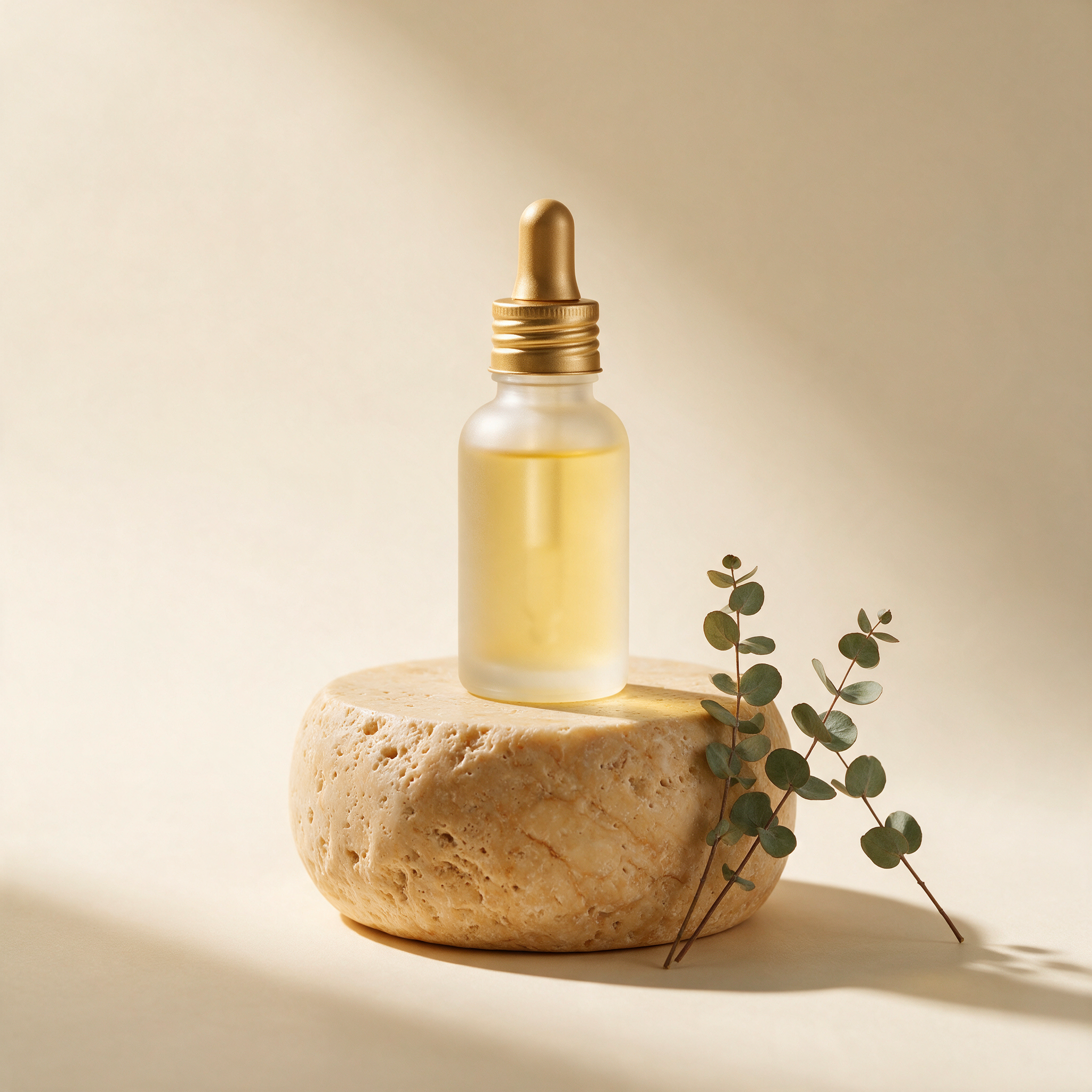
The stone pedestal and eucalyptus sprigs were both invented details in the prompt — not composited afterward — and the shadow falls correctly under the bottle's actual silhouette rather than looking pasted on. That physical consistency is what separates a usable packshot from an obviously synthetic one.
2. The promo banner (with rendered text)
This is the asset that actually tests the "Pro" in Seedream 5.0 Pro: a promotional banner where the sale copy has to render as real, legible text baked into the image, not added in a design tool afterward.
Autumn-themed promotional banner for a skincare serum. Left third of the frame: the same amber glass serum bottle with gold dropper cap, standing on a stack of orange hardcover books, with a few maple leaves scattered around the base, warm autumn color palette. Right two-thirds of the frame: bold brown headline text "AUTUMN GLOW SALE" in a clean serif font, with smaller text below reading "Save 20% This Week Only". Warm cream and burnt-orange background, soft studio lighting, e-commerce promotional banner layout, wide format, sharp legible text rendering, photorealistic product photography style.

Both lines of copy came back correctly spelled and evenly kerned on the first render — no dropped letters, no warped characters. That said: always proofread rendered text character by character before publishing. Text rendering in image models is very good, not infallible, and a single wrong character in a discount banner is the kind of mistake customers actually notice. If a render comes back with a typo, the fix is just re-running the same prompt, not touching a design tool.
3. The styled flat-lay
For marketplace grids and social posts, a straight packshot often reads as flat. A styled flat-lay with props gives the same product a lifestyle context without needing an actual photoshoot.
Overhead flat-lay product photography of a pink cosmetic cream jar with a white lid, styled with a single white orchid bloom, a small rose quartz stone, and a folded cream-colored towel, arranged on a light gray linen surface. Soft even top-down lighting, minimal shadows, airy and clean beauty-brand aesthetic, no text, no logo, photorealistic, vertical 3:4 composition.
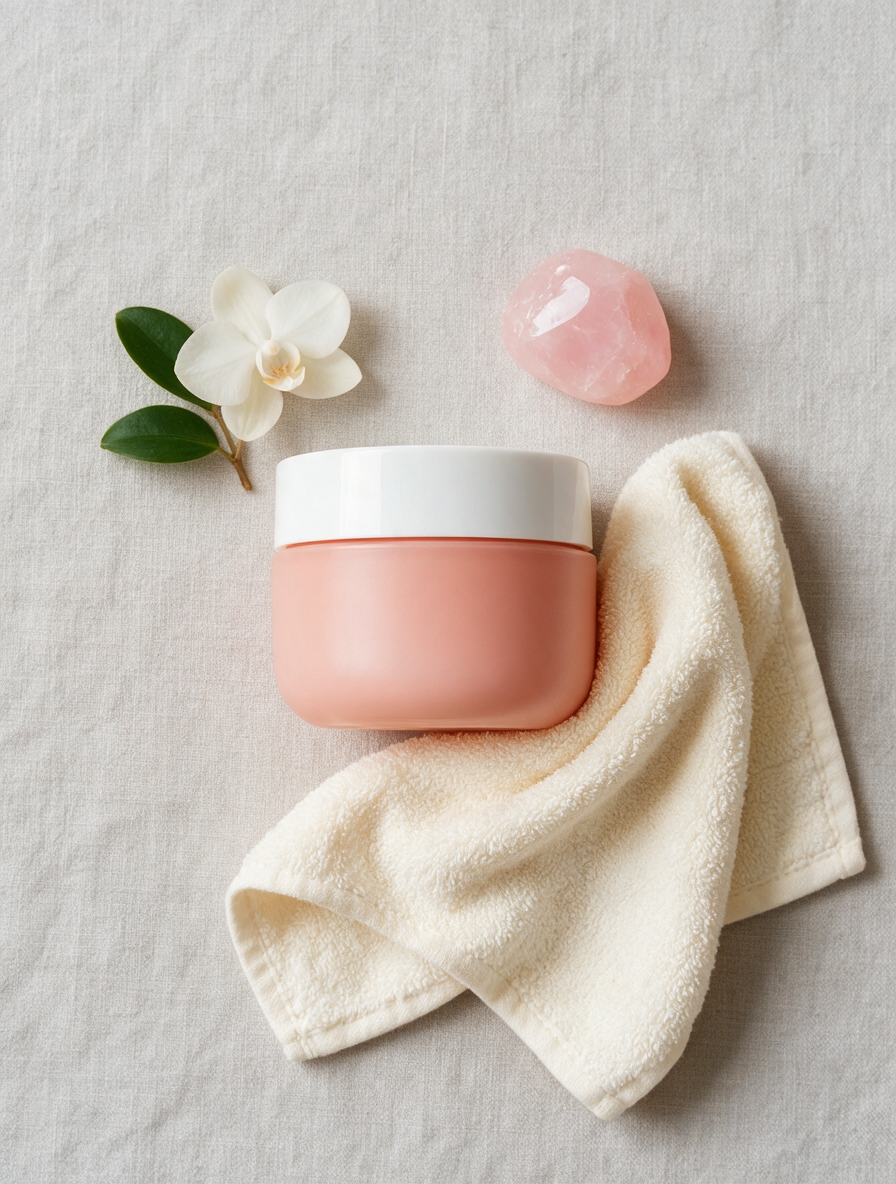
Note this used a different product (a cream jar instead of the serum bottle) — the point of the flat-lay format is that it's reusable across your whole catalog, not tied to one hero SKU. Swap the product description and props and the same composition style works for a completely different item.
The input schema, verified against the live API
The generic docs list a wider set of supported ratios, but Seedream 5.0 Pro's actual text-to-image endpoint is stricter than that. We probed it directly rather than trusting the general schema:
| Field | Type | Notes |
|---|---|---|
prompt | string | required |
aspect_ratio | string | one of 1:1, 4:3, 3:4, 16:9, 9:16, 2:3, 3:2, 21:9 — 4:5 and 5:4 are rejected despite appearing in the general docs |
resolution | string | 1K or 2K |
If you send 4:5 or 5:4, expect a 400. Use 4:3/3:4 as the nearest supported alternative for near-square product crops.
Pricing: 1K vs. 2K, and Pro vs. Lite
Pricing below is pulled directly from hiapi's live pricing endpoint, current as of 2026-08.
| Model | Mode | Resolution | Price |
|---|---|---|---|
| Seedream 5.0 Pro | text-to-image | 1K | $0.05/image |
| Seedream 5.0 Pro | text-to-image | 2K | $0.10/image |
| Seedream 5.0 Lite | text-to-image | — | $0.035/image |
All three images in this article were generated at 1K for $0.05 each — $0.15 total for a full hero/banner/flat-lay set.
The Lite tier is cheaper per image, but the gap that matters isn't the $0.015 price difference — it's text rendering and fine detail. If your image needs legible on-image copy (a banner, a label, a callout), Pro is the tier that reliably gets the letters right. If you're generating simple background or lifestyle shots with no text requirement, Lite is a reasonable place to cut cost. See our Seedream 5.0 Lite e-commerce workflow for that comparison in practice.
Prompting tips that actually moved the output
- Name the surface, not just the product. "Stone pedestal," "linen surface," "stack of hardcover books" — these grounding details are what make the shadow and lighting behave correctly. A prompt with just the product and no surface tends to render it floating.
- Put text in literal quotes.
"AUTUMN GLOW SALE"rendered more reliably than describing the sentiment without quoting the exact string. Quote marks appear to tell the model "this is literal text," not just a vibe. - Specify the aspect ratio you're actually going to use, don't crop after. Composing for
1:1and then cropping to3:4clips the product. Generate at the ratio your listing template needs. - Say "no text, no logo" explicitly on non-text assets. Without that instruction, product shots occasionally sprout invented brand marks or watermark-like text in the corner.
- Reuse your surface and prop language across a product line. The same "beige stone pedestal, soft studio lighting" phrasing produced a consistent look across different bottles in early testing — useful if you're building a catalog and want visual consistency without a shared physical set.
FAQ
Can Seedream 5.0 Pro generate multiple product angles from one prompt? No — each request returns one image per task. For a multi-angle set (front, three-quarter, top-down), submit separate prompts describing each angle explicitly.
Does it support transparent backgrounds for cutout-style product images?
The text-to-image endpoint outputs a rendered scene, not a transparency channel. For a clean isolated cutout, prompt for a solid seamless background (as in the hero shot above) rather than expecting alpha transparency.
What if I already have a real photo of the product? Use image-to-image instead of text-to-image — that mode edits or restyles an existing photo rather than generating one from a description. See the Seedream 5.0 Pro image-to-image prompts guide.
Is 2K resolution worth the extra cost for e-commerce listings? Most marketplace and storefront templates downscale images well below 2K on display, so 1K is usually sufficient and half the price. 2K is worth it mainly if you need to crop tightly into a region of the image after generation, or the platform requires large source assets.
Why did the rendered text come out correct on the first try — is that guaranteed? No. Text rendering quality is generally strong on this model, but not 100% reliable — treat every render with on-image text as a draft that needs a human proofread pass before publishing, exactly as we did for the banner above.
Wrap-up
For catalogs that need a steady supply of hero shots, promo banners, and lifestyle flat-lays without booking a studio for every SKU refresh, generating from a text prompt is a genuinely faster loop than shooting and retouching — and Seedream 5.0 Pro's text rendering makes the promo-banner case, specifically, viable in a way that weaker models aren't. If you want to see the full parameter set and try it against your own product descriptions, the Seedream 5.0 Pro model page has the live schema and lets you run a test generation directly.









