Short-form video has a brutal production math problem: TikTok and Reels reward volume, but a single polished product clip can eat an afternoon of shooting, editing, and sound design. Google's Veo 3.1 image-to-video model (veo-3.1/image-to-video) collapses that pipeline into two API calls — one cheap still image, one video task — and hands back a vertical clip with native audio already mixed in.
Here is the entire output of that pipeline, generated for this post. One $0.03 source image, one API call, 115 seconds of waiting:
Turn the sound on — the landing thud, the ambient bass pulse, and the mist hiss are all generated by the model. Nothing here was edited, color-graded, or sound-designed by a human. In this guide we build that exact clip end to end through the hiapi task API, then scale the same workflow into a batch pipeline for producing short-form variants.
Why image-to-video is the right tool for short-form
Text-to-video is great for exploration, but short-form commerce content usually starts from an asset you already control: a product photo, a packshot, a poster frame. Image-to-video keeps that visual identity locked while adding motion. Three properties of veo-3.1/image-to-video matter specifically for the TikTok/Reels format:
- The output follows your input frame. There is no
aspect_ratioparameter — the model inherits composition from the image you feed it. Give it a 9:16 vertical still and you get a 9:16 vertical video. Both clips in this post came out at exactly 1080×1920 and 720×1280 because the source still was 9:16. Your framing decision happens once, at the image stage. - Native audio. Every clip ships with a 48 kHz AAC track generated from your prompt — foley, ambience, and musical texture. For short-form, where silent autoplay converts worse than sound-on content, this deletes an entire editing step.
- Platform-ready resolutions.
720pfor drafts,1080pfor feed-quality verticals, and4kwhen the clip doubles as a master for other placements.
The input schema (verified against the live API)
We probed the live endpoint before writing this guide. The schema is strict — unknown fields are rejected with a 400, so don't guess:
| Field | Required | Type | Values |
|---|---|---|---|
prompt | recommended | string | Motion, camera, and audio direction |
image_url | yes | string | A single publicly reachable image URL |
resolution | yes | string | 720p, 1080p, 4k |
duration | yes | integer | 4, 6, or 8 (seconds) |
Two gotchas worth knowing up front: image_url is singular — this is a one-reference model, not a multi-image blender — and the URL must be publicly fetchable (host it on your own CDN or object storage; a signed localhost link won't work).
Step 1 — Generate the source still
Any 9:16 image works, including a real product photo. We generated ours with gpt-image-2 for $0.03 so the whole pipeline stays inside one API:
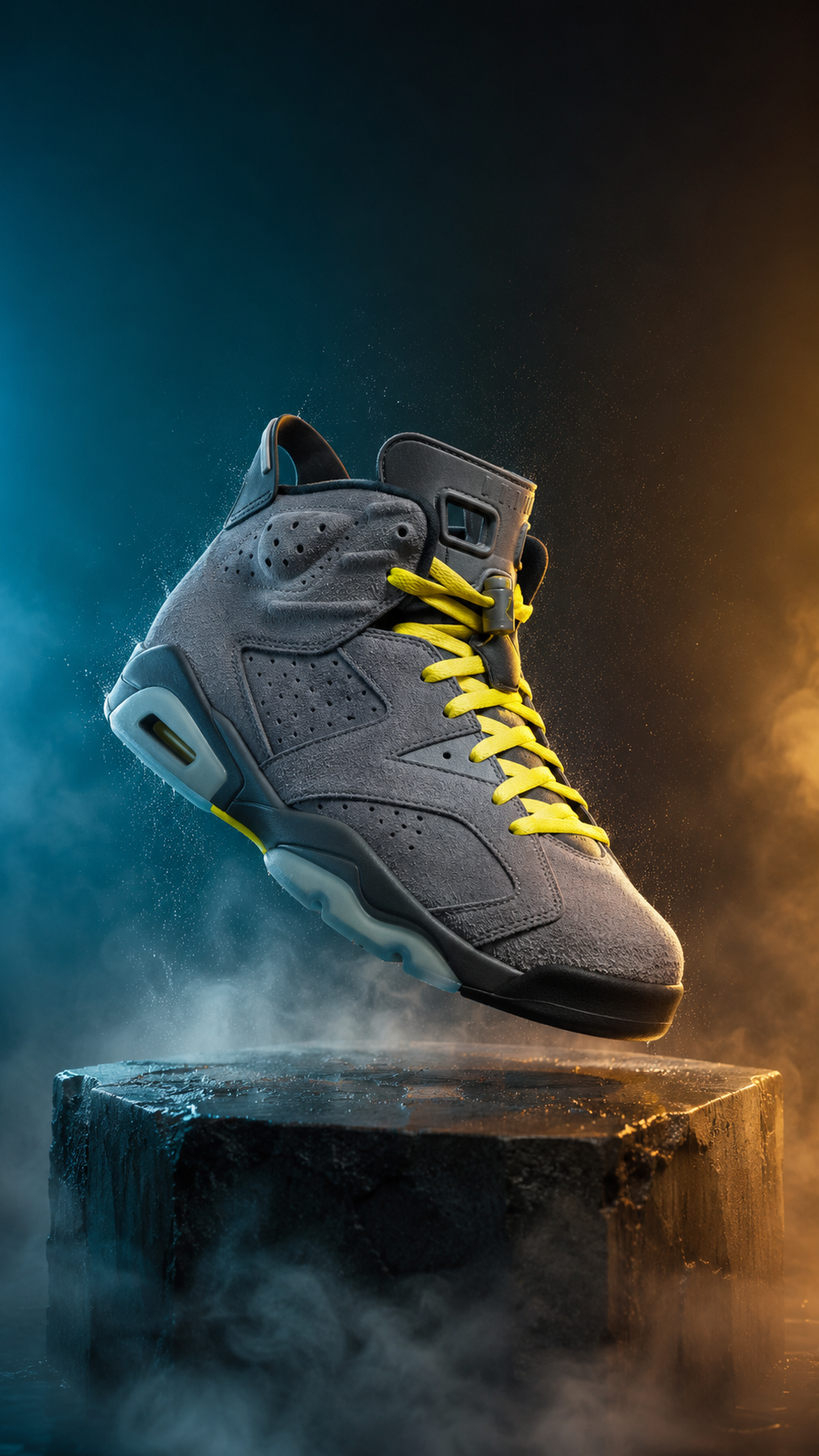
curl -X POST https://api.hiapi.ai/v1/tasks \
  -H "Authorization: Bearer $HIAPI_API_KEY" \
  -H "Content-Type: application/json" \
  -d '{
    "model": "gpt-image-2/text-to-image",
    "input": {
      "prompt": "Vertical product hero shot of a chunky retro basketball sneaker in wolf-gray suede with volt yellow laces, floating at a slight tilt above a wet concrete pedestal, dramatic teal-to-amber gradient backdrop, fine mist and dust particles suspended in hard rim light, ultra-sharp commercial product photography, no text, no logos",
      "aspect_ratio": "9:16",
      "resolution": "1K"
    }
  }'
The composition rules for a good i2v source are the same rules you'd give a stills photographer, plus one extra: leave motion headroom. Our sneaker floats above the pedestal precisely so the video model has an obvious, physical move to make — settle the shoe onto the stone. A subject frozen mid-action gives Veo a story to finish; a static centered packshot gives it nothing, and you'll get drifting-camera filler.
Step 2 — Submit the video task
Same /v1/tasks endpoint, different model. The prompt should direct three channels at once: subject motion, camera, and audio.
curl -X POST https://api.hiapi.ai/v1/tasks \
  -H "Authorization: Bearer $HIAPI_API_KEY" \
  -H "Content-Type: application/json" \
  -d '{
    "model": "veo-3.1/image-to-video",
    "input": {
      "prompt": "The sneaker slowly rotates about 90 degrees as the camera pushes in from a low angle. Dust particles drift through the rim light. The shoe settles onto the wet stone pedestal with a deep, satisfying thud, sending a soft ring of mist rolling off the edges. A warm light sweep travels across the suede texture. Subtle bass-heavy electronic pulse builds in the background with a low whoosh on the landing. Cinematic product commercial, smooth stabilized motion, no text overlays.",
      "image_url": "https://your-cdn.example.com/stills/sneaker-916.jpg",
      "resolution": "1080p",
      "duration": 6
    }
  }'
The response returns immediately with a task ID:
{"code": 200, "data": {"taskId": "tk-hiapi-01KXCTHP6F6VXQ9XZCSCCEEEMM"}, "message": "success"}
Note how the prompt is written in the order the clip should play: rotate → push in → land → light sweep, with the audio cues attached to the moments they belong to ("thud" on the landing, pulse underneath). Veo follows event order in the prompt remarkably literally — that's what makes it scriptable.
Step 3 — Poll and download
Video tasks are asynchronous. Poll the task until status flips to success, then download the output immediately — the URL is a temporary link with an expireAt timestamp, not permanent storage:
import os, time, requests

API = "https://api.hiapi.ai/v1/tasks"
HEADERS = {"Authorization": f"Bearer {os.environ['HIAPI_API_KEY']}"}

def wait_and_download(task_id: str, out_path: str, timeout_s: int = 900):
    deadline = time.time() + timeout_s
    while time.time() < deadline:
        task = requests.get(f"{API}/{task_id}", headers=HEADERS, timeout=30).json()["data"]
        if task["status"] == "success":
            url = task["output"][0]["url"]          # temp link — expires!
            clip = requests.get(url, timeout=120).content
            with open(out_path, "wb") as f:
                f.write(clip)                        # persist to your own storage now
            return out_path
        if task["status"] == "fail":
            raise RuntimeError(task.get("error"))
        time.sleep(10)
    raise TimeoutError(task_id)
In our run, the 6-second 1080p clip completed in 115 seconds from submit to done. That's fast enough to sit inside a content pipeline without a queue in front of it.
Draft cheap, finish sharp: the two-tier workflow
Veo 3.1 has a fast tier — veo-3.1-fast/image-to-video — with the identical input schema at less than half the per-second price. That enables a workflow borrowed from photography: shoot Polaroids before burning film. Iterate your motion prompt on the fast tier at 720p, and only re-render the winning prompt on the standard tier.
Here is the fast-tier draft of the exact same prompt and source still (6s, 720p, $1.50, done in 58 seconds):
The draft nails the same beats — rotation, landing, mist — with visibly simpler texture detail and a flatter audio mix. For prompt iteration, that's all you need: you're checking choreography, not final polish. Both clips in this post were first takes; the fast tier is how you make sure the standard-tier take is the only one you pay for.
Scaling to batch production
Short-form strategy is a volume game — you want 5–10 variants per product to test hooks. Because everything is one async endpoint, batching is just a loop: submit all tasks first, then collect.
STILLS = [
    ("sneaker-916.jpg",  "rotates and lands on the pedestal with a deep thud..."),
    ("bottle-916.jpg",   "condensation beads race down the glass as camera orbits..."),
    ("headphones-916.jpg","earcup unfolds in slow motion, soft click, synth swell..."),
]

task_ids = []
for still, motion in STILLS:
    r = requests.post(API, headers=HEADERS, json={
        "model": "veo-3.1-fast/image-to-video",   # draft tier for the first sweep
        "input": {
            "prompt": motion,
            "image_url": f"https://your-cdn.example.com/stills/{still}",
            "resolution": "720p",
            "duration": 6,
        },
    }, timeout=60).json()
    task_ids.append(r["data"]["taskId"])

for i, tid in enumerate(task_ids):
    wait_and_download(tid, f"draft-{i}.mp4")
Submitting first and collecting second matters: the clips generate concurrently on the platform side, so ten drafts take roughly as long as one, not ten times as long.
What it costs
Per hiapi pricing, both tiers bill per second of output video:
| Model | Price | 4s clip | 6s clip | 8s clip |
|---|---|---|---|---|
veo-3.1/image-to-video | $0.57/s | $2.28 | $3.42 | $4.56 |
veo-3.1-fast/image-to-video | $0.25/s | $1.00 | $1.50 | $2.00 |
Everything shown in this post — one source still, one cover image, one fast draft, one 1080p final — cost $4.98 in API spend. A workflow of three fast drafts plus one standard final lands around $8 per finished vertical, which is a different universe from a shoot day.
FAQ
How do I control the aspect ratio? You don't — the output inherits the input image's frame. For TikTok/Reels, generate or crop your source still to 9:16 before submitting. Our 9:16 still produced exact 1080×1920 output.
Is the audio really generated too? Yes. Both clips above carry a model-generated 48 kHz AAC track — foley (the landing thud), ambience, and musical texture, all steered by the prompt. Describe sounds in the prompt at the moment they should occur.
How long does generation take? In our measured run: 58 seconds for a 6s/720p fast-tier clip, 115 seconds for a 6s/1080p standard-tier clip. Budget a few minutes per clip and use the submit-all-then-collect pattern for batches.
Can I use a real product photo instead of a generated still? Absolutely — that's the primary use case. The image just has to be publicly fetchable via URL. Keep the subject sharp, leave motion headroom, and describe the motion you want in the prompt.
When should I pay for 4k? When the vertical doubles as a master asset — cutting a 4k source down to feed placements, web heroes, and paid units. For feed-only delivery, 1080p is what platforms transcode to anyway.
Ship your first clip
The whole pipeline is two POSTs and a poll: still in, vertical ad with sound out, in about two minutes. Grab your API key, point the snippet above at your best product photo, and run one 720p fast-tier draft — at $1.50 for six seconds, it's the cheapest screen test you'll ever commission. Full parameters and live examples are on the veo-3.1/image-to-video model page, and if you're comparing i2v engines, our Hailuo 2.3 image-to-video prompt recipes make a good side-by-side.









